Pose-estimation import tools
Import single DLC CSV file
- simba.pose_importers.dlc_importer_csv.import_dlc_csv(config_path, source)[source]
Import file or folder of DLC pose-estimation CSV files to SimBA project. Returns list of file paths that has been imported.
- Parameters
config_path (str) – path to SimBA project config file in Configparser format
source (str) – path to file or folder containing DLC pose-estimation CSV files
- Return List[str]
Paths to location of imported files.
- Example
>>> import_dlc_csv(config_path='project_folder/project_config.ini', source='CSV_import/Together_1.csv')
>>> ['project_folder/csv/input_csv/Together_1.csv']
- simba.pose_importers.dlc_importer_csv.import_dlc_csv_data(config_path, data_path, interpolation_settings=None, smoothing_settings=None)[source]
Import multiple DLC CSV tracking files to SimBA project and apply specified interpolation and smoothing parameters to the imported data.
- Parameters
config_path (Union[str, os.PathLike]) – Path to SimBA config file in ConfigParser format.
data_path (Union[str, os.PathLike]) – Path to directory holding DLC pose-estimation data in CSV format, or path to a single CSV file with DLC pose-estimation data.
interpolation_settings (Optional[Dict[str, Any]]) – Dictionary holding settings for interpolation.
smoothing_settings (Optional[Dict[str, Any]]) – Dictionary holding settings for smoothing.
- Return None
- Example
>>> interpolation_settings = {'type': 'body-parts', 'method': 'linear'}
>>> smoothing_settings = None #{'time_window': 500, 'method': 'savitzky-golay'}
>>> import_dlc_csv_data(config_path='/Users/simon/Desktop/envs/simba/troubleshooting/two_black_animals_14bp/project_folder/project_config.ini', data_path='/Users/simon/Desktop/envs/simba/troubleshooting/two_black_animals_14bp/project_folder/new_data', interpolation_settings=interpolation_settings, smoothing_settings=smoothing_settings)
Import MARS pose-estimation data
- class simba.pose_importers.import_mars.MarsImporter(config_path, data_path, interpolation_method, smoothing_method)[source]
Bases:
objectImport two animal MARS pose-estimation data (in JSON format) into a SimBA project in parquet or CSV format.
- Parameters
config_path (str) – path to SimBA project config file in Configparser format
data_folder (str) – Path to file (or directory) with data in .json format.
interpolation_settings (str) – String defining the pose-estimation interpolation method. OPTIONS: ‘None’, ‘Animal(s): Nearest’, ‘Animal(s): Linear’, ‘Animal(s): Quadratic’,’Body-parts: Nearest’, ‘Body-parts: Linear’, ‘Body-parts: Quadratic’. See this image <https://gist.github.com/gyassine/b47b90e8de935cc06ef856401f7582b0>>_ for comparison of interpolation methods.
smoothing_method (dict) – Dictionary defining the pose estimation smoothing method. EXAMPLE: {‘Method’: ‘Savitzky Golay’, ‘Parameters’: {‘Time_window’: ‘200’}})
Examples
>>> mars_importer = MarsImporter(config_path=r'MyConfigPath', data_folder=r'MyMarsDataFolder', interpolation_settings='None', smoothing_settings={'Method': 'None', 'Parameters': {'Time_window': '200'}})
>>> mars_importer.import_data()
References
- 1
Segalin, C., et al. (2021). The Mouse Action Recognition System (MARS) software pipeline for automated analysis of social behaviors in mice. eLife, 10, e63720.
Import DANNCE pose-estimation data
Import SLEAP CSV pose-estimation data
- class simba.pose_importers.sleap_csv_importer.SLEAPImporterCSV(config_path, data_folder, id_lst, interpolation_settings=None, smoothing_settings=None)[source]
Bases:
simba.mixins.config_reader.ConfigReader,simba.mixins.pose_importer_mixin.PoseImporterMixinImporting SLEAP pose-estimation data into SimBA project in
CSVformat.Note
Google Colab notebook for converting SLEAP .slp to CSV written by @Toshea111. Example expected SLEAP csv data file for 5 animals / 4 pose-estimated body-parts.
- Parameters
config_path (str) – path to SimBA project config file in Configparser format
data_folder (str) – Path to folder containing SLEAP data in csv format.
id_lst (List[str]) – Animal names. This will be ignored in one animal projects and default to
Animal_1.interpolation_setting (Optional[Dict[str, str]]) – Dict defining the type and method to use to perform interpolation {‘type’: ‘animals’, ‘method’: ‘linear’}.
smoothing_settings (Optional[Dict[str, Union[str, int]]]) – Dictionary defining the pose estimation smoothing method {‘time_window’: 500, ‘method’: ‘gaussian’}.
References
- 1
Pereira, T. D., et al. (2022). SLEAP: A deep learning system for multi-animal pose tracking. Nature Methods, 19, 486–495.
>>> sleap_csv_importer = SLEAPImporterCSV(config_path=r'project_folder/project_config.ini', data_folder=r'data_folder', id_lst=['Termite_1', 'Termite_2', 'Termite_3', 'Termite_4', 'Termite_5'], interpolation_settings={'type': 'animals', 'method': 'linear'}, smoothing_settings = {'time_window': 500, 'method': 'gaussian'})
>>> sleap_csv_importer.run()
Import SLEAP H5 pose-estimation data
- class simba.pose_importers.sleap_h5_importer.SLEAPImporterH5(config_path, data_folder, id_lst, interpolation_settings, smoothing_settings)[source]
Bases:
simba.mixins.config_reader.ConfigReader,simba.mixins.pose_importer_mixin.PoseImporterMixinImporting SLEAP pose-estimation data into SimBA project in
H5format- Parameters
config_path (str) – path to SimBA project config file in Configparser format
data_folder (str) – Path to folder containing SLEAP data in H5 format.
id_lst (List[str]) – Animal names. This will be ignored in one animal projects and default to
Animal_1.interpolation_setting (Optional[Dict[str, str]]) – Dict defining the type and method to use to perform interpolation {‘type’: ‘animals’, ‘method’: ‘linear’}.
smoothing_settings (Optional[Dict[str, Union[str, int]]]) – Dictionary defining the pose estimation smoothing method {‘time_window’: 500, ‘method’: ‘gaussian’}.
References
- 1
Pereira, T. D., et al. (2022). SLEAP: A deep learning system for multi-animal pose tracking. Nature Methods, 19, 486–495.
>>> sleap_h5_importer = SLEAPImporterH5(config_path=r'project_folder/project_config.ini', data_folder=r'data_folder', actor_IDs=['Termite_1', 'Termite_2', 'Termite_3', 'Termite_4', 'Termite_5'], interpolation_settings="Body-parts: Nearest", smoothing_settings = {'Method': 'Savitzky Golay', 'Parameters': {'Time_window': '200'}})
>>> sleap_h5_importer.run()
Import SLEAP SLP pose-estimation data
- class simba.pose_importers.sleap_slp_importer.SLEAPImporterSLP(project_path, data_folder, id_lst, interpolation_settings=None, smoothing_settings=None)[source]
Bases:
simba.mixins.config_reader.ConfigReader,simba.mixins.pose_importer_mixin.PoseImporterMixinClass for importing SLEAP pose-estimation data (
.slpfiles) into a SimBA project.- Parameters
project_path (str) – path to SimBA project config file in Configparser format.
data_folder (str) – Path to folder containing SLEAP data in
.slpformat.id_lst (List[str]) – Animal names. This will be ignored in one animal projects and default to
Animal_1.interpolation_settings (Optional[Dict[str, str]]) – Dict defining the type and method to use to perform interpolation e.g. {‘type’: ‘animals’, ‘method’: ‘linear’}.
smoothing_settings (Optional[Dict[str, Union[str, int]]]) – Dictionary defining the pose estimation smoothing method e.g. {‘time_window’: 500, ‘method’: ‘gaussian’}.
- Example
>>> slp_importer = SLEAPImporterSLP(project_path="MyConfigPath", data_folder=r'MySLPDataFolder', id_lst=['Mouse_1', 'Mouse_2'], interpolation_settings={'type': 'animals', 'method': 'linear'}, smoothing_settings={'time_window': 200, 'method': 'savitzky-golay'})
>>> slp_importer.run()
References
- 1
Pereira, T. D., et al. (2022). SLEAP: A deep learning system for multi-animal pose tracking. Nature Methods, 19, 486–495.
Import APT TRK pose-estimation data
Import DLC H5 files
- class simba.pose_importers.madlc_importer.MADLCImporterH5(config_path, data_folder, file_type, id_lst, interpolation_settings=None, smoothing_settings=None)[source]
Bases:
simba.mixins.config_reader.ConfigReader,simba.mixins.pose_importer_mixin.PoseImporterMixinImporting multi-animal deeplabcut (maDLC) pose-estimation data (in H5 format) into a SimBA project in parquet or CSV format.
- Parameters
config_path (str) – path to SimBA project config file in Configparser format
data_folder (str) – Path to folder containing maDLC data in
.h5format.file_type (str) – Method used to perform pose-estimation in maDLC. OPTIONS: skeleton, box, ellipse.
id_lst (List[str]) – Names of animals.
interpolation_setting (Optional[Dict[str, str]]) – Dict defining the type and method to use to perform interpolation {‘type’: ‘animals’, ‘method’: ‘linear’}.
smoothing_settings (Optional[Dict[str, Union[str, int]]]) – Dictionary defining the pose estimation smoothing method {‘time_window’: 500, ‘method’: ‘gaussian’}.
- Examples
>>> _ = MADLCImporterH5(config_path=r'MyConfigPath', data_folder=r'maDLCDataFolder', file_type='ellipse', id_lst=['Animal_1', 'Animal_2'], interpolation_settings={'type': 'animals', 'method': 'linear'}, smoothing_settings={'time_window': 500, 'method': 'gaussian'}).run()
References
- 1
Lauer, J., et al. (2022). Multi-animal pose estimation, identification and tracking with DeepLabCut. Nature Methods, 19, 496–504.
Reset pose
- class simba.pose_processors.pose_reset.PoseResetter(master=None)[source]
Bases:
objectLaunch GUI for deleting all user-defined pose-estimation schematics, diagrams and other settings from the SimBA installation.
- Parameters
master (Optional[TopLevel]) – Tkinter TopLevel window. Default: None.
Examples
>>> _ = PoseResetter(master=None)
Remove key-points
- class simba.pose_processors.remove_keypoints.KeypointRemover(data_folder, pose_tool, file_format)[source]
Bases:
objectRemove pose-estimated keypoints from data in CSV or H5 format.
- Parameters
GitHub tutorial/documentation.
Examples
>>> keypoint_remover = KeypointRemover(data_folder="MyDataFolder", pose_tool='maDLC', file_format='h5')
>>> keypoint_remover.run(bp_to_remove_list=['Nose_1, Nose_2'])
Re-organize key-points
- class simba.pose_processors.reorganize_keypoint.KeypointReorganizer(data_folder, pose_tool, file_format=None)[source]
Bases:
objectRe-organizing the order of pose-estimated keypoints in directory containing CSV or H5 format files.
- Parameters
Examples
>>> keypoint_reorganizer = KeypointReorganizer(data_folder="test_data/misc_test_files", pose_tool='maDLC', file_format='h5')
>>> keypoint_reorganizer.run(animal_list=['UM', 'LM', 'LM', 'UM', 'LM', 'UM', 'LM', 'LM', 'UM', 'LM', 'UM', 'UM', 'UM', 'UM', 'LM', 'LM'], bp_lst=['Lateral_left', 'Nose', 'Tail_base', 'Lateral_right', 'Ear_right', 'Center', 'Nose', 'Ear_left', 'Ear_right', 'Center', 'Tail_end', 'Ear_left', 'Tail_base', 'Lateral_left', 'Tail_end', 'Lateral_right'])
>>> keypoint_reorganizer = KeypointReorganizer(data_folder="test_data/misc_test_files", pose_tool='DLC', file_format='csv')
>>> keypoint_reorganizer.run(bp_lst=['Ear_left_1', 'Ear_right_1', 'Nose_1', 'Center_1', 'Lateral_left_1', 'Lateral_right_1', 'Tail_base_1', 'Ear_left_2', 'Ear_right_2', 'Nose_2', 'Center_2', 'Lateral_left_2', 'Lateral_right_2', 'Tail_base_2'], animal_list=None)
Reverse pose
Pose import mixins
- class simba.mixins.pose_importer_mixin.PoseImporterMixin[source]
Bases:
objectMethods for importing pose-estimation data.
- find_data_files(dir, extensions)[source]
Search for files with specific extensions in a given directory and return their paths.
- Parameters
dir (Union[str, os.PathLike]) – The directory to search for files. It can be a string or a path-like object.
extensions (List[str]) – A list of file extensions to look for.
- Returns
A list of paths to the files with the specified extensions found in the directory.
- Raises
NoDataError – If no files with the specified extensions are found in the directory.
- initialize_multi_animal_ui(animal_bp_dict, video_info, data_df, video_path, initial_frame_no=None)[source]
- Parameters
initial_frame_no (Optional[int]) – Frame index to start the assignment UI on. Useful for jumping directly to a frame where all animals are simultaneously detected, so the user doesn’t have to press “x” repeatedly to find one. If
None(default) the UI starts at frame 0, preserving previous behaviour. Clamped to the valid range[0, len(data_df) - 1]; out-of-range values emit aFrameRangeWarningand fall back to 0.
- link_video_paths_to_data_paths(data_paths, video_paths, str_splits=None, filename_cleaning_func=None, raise_error=True)[source]
Given a list of paths to video files and a separate list of paths to data files, create a dictionary pairing each video file to a datafile based on the file names of the video and data file.
- Parameters
data_paths (List[str]) – List of full paths to data files, e.g., CSV or H5 files.
video_paths (List[str]) – List of full paths to video files, e.g., MP4 or AVI files.
str_splits (Optional[List[str]]) – Optional list of substrings that the data_paths would need to be split at in order to find a matching video name. E.g., [‘dlc_resnet50’].
filename_cleaning_func (Optional[object]) – Optional filename cleaning function that the data_paths filenames would have to pass through in order to find a matching video name. E.g.,
simba.utils.read_write.clean_sleap_filename(filepath).raise_error (bool) – If True, raises an error if a video file representing a data file doesn’t exist. If False, return None for the specific key.
- Return dict
Dictionary with the data/file name as keys, and the video and data paths as values.
Import SimBA blob tracking as pose
- class simba.pose_importers.simba_blob_importer.SimBABlobImporter(config_path, data_path, save_dir=None, smoothing_settings=None, interpolation_settings=None, verbose=True)[source]
Bases:
simba.mixins.config_reader.ConfigReaderImport blob tracking data generated by SimBA’s blob tracking tools into a SimBA project.
This class imports CSV files containing blob tracking data (with columns for nose, tail, center, left, and right body parts) and converts them into SimBA’s standard pose-estimation format. Because blob tracking is geometric (derived from a background-subtracted silhouette) and carries no pose-confidence score, a constant likelihood column (
<bp>_p = 1.0) is appended for each body part, yielding a 15-column SimBA pose file. The imported data can optionally be interpolated and smoothed.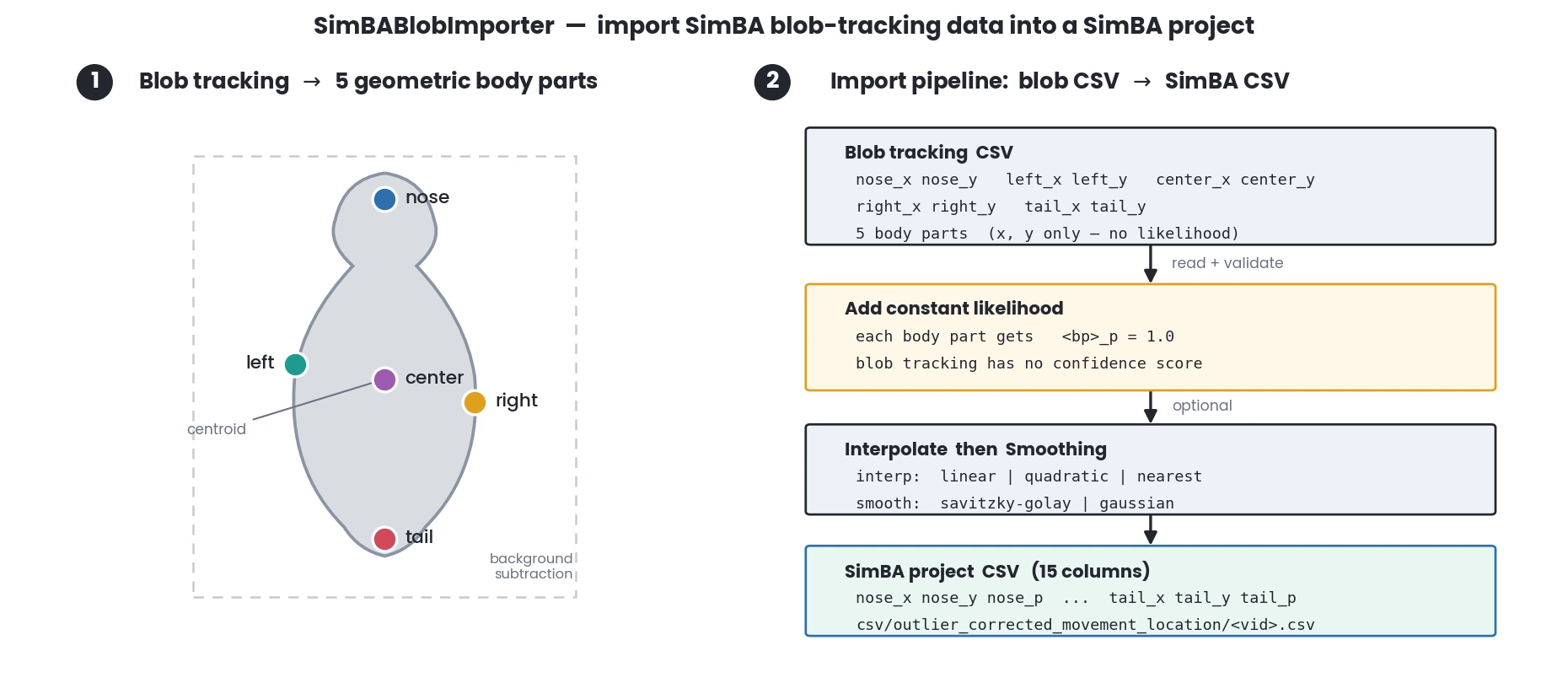
Note
The project must be configured as a SimBA blob project (pose setting must be set to ‘simba_blob’). The input CSV files must contain the following required fields: nose_x, nose_y, left_x, left_y, center_x, center_y, right_x, right_y, tail_x, tail_y.
See also
To generate blob tracking data, see
simba.video_processors.blob_tracking_executor.BlobTrackingExecutor(). To visualize blob tracking results, seesimba.plotting.blob_visualizer.BlobVisualizer().- Parameters
config_path (Union[str, os.PathLike]) – Path to the SimBA project configuration file.
data_path (Union[str, os.PathLike]) – Path to a directory containing blob tracking CSV files, or a single CSV file.
save_dir (Optional[Union[str, os.PathLike]]) – Directory where imported files will be saved. If None, saves to the project’s outlier_corrected directory. Default: None.
smoothing_settings (Optional[dict]) – Dictionary with smoothing settings. Must contain ‘method’ (‘savitzky-golay’ or ‘gaussian’) and ‘time_window’ (positive integer). If None, no smoothing is applied. Default: None.
interpolation_settings (Optional[dict]) – Dictionary with interpolation settings. Must contain ‘method’ (‘linear’, ‘quadratic’, or ‘nearest’) and ‘type’ (‘body-parts’ or ‘animals’). If None, no interpolation is applied. Default: None.
verbose (Optional[bool]) – If True, prints progress messages. Default: True.
- Example
>>> r = SimBABlobImporter(config_path=r"C:/troubleshooting/simba_blob_project/project_folder/project_config.ini", data_path=r'C:/troubleshooting/simba_blob_project/data')
>>> r.run()
>>> r = SimBABlobImporter(config_path=r"C:/troubleshooting/simba_blob_project/project_folder/project_config.ini",
...                       data_path=r'C:/troubleshooting/simba_blob_project/data',
...                       smoothing_settings={'method': 'savitzky-golay', 'time_window': 100},
...                       interpolation_settings={'method': 'nearest', 'type': 'body-parts'})
>>> r.run()
Import FaceMap body-part tracking
- class simba.pose_importers.facemap_h5_importer.FaceMapImporter(config_path, data_path, save_dir=None, smoothing_settings=None, interpolation_settings=None, verbose=True)[source]
Bases:
simba.mixins.config_reader.ConfigReaderImport FaceMap orofacial keypoint tracking data into a SimBA project.
FaceMap tracks 15 keypoints on the mouse face (4 eye, 5 nose, 3 whisker, mouth + lowerlip, and paw), storing each keypoint’s
x,yandlikelihoodper frame in an.h5file. This class reads each.h5file, converts it to a SimBA pose-estimation CSV (one<keypoint>_x,<keypoint>_y,<keypoint>_ptriplet per keypoint), and saves it into the project’soutlier_corrected_movement_locationdirectory. Interpolation and smoothing are applied afterwards if requested.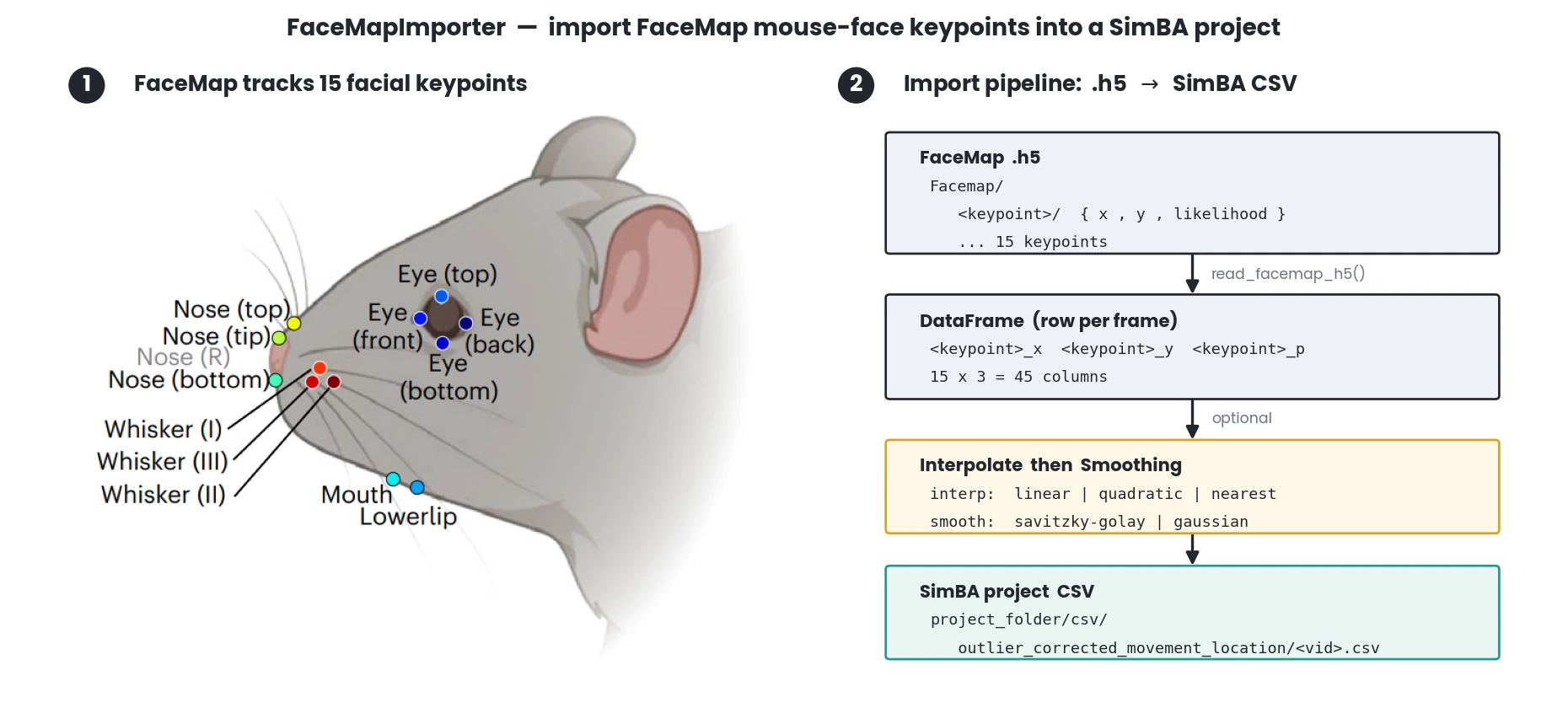
See also
The
.h5parsing is performed bysimba.utils.read_write.read_facemap_h5()Note
The SimBA project must be created as a FaceMap project (
pose_estimation_body_parts: Facemap); importing into a project of any other pose-configuration raises an error.- 1
Syeda, A., Zhong, L., Tung, R., et al. Facemap: a framework for modeling neural activity based on orofacial tracking. Nature Neuroscience, 26, 1775–1783 (2023).
- 2
FaceMap, MouseLand, https://github.com/mouseland/facemap.
- param Union[str, os.PathLike] config_path
Path to SimBA project
project_config.ini(must be a FaceMap project).- param Union[str, os.PathLike] data_path
Path to a FaceMap
.h5file, or a directory containing one or more.h5files.- param Optional[Union[str, os.PathLike]] save_dir
Directory to save the imported CSVs. If None, defaults to the project’s
outlier_corrected_movement_locationdirectory.- param Optional[dict] smoothing_settings
Optional smoothing, e.g.
{'method': 'savitzky-golay', 'time_window': 100}.methodis one of'savitzky-golay'/'gaussian';time_windowis in milliseconds. Default None (no smoothing).- param Optional[dict] interpolation_settings
Optional interpolation, e.g.
{'type': 'body-parts', 'method': 'linear'}.typeis'body-parts'/'animals';methodis'linear'/'quadratic'/'nearest'. Default None (no interpolation).- param Optional[bool] verbose
If True, print per-file progress. Default True.
- example
>>> r = FaceMapImporter(config_path=r"C: roubleshooting
acemap_projectproject_folderproject_config.ini”, data_path=r’C: roubleshooting acemap_projectdata’, smoothing_settings={‘method’: ‘savitzky-golay’, ‘time_window’: 100})
>>> r.run()
Import SuperAnimal-TopView Mouse body-part tracking
- class simba.pose_importers.superanimal_import.SuperAnimalTopViewImporter(config_path, data_folder, id_lst, interpolation_settings=None, smoothing_settings=None, initial_frame_no=None)[source]
Bases:
simba.mixins.pose_importer_mixin.PoseImporterMixin,simba.mixins.config_reader.ConfigReaderImport SuperAnimal-TopView mouse data to SimBA
Note
For more information see the DeepLabCutModelZoo-SuperAnimal-TopViewMouse on huggingface https://huggingface.co/mwmathis/DeepLabCutModelZoo-SuperAnimal-TopViewMouse
Trackes 27 body-parts on one or more mice recorded from zenith.
Supports both DLC H5 layouts: the legacy TensorFlow backend (
df_with_missing/table) and the modern DLC 3.0+ PyTorch backend (HRNet, RTMPose), including multi-animal tracked outputs ending in_el.h5/_full.h5. H5 column order is assumed to follow the SuperAnimal-TopView 27 body-part schema, with animals in the order supplied viaid_lst(positional mapping).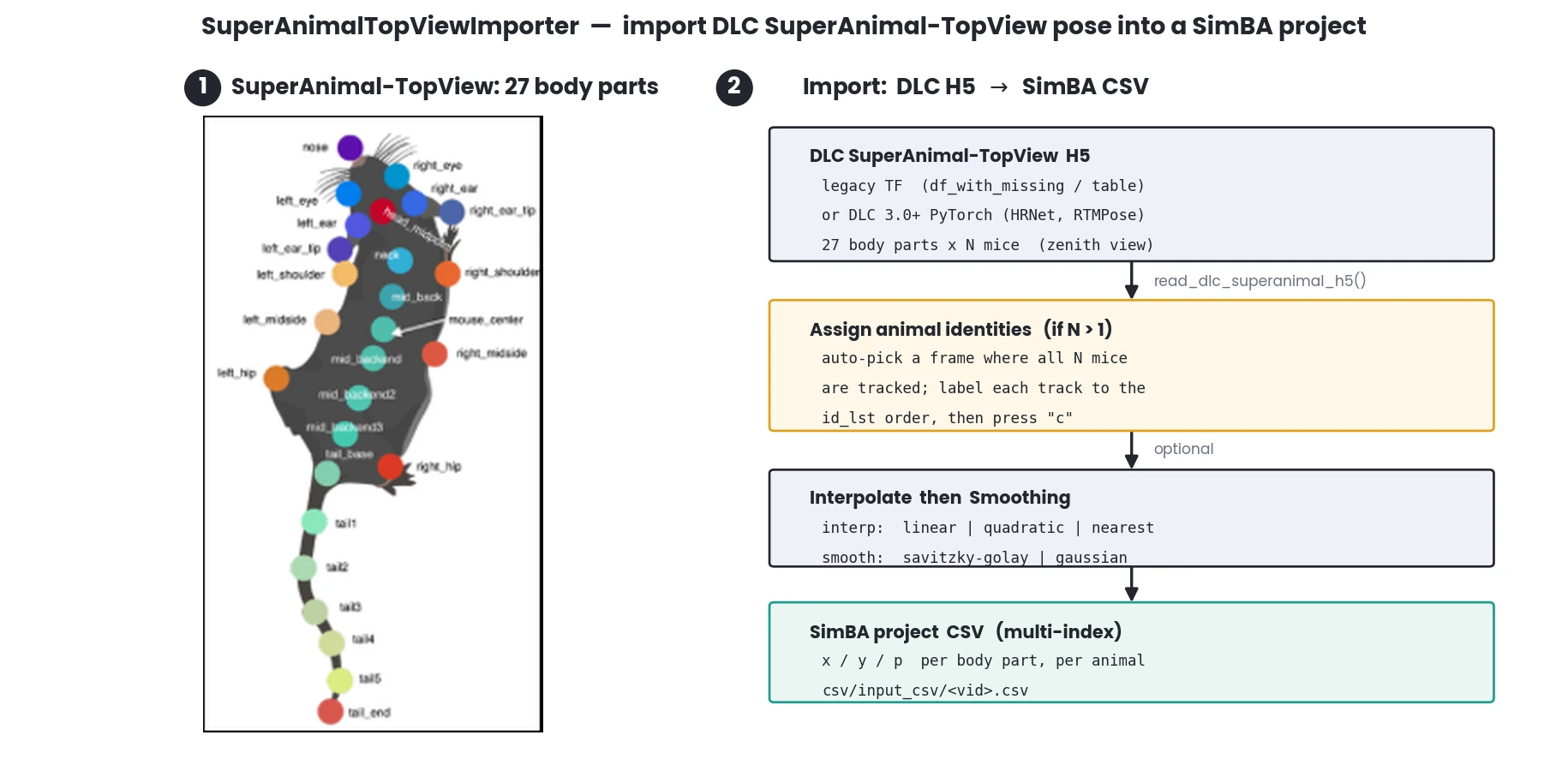
- Parameters
config_path – path to SimBA project config file in Configparser format
data_folder (str) – Path to folder containing SuperAnimal data in
.h5format.id_lst (List[str]) – Names of animals.
interpolation_setting (Optional[Dict[str, str]]) – Dict defining the type and method to use to perform interpolation {‘type’: ‘animals’, ‘method’: ‘linear’}.
smoothing_settings (Optional[Dict[str, Union[str, int]]]) – Dictionary defining the pose estimation smoothing method {‘time_window’: 500, ‘method’: ‘gaussian’}.
initial_frame_no (Optional[int]) –
Frame index at which to open the multi-animal identity-assignment UI. Only used when
len(id_lst) > 1.If an integer is passed, it is used directly (and must be
>= 0and strictly less than the frame count of every H5 file indata_folder; otherwise anInvalidInputErroris raised by__init__).If
None(default) in multi-animal mode, the importer attempts to auto-detect, per video, a frame where alllen(id_lst)animals are simultaneously tracked (viasimba.utils.lookups.find_best_multi_animal_assignment_frame()). The UI opens on that frame, so the user only needs to press “c” once. If no such frame exists (or detection fails for any reason) the UI falls back to frame 0 as in earlier SimBA versions.Single-animal imports ignore this argument entirely.
- References
- 1
Ye, Shaokai, Anastasiia Filippova, Jessy Lauer, et al. “SuperAnimal Pretrained Pose Estimation Models for Behavioral Analysis.” Nature Communications 15, no. 1 (2024): 5165. https://doi.org/10.1038/s41467-024-48792-2.
- 2
mwmathis lab on huggingface - https://huggingface.co/mwmathis/.
- Example
>>> importer = SuperAnimalTopViewImporter(config_path=r"C:  roubleshooting\super_animal_import\project_folder\project_config.ini", data_folder=r'C: roubleshooting\super_animal_import\data_files', id_lst=['Animal_1'])
>>> importer.run()
- Example multi-animal with a known good frame
>>> importer = SuperAnimalTopViewImporter(config_path=r"...\project_config.ini", data_folder=r'...\data_files', id_lst=['mouse_1', 'mouse_2', 'mouse_3', 'mouse_4', 'mouse_5'], initial_frame_no=3313)
>>> importer.run()
Import YOLO pose-estimation tracking (unique individuals, non-track based, only)
- class simba.pose_importers.simba_yolo_importer.SimBAYoloImporter(config_path, data_dir, verbose=False, px_per_mm=None, resolution=None, fps=None, add_to_video_info=True, interpolation_settings=None, smoothing_settings=None)[source]
Bases:
simba.mixins.config_reader.ConfigReaderImport YOLO pose estimation results into SimBA project format with optional interpolation and smoothing.
Each YOLO results CSV holds one row per detection (
FRAME,CLASS_ID,CLASS_NAME,CONFIDENCE, the four bounding-box cornersX1..Y4, and the keypoint columns). On import, the bounding-box corners,CLASS_IDandCONFIDENCEare dropped, and the data is pivoted from long (one row per detection) to wide (one row per frame) with each class’s keypoints placed side-by-side as<class>_<bp>_x/_y/_pcolumns. The body-part names and multi-animal IDs are written to the project, and the result is saved to theoutlier_corrected_movement_locationdirectory (optionally interpolated and smoothed, and optionally with video metadata added tovideo_info.csv).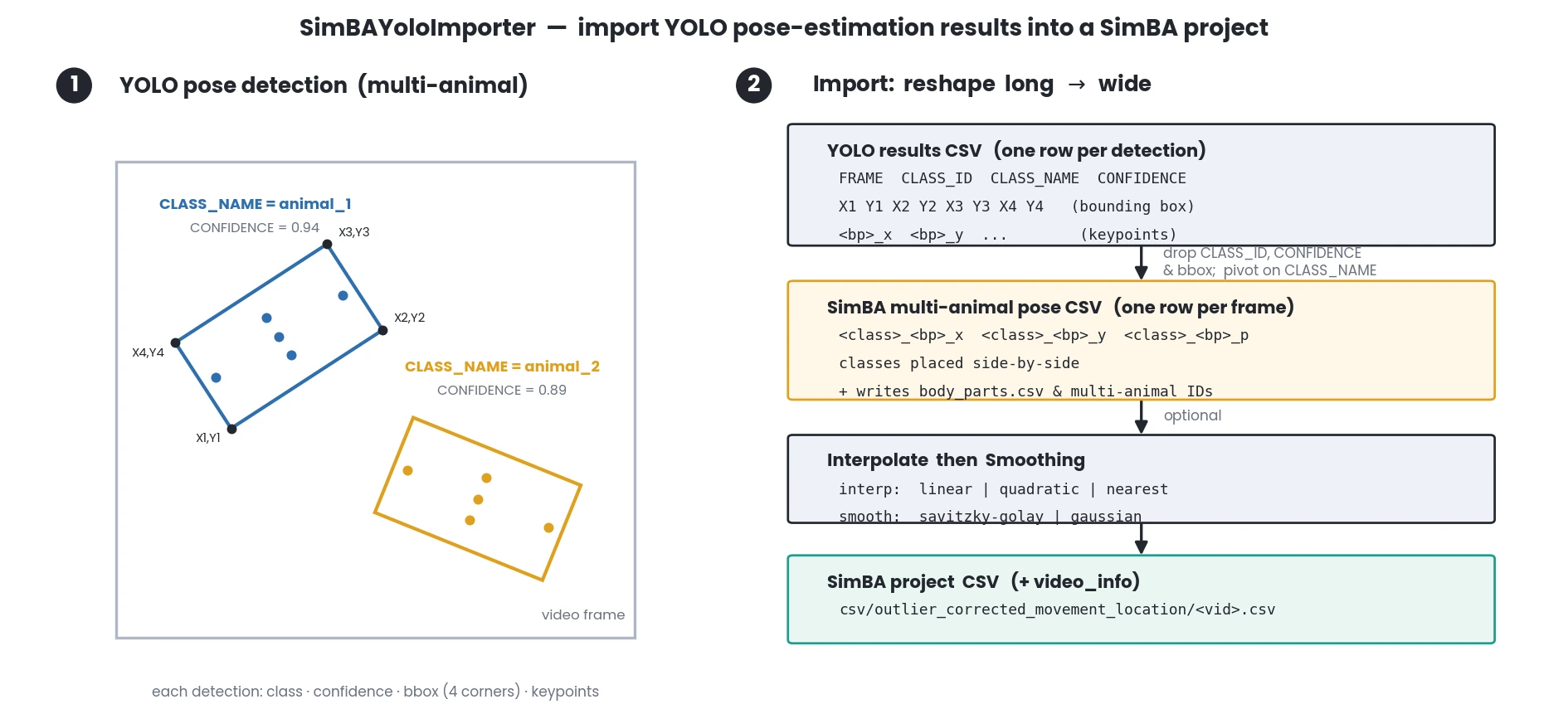
See also
YOLO pose data can be created with
simba.model.yolo_pose_inference.YOLOPoseInference()orsimba.model.yolo_pose_track_inference.YOLOPoseTrackInference().- Parameters
config_path (Union[str, os.PathLike]) – Path to SimBA project config file.
data_dir (Union[str, os.PathLike]) – Directory containing YOLO results CSV files.
verbose (bool) – If True, prints progress information. Default: False.
px_per_mm (Optional[float]) – Pixels per millimeter for the videos. If provided, updates project video info.
resolution (Optional[tuple]) – Video resolution as (width, height). Default: (927, 927).
fps (Optional[float]) – Video frames per second. Default: 927.
add_to_video_info (Optional[bool]) – If True, adds video metadata to project video_info.csv. Default: True.
interpolation_settings (Optional[Dict[str, str]]) – Dictionary with ‘method’ (‘linear’, ‘quadratic’, ‘nearest’) and ‘type’ (‘body-parts’, ‘animals’). If None, no interpolation applied.
smoothing_settings (Optional[Dict[str, str]]) – Dictionary with ‘method’ (‘savitzky-golay’, ‘gaussian’) and ‘time_window’ (int, milliseconds). If None, no smoothing applied.
- Example
>>> importer = SimBAYoloImporter(data_dir='yolo_results/', config_path='project_config.ini', verbose=True, px_per_mm=1.43, fps=30)
>>> importer.run()
- Example
>>> # With interpolation and smoothing
>>> interpolation = {'method': 'linear', 'type': 'body-parts'}
>>> smoothing = {'method': 'savitzky-golay', 'time_window': 200}
>>> importer = SimBAYoloImporter(data_dir='yolo_results/', config_path='project_config.ini', interpolation_settings=interpolation, smoothing_settings=smoothing)
>>> importer.run()