⚡ Train random forest models on GPU in SimBA
1) In Linux, be in a python 3.10 environment with SimBA installed. you can create a SimBA python 3.10 environment as documented HERE.
Note
Microsoft Windows WSL environment should work.
To create the conda environment use e.g., conda create -n simba_3_10 python=3.10 anaconda -y.
Use SImBA version at or above 2.9.4.
2) Install the cuml-cu12 (which is not present in the standard simba requirements.txt). To do this, after activating the SimBA python 3.10 environment created in step 1 type:
pip install cuml-cu12==24.12.0
3) Next, we need to tell SimBA to look for cuml-cu12 (which was installed in the prior step) when booting up. To do this, in the command line, type:
export CUML=True

and hit ENTER.
4) Next, launch SimBA with simba. If everything has gone to plan you should see the below beeing printed out. Specifically, you should see SimBA CUML enabled. followed by 'CUML': True, as in the below screengrab.

Set you global machine learning paramaters as usual in SimBA as documented HERE, or create multiple model config files as documented HERE to train multiple models. However, don’t click to train the model(s) yet, we need to modify one thing in the files to tell them to use the GPU libraries that we just have imported into SimBA.
5)
TRAINING A SINGLE MODEL
If you are training from the global environment, open the project_config.ini file and add one parameter to the [create ensemble settings] section. Add:
cuda = True
as in screengrab below”:
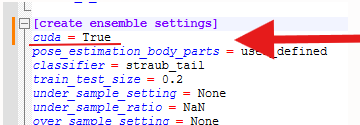
and save the file.
TRAINING MULTPLE MODELS
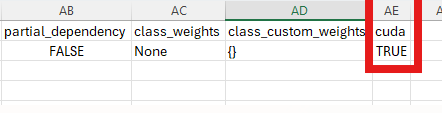
If you are training multiple models, open each of the CSV files in the project_folder/configs and add one header named cuda and set the value to TRUE, as in the screengrab below:
6) Train your models in SimBA from your config files by clicking the green or blue TRAIN SINGLE MODEL or TRAIN MULTIPLE MODELS buttons in the [TRAIN MACHINE MODEL] tab as documented HERE. The models should now be trained on the GPU and you should see significant speed up for the training part (NOTE: the evaluation parts, e.g., learning curves, PR curves, feature importance calculations etc, might not be as quick.)
Caution
The paths in WSL Ubuntu vs Microsoft Windows are slightly different. For example, a project created in Windows at path C:\my_projects\project_folder becomes /mnt/c/my_projects/project_folder when accessed through WSL Ubuntu. You may have to update them in the project_config.ini if shifting between environments (I’m looking to automate this).
Although training on the GPU can be much quicker, there are some non-functional drawbacks:
Getting feature importances (gini/entropy) from GPU models is much slower an on the CPU.
Getting SHAP values from GPU models is not supported. However, SHAP values from CPU models can be computed on the GPU at greatly improved run-times as documented HERE os using code HERE.
6) Train your models in SimBA from your config files by clicking the green or blue TRAIN SINGLE MODEL or TRAIN MULTIPLE MODELS buttons in the [TRAIN MACHINE MODEL] tab as documented HERE. The models should now be trained on the GPU and you should see significant speed up for the training part (NOTE: the evaluation parts, e.g., learning curves, PR curves, feature importance calculations etc)