Feature extraction mixins
Feature extraction methods
- class simba.mixins.feature_extraction_mixin.FeatureExtractionMixin(config_path=None)[source]
Methods for featurizing pose-estimation data.
- Parameters
config_path (Optional[configparser.Configparser]) – Optional path to SimBA project_config.ini
- static angle3pt(ax, ay, bx, by, cx, cy)[source]
Compute 3-point angle using thre body-parts.
See also
For multicore numba based method across multiple observations, see
simba.mixins.feature_extraction_mixin.FeatureExtractionMixin.angle3pt_vectorized(). For GPU acceleration, usesimba.data_processors.cuda.statistics.get_3pt_angle().
- Parameters
ax (float) – x coordinate of the first body-part (e.g., nape).
ay (float) – y coordinate of the first body-part (e.g., nape).
bx (float) – x coordinate of the second body-part (e.g., center).
by (float) – y coordinate of the second body-part (e.g., center).
cx (float) – x coordinate of the second body-part (e.g., tail-base).
cy (float) – y coordinate of the second body-part (e.g., tail-base).
- Returns
Angle between 0-360.
- Return type
- Example
>>> FeatureExtractionMixin.angle3pt(ax=122.0, ay=198.0, bx=237.0, by=138.0, cx=191.0, cy=109)
>>> 59.78156901181637
- static angle3pt_vectorized(data)[source]
Numba accelerated compute of frame-wise 3-point angles.
See also
For GPU acceleration, use
simba.data_processors.cuda.statistics.get_3pt_angle()for single frame alternative, seesimba.mixins.feature_extraction_mixin.FeatureExtractionMixin.angle3pt()- Parameters
data (ndarray) – 2D numerical array with frame number on x and [ax, ay, bx, by, cx, cy] on y.
- Returns
1d float numerical array of size data.shape[0] with angles.
- Return type
ndarray
- Examples
>>> coordinates = np.random.randint(1, 10, size=(6, 6))
>>> FeatureExtractionMixin.angle3pt_vectorized(data=coordinates)
>>> [ 67.16634582,   1.84761027, 334.23067238, 258.69006753, 11.30993247, 288.43494882]
- static bodypart_distance(bp1_coords, bp2_coords, px_per_mm=1.0, in_centimeters=False)[source]
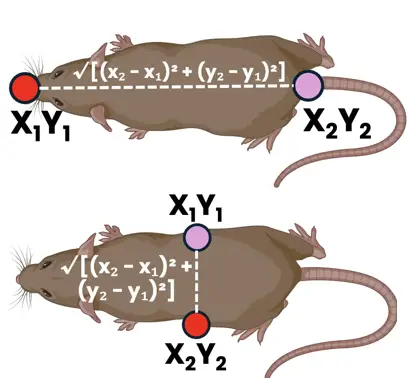
Calculate frame-wise Euclidean distances between two sets of body part coordinates.
The function uses the standard Euclidean distance formula: distance = √((x₁-x₂)² + (y₁-y₂)²) / px_per_mm
See also
Wrapper function (ensuring data validity) for the underlying implementation
simba.mixins.feature_extraction_mixin.FeatureExtractionMixin.framewise_euclidean_distance(). For GPU CuPy solution, seesimba.data_processors.cuda.statistics.get_euclidean_distance_cupy(). For GPU numba CUDA solution, seesimba.data_processors.cuda.statistics.get_euclidean_distance_cuda(). For Euclidean distance between one moving and one static target, seesimba.mixins.feature_extraction_mixin.FeatureExtractionMixin.framewise_euclidean_distance_roi().
- Parameters
bp1_coords (np.ndarray) – First body part coordinates with shape (n_frames, 2), where each row contains [x, y] pixel coordinates for a specific frame.
bp2_coords (np.ndarray) – Second body part coordinates with shape (n_frames, 2), where each row contains [x, y] pixel coordinates for a specific frame. Must have the same number of frames as bp1_coords.
px_per_mm (float) – Conversion factor from pixels to millimeters. Must be positive. Default: 1.0.
in_centimeters (bool) – If True, returns distances in centimeters. If False, returns distances in millimeters. Default: False.
- Returns
Array of Euclidean distances with shape (n_frames,) in the specified units as float32.
- Return type
np.ndarray[np.float32]
- Example
>>> bp1_coords = np.random.randint(0, 500, size=(1000, 2))
>>> bp2_coords = np.random.randint(0, 500, size=(1000, 2))
>>> FeatureExtractionMixin().bodypart_distance(bp1_coords=bp1_coords, bp2_coords=bp2_coords, px_per_mm=1.0, in_centimeters=False)
- static cdist(array_1, array_2)[source]
Analogue of meth:scipy.cdist for two 2D arrays. Use to calculate Euclidean distances between all coordinates in one array and all coordinates in a second array. E.g., computes the distances between all body-parts of one animal and all body-parts of a second animal. Acceleration though numba.

See also
For GPU acceleration, use cupyx.scipy.spatial.distance.cdist
- Parameters
array_1 (np.ndarray) – 2D array of body-part coordinates
array_2 (np.ndarray) – 2D array of body-part coordinates
- Returns
2D array of Euclidean distances between body-parts in
array_1andarray_2- Return type
np.ndarray
- Example
>>> array_1 = np.random.randint(1, 10, size=(3, 2)).astype(np.float32)
>>> array_2 = np.random.randint(1, 10, size=(3, 2)).astype(np.float32)
>>> FeatureExtractionMixin.cdist(array_1=array_1, array_2=array_2)
>>> [[7.07106781, 1.        , 3.60555124],
>>> [3.60555124, 6.3245554 , 2.        ],
>>>  [3.1622777 , 5.38516474, 4.12310553]])
- static cdist_3d(data)[source]
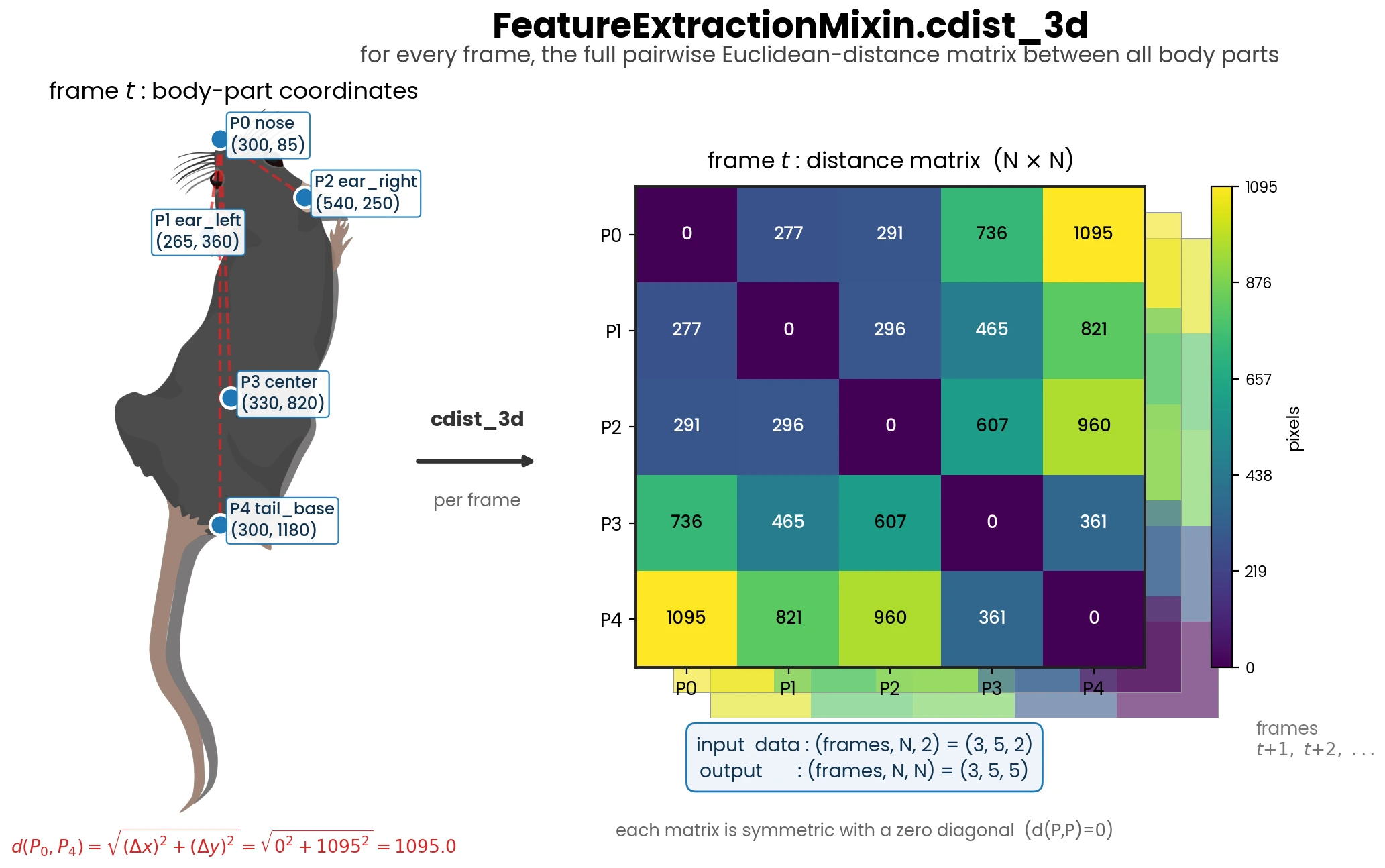
Jitted analogue of meth:scipy.cdist for 3D array. Use to calculate Euclidean distances between all coordinates in of one array and itself.
- Parameters
data (np.ndarray) – 3D array of body-part coordinates of size len(frames) x -1 x 2.
- Return np.ndarray
3D array of size data.shape[0], data.shape[1], data.shape[1].
- change_in_bodypart_euclidean_distance(location_1, location_2, fps, px_per_mm, time_windows=array([0.2, 0.4, 0.8, 1.6]))[source]
Computes the difference between the distance of two body-parts in the current frame versus N.N seconds ago. Used for computing if animal body-parts are traveling away from each other (positive values) or towards each other (negative values) within defined time-windows.
See also
For an equivalent stand-alone implementation, see
simba.mixins.feature_extraction_supplement_mixin.FeatureExtractionSupplemental.euclidean_distance_timeseries_change().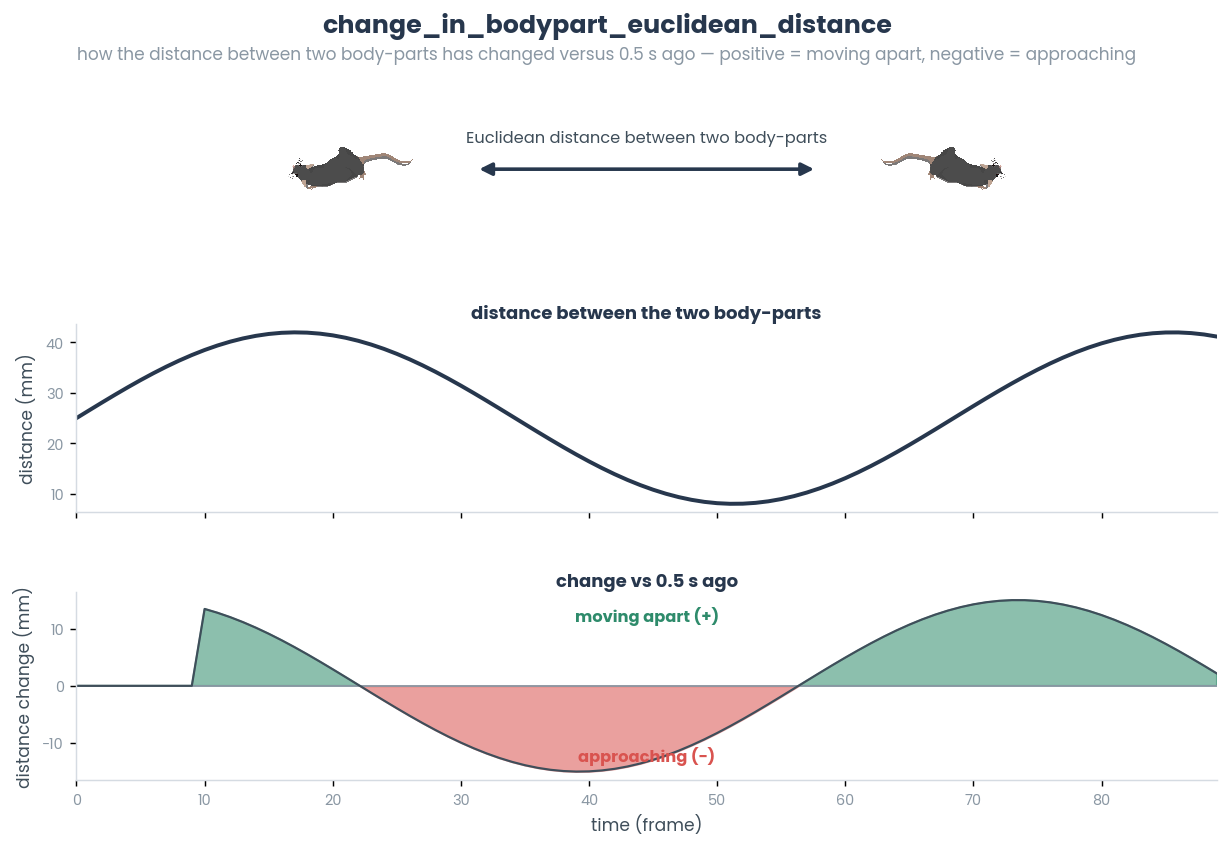
- Parameters
location_1 (np.ndarray) – 2D array (n_frames, 2) with the x,y positions of the first body-part.
location_2 (np.ndarray) – 2D array (n_frames, 2) with the x,y positions of the second body-part.
px_per_mm (float) – Pixels per millimeter conversion factor.
time_windows (np.ndarray) – Reference time-windows (in seconds) to compare the current distance against.
- Returns
Array of shape (n_frames, len(time_windows)); positive = parts moved apart, negative = moved closer.
- Return type
np.ndarray
- Example
>>> loc1 = np.random.randint(0, 500, (200, 2)).astype(np.float64)
>>> loc2 = np.random.randint(0, 500, (200, 2)).astype(np.float64)
>>> FeatureExtractionMixin().change_in_bodypart_euclidean_distance(location_1=loc1, location_2=loc2, fps=25, px_per_mm=2.0)
- check_directionality_cords()[source]
Helper to check if ear and nose body-parts are present within the pose-estimation data.
- Return dict
Body-part names of ear and nose body-parts as values and animal names as keys. If empty, ear and nose body-parts are not present within the pose-estimation data
- check_directionality_viable()[source]
Check if it is possible to calculate
directionalitystatistics.Specifically, checks if nose and coordinates from pose estimation has to be present
- Return bool
If True, directionality is viable. Else, not viable.
- Return np.ndarray nose_coord
If viable, then 2D array with coordinates of the nose in all frames. Else, empty array.
- Return np.ndarray ear_left_coord
If viable, then 2D array with coordinates of the left ear in all frames. Else, empty array.
- Return np.ndarray ear_right_coord
If viable, then 2D array with coordinates of the right ear in all frames. Else, empty array.
- static convex_hull_calculator_mp(arr, px_per_mm)[source]
Calculate single frame convex hull perimeter length in millimeters.

Note
For acceptable run-time, call using parallel processing.
See also
For numba CPU based acceleration, use
simba.feature_extractors.perimeter_jit.jitted_hull(). For multicore based acceleration, usesimba.mixins.geometry_mixin.GeometryMixin.bodyparts_to_polygon(). For numba CUDA based acceleration, usesimba.data_processors.cuda.geometry.get_convex_hull(),- Parameters
arr (np.ndarray) – 2D array of size len(body-parts) x 2.
px_per_mm (float) – Video pixels per millimeter.
- Returns
The length of the animal perimeter in millimeters.
- Return type
- Example
>>> coordinates = np.random.randint(1, 200, size=(6, 2)).astype(np.float32)
>>> FeatureExtractionMixin.convex_hull_calculator_mp(arr=coordinates, px_per_mm=4.56)
>>> 98.6676814218373
- static cosine_similarity(data)[source]
Analogue of
sklearn.metrics.pairwise.cosine_similarity. Similar to scipy.cdist. Calculates the cosine similarity (the cosine of the angle between two vectors, so magnitude is ignored) between all pairs of rows in a 2D array. Values range from 1 (same direction) through 0 (orthogonal) to -1 (opposite). Zero-vectors yield a similarity of 0.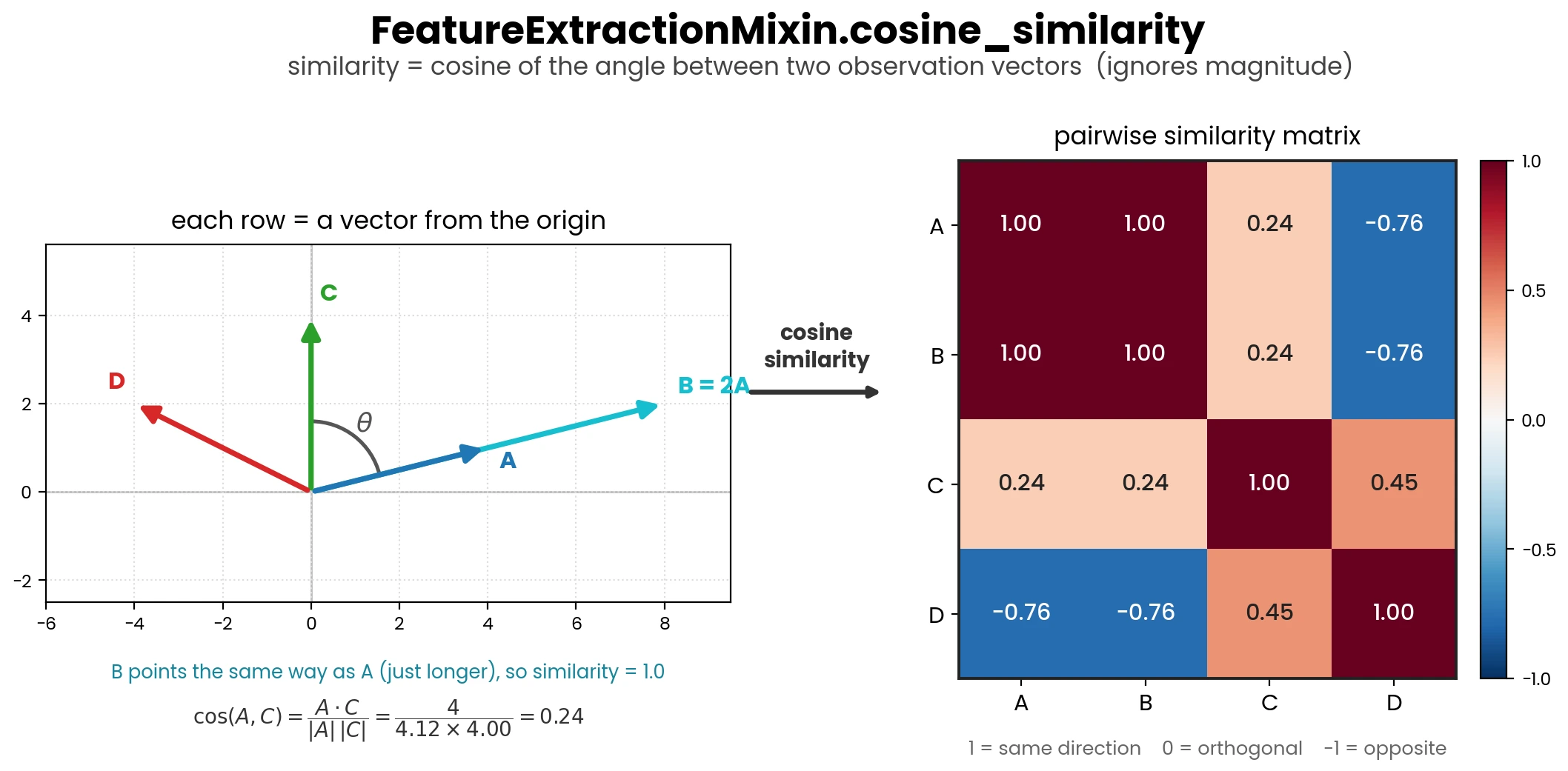
- Parameters
data (np.ndarray) – 2D array of observations.
- Returns
Matrix representing the cosine similarity between all observations in
data.- Return type
np.ndarray
- Example
>>> data = np.array([[1, 2, 3], [4, 5, 6], [7, 8, 9]]).astype(np.float32)
>>> FeatureExtractionMixin().cosine_similarity(data=data)
>>> [[1.0, 0.974, 0.959], [0.974, 1.0, 0.998], [0.959, 0.998, 1.0]]
- static count_values_in_range(data, ranges)[source]
Jitted helper finding count of values that falls within ranges. E.g., count number of pose-estimated body-parts that fall within defined bracket of probabilities per frame.


See also
For GPU acceleration, use
simba.data_processors.cuda.statistics.count_values_in_ranges()- Parameters
data (np.ndarray) – 2D numpy array with frames on X.
ranges (np.ndarray) – 2D numpy array representing the brackets. E.g., [[0, 0.1], [0.1, 0.5]]
- Returns
2D numpy array of size data.shape[0], ranges.shape[1]
- Return type
np.ndarray
- Example
>>> FeatureExtractionMixin.count_values_in_range(data=np.random.random((3,10)), ranges=np.array([[0.0, 0.25], [0.25, 0.5]]))
>>> [[6, 1], [3, 2],[2, 1]]
- static create_shifted_array(data, periods=1)[source]
Create a shifted NumPy array with edge values filled from original data.
This method mirrors
create_shifted_df()shift behavior, but for NumPy arrays. It returns only shifted values (not concatenated with original input values).See also
For pandas DataFrame input with concatenated original and shifted columns, see
simba.mixins.feature_extraction_mixin.FeatureExtractionMixin.create_shifted_df().- Parameters
data (np.ndarray) – Numeric 1D or 2D array with frames on axis 0.
periods (int) – Number of rows to shift. Positive shifts down, negative shifts up.
- Returns
Shifted array with the same shape as input (1D input is returned as 2D
(n, 1)).- Return type
np.ndarray
- Example
>>> arr = np.array([[10], [95], [85]])
>>> FeatureExtractionMixin.create_shifted_array(data=arr, periods=1)
>>> array([[10.], [10.], [95.]])
- static create_shifted_df(df, periods=1, suffix='_shifted')[source]
Create dataframe including duplicated shifted (1) columns with
_shiftedsuffix.See also
For NumPy input and shifted-values-only output, see
simba.mixins.feature_extraction_mixin.FeatureExtractionMixin.create_shifted_array().- Parameters
df (pd.DataFrame) – Dataframe to create additional shifted fields from.
int (periods) – The rows to shift the new fields. 1 denotes that the shifted fields get shifted one row “down”. -1 and the fields would be shifted one row “up”.
suffix (str) – The suffix to add to the new, shifted, fields. Default: “shifted”.
- Return pd.DataFrame
Dataframe including original and shifted columns.
- Example
>>> df = pd.DataFrame(np.random.randint(0,100,size=(3, 1)), columns=['Feature_1'])
>>> FeatureExtractionMixin.create_shifted_df(df=df)
>>>             Feature_1  Feature_1_shifted
>>>    0         76               76.0
>>>    1         41               76.0
>>>    2         89               41.0
- dataframe_gaussian_smoother(df, fps, time_window=100)[source]
Column-wise Gaussian smoothing of dataframe.
- Parameters
- Return pd.DataFrame
Dataframe with smoothened data
- References
- dataframe_savgol_smoother(df, fps, time_window=150)[source]
Column-wise Savitzky-Golay smoothing of dataframe.
- Parameters
- Return pd.DataFrame
Dataframe with smoothened data
- References
- static euclidean_distance(bp_1_x, bp_2_x, bp_1_y, bp_2_y, px_per_mm)[source]
Compute Euclidean distance in millimeters between two body-parts.
See also
For improved runtime on CPU, use
simba.mixins.feature_extraction_mixin.FeatureExtractionMixin.framewise_euclidean_distance()orsimba.mixins.feature_extraction_mixin.FeatureExtractionMixin.keypoint_distances(). For GPU acceleration through CuPy, usesimba.data_processors.cuda.statistics.get_euclidean_distance_cupy(). For GPU acceleration through numba CUDA, usesimba.data_processors.cuda.statistics.get_euclidean_distance_cuda().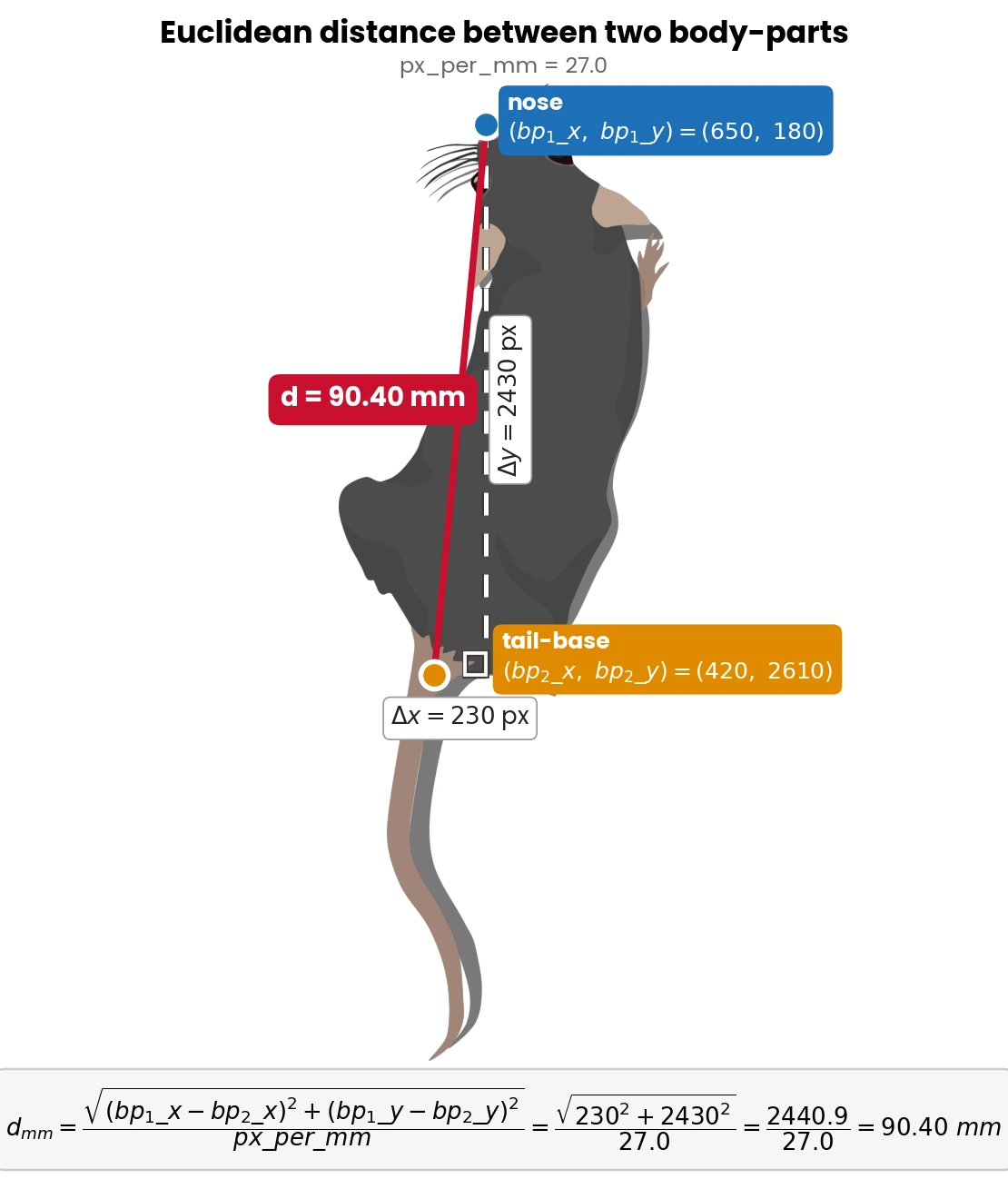
- Parameters
bp_1_x (np.ndarray) – 2D array of size len(frames) x 1 with bodypart 1 x-coordinates.
bp_2_x (np.ndarray) – 2D array of size len(frames) x 1 with bodypart 2 x-coordinates.
bp_1_y (np.ndarray) – 2D array of size len(frames) x 1 with bodypart 1 y-coordinates.
bp_2_y (np.ndarray) – 2D array of size len(frames) x 1 with bodypart 2 y-coordinates.
- Returns
2D array of size len(frames) x 1 with distances between body-part 1 and body-part 2 in millimeters
- Return type
np.ndarray
- Example
>>> x1, x2 = np.random.randint(1, 10, size=(10, 1)), np.random.randint(1, 10, size=(10, 1))
>>> y1, y2 = np.random.randint(1, 10, size=(10, 1)), np.random.randint(1, 10, size=(10, 1))
>>> FeatureExtractionMixin.euclidean_distance(bp_1_x=x1, bp_2_x=x2, bp_1_y=y1, bp_2_y=y2, px_per_mm=4.56)
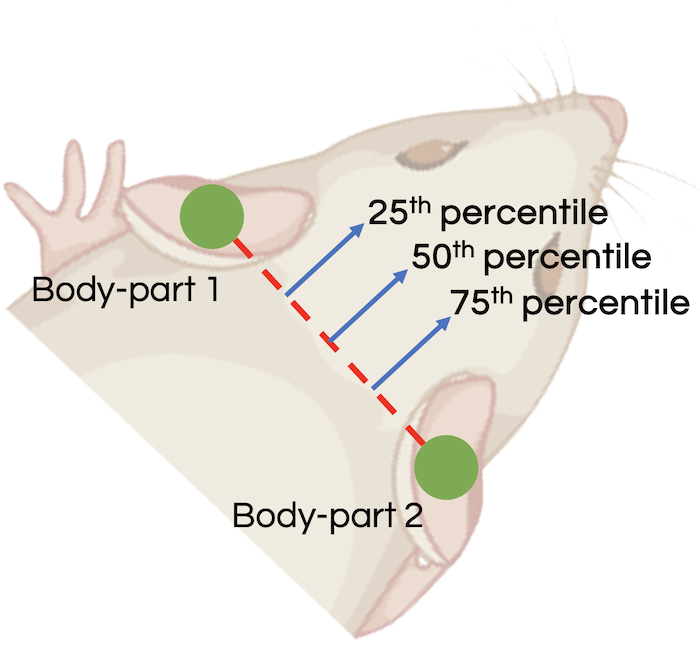
- static find_midpoints(bp_1, bp_2, percentile)[source]
Compute the midpoints between two sets of 2D points based on a given percentile.
See also
For GPU acceleration, use
simba.data_processors.cuda.geometry.find_midpoints()- Parameters
bp_1 (np.ndarray) – An array of 2D points representing the first set of points. Rows represent frames. First column represent x coordinates. Second column represent y coordinates.
bp_2 (np.ndarray) – An array of 2D points representing the second set of points. Rows represent frames. First column represent x coordinates. Second column represent y coordinates.
percentile (float) – The percentile value to determine the distance between the points for calculating midpoints. When set to 0.5 it calculates midpoints at the midpoint of the two points.
- Returns
An array of 2D points representing the midpoints between the points in bp_1 and bp_2 based on the specified percentile.
- Return type
np.ndarray
- Example
>>> bp_1 = np.array([[1, 3], [30, 10]]).astype(np.int64)
>>> bp_2 = np.array([[10, 4], [20, 1]]).astype(np.int64)
>>> FeatureExtractionMixin().find_midpoints(bp_1=bp_1, bp_2=bp_2, percentile=0.5)
>>> [[ 5,  3], [25,  6]]
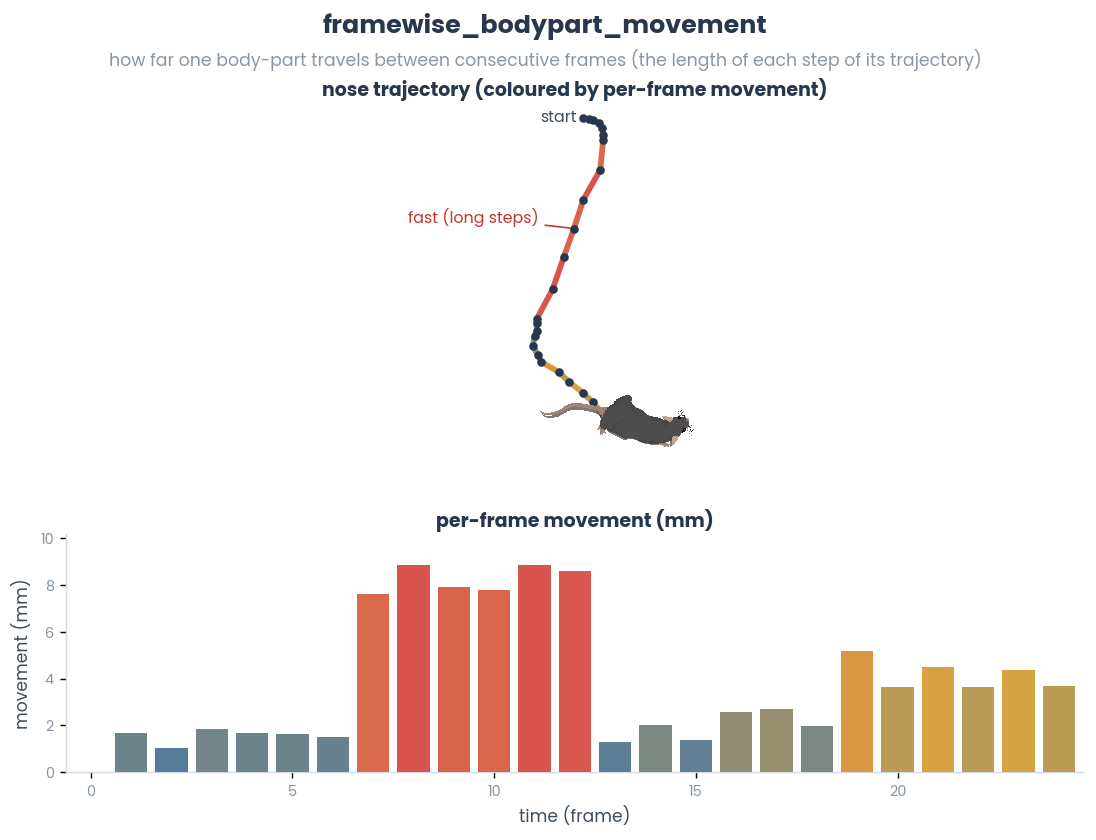
- static framewise_bodypart_movement(data, px_per_mm=1, centimeter=False)[source]
Compute frame-wise movement for a single body-part trajectory.
See also
For movement between two distinct body-parts, use func:simba.mixins.feature_extraction_mixin.FeatureExtractionMixin.bodypart_distance. For direct per-frame distance computation between two coordinate arrays, use func:simba.mixins.feature_extraction_mixin.FeatureExtractionMixin.framewise_euclidean_distance.
- Parameters
data (Union[np.ndarray, pd.DataFrame]) – Body-part coordinates with shape
(n_frames, 2)where columns representxandypixel positions. Accepted as numpy array or pandas DataFrame.px_per_mm (float) – Conversion factor from pixels to millimeters. Must be positive. Default: 1.
centimeter (bool) – If True, return movement in centimeters. If False, return movement in millimeters. Default: False.
- Returns
1D array of frame-wise displacement values with shape
(n_frames,).- Return type
np.ndarray
- Example
>>> coords = np.array([[10, 10], [13, 14], [13, 20]], dtype=np.float32)
>>> FeatureExtractionMixin.framewise_bodypart_movement(data=coords, px_per_mm=2.0, centimeter=False)
- static framewise_euclidean_distance(location_1, location_2, px_per_mm, centimeter)[source]
Compute frame-wise Euclidean distances between two sets of moving 2D locations.
This numba-jitted function efficiently calculates the straight-line distance between corresponding points in two location arrays for each frame. The distances are converted from pixels to real-world units (millimeters or centimeters) using the provided pixel-to-millimeter conversion factor.
Uses the standard Euclidean distance formula: √((x₁-x₂)² + (y₁-y₂)²) / px_per_mm
Note
This function is optimized with numba JIT parallel execution compilation for high performance on large datasets.
See also
For GPU CuPy solution, see
simba.data_processors.cuda.statistics.get_euclidean_distance_cupy(). For GPU numba CUDA solution, seesimba.data_processors.cuda.statistics.get_euclidean_distance_cuda(). For Euclidean distance between one moving and one static target, seesimba.mixins.feature_extraction_mixin.FeatureExtractionMixin.framewise_euclidean_distance_roi(). For wrapper function ensuring dtypes and data validity in this method, seesimba.mixins.feature_extraction_mixin.FeatureExtractionMixin.bodypart_distance().- Parameters
location_1 (np.ndarray) – First set of 2D coordinates with shape (n_frames, 2), where each row contains [x, y] pixel coordinates for a specific frame.
location_2 (np.ndarray) – Second set of 2D coordinates with shape (n_frames, 2), where each row contains [x, y] pixel coordinates for a specific frame. Must have same shape as location_1.
px_per_mm (float) – Conversion factor from pixels to millimeters. Must be positive.
centimeter (bool) – If True, returns distances in centimeters. If False, returns distances in millimeters. Default is False.
- Returns
Array of Euclidean distances with shape (n_frames,).
- Return type
np.ndarray
- Example
>>> # Calculate distances between two body parts across frames
>>> nose_coords = np.array([[100, 150], [102, 148], [105, 145]], dtype=np.float32)
>>> ear_coords = np.array([[90, 140], [92, 138], [95, 135]], dtype=np.float32)
>>> distances_mm = FeatureExtractionMixin.framewise_euclidean_distance(location_1=nose_coords, location_2=ear_coords, px_per_mm=4.5, centimeter=False)
>>> distances_cm = FeatureExtractionMixin.framewise_euclidean_distance(location_1=nose_coords, location_2=ear_coords, px_per_mm=4.5, centimeter=True)
- static framewise_euclidean_distance_roi(location_1, location_2, px_per_mm, centimeter=False)[source]
Find frame-wise distances between a moving location (location_1) and static location (location_2) in millimeter or centimeter.

See also
For distances between two moving targets, use
simba.mixins.feature_extraction_mixin.FeatureExtractionMixin.framewise_euclidean_distance(), For GPU implementation, seesimba.data_processors.cuda.statistics.get_euclidean_distance_cupy()orsimba.data_processors.cuda.statistics.get_euclidean_distance_cuda()For numpy method (which appears faster than numba) usesimba.mixins.feature_extraction_mixin.FeatureExtractionMixin.keypoint_distances().- Parameters
location_1 (ndarray) – 2D numpy array of size len(frames) x 2.
location_2 (ndarray) – 1D numpy array holding the X and Y of the static location.
px_per_mm (float) – The pixels per millimeter in the video.
centimeter (bool) – If true, the value in centimeters is returned. Else the value in millimeters.
- Returns
1D array of size location_1.shape[0] with distances in millimeter or centimeter.
- Return type
np.ndarray
- Example
>>> loc_1 = np.random.randint(1, 200, size=(6, 2)).astype(np.float32)
>>> loc_2 = np.random.randint(1, 200, size=(1, 2)).astype(np.float32)
>>> FeatureExtractionMixin.framewise_euclidean_distance_roi(location_1=loc_1, location_2=loc_2, px_per_mm=4.56, centimeter=False)
>>> [11.31884926, 13.84534585,  6.09712224, 17.12773976, 19.32066031, 12.18043378]
>>> FeatureExtractionMixin.framewise_euclidean_distance_roi(location_1=loc_1, location_2=loc_2, px_per_mm=4.56, centimeter=True)
>>> [1.13188493, 1.38453458, 0.60971222, 1.71277398, 1.93206603, 1.21804338]
- static framewise_inside_polygon_roi(bp_location, roi_coords)[source]
Jitted helper for frame-wise detection if animal is inside static polygon ROI.
Note
Modified from epifanio

See also
For GPU acceleration, use
simba.data_processors.cuda.geometry.is_inside_polygon()- Parameters
bp_location (np.ndarray) – 2d numeric np.ndarray size len(frames) x 2
roi_coords (np.ndarray) – 2d numeric np.ndarray size len(polygon points) x 2
- Returns
2d numeric boolean np.ndarray size len(frames) x 1, with 0 representing outside the polygon and 1 representing inside the polygon.
- Return type
np.ndarray
- Example
>>> bp_loc = np.random.randint(1, 10, size=(6, 2)).astype(np.float32)
>>> roi_coords = np.random.randint(1, 10, size=(10, 2)).astype(np.float32)
>>> FeatureExtractionMixin.framewise_inside_polygon_roi(bp_location=bp_loc, roi_coords=roi_coords)
>>> [0, 0, 0, 1]
- static framewise_inside_rectangle_roi(bp_location, roi_coords)[source]
Frame-wise analysis if animal is inside static rectangular ROI.

See also
For GPU acceleration, use
simba.data_processors.cuda.geometry.is_inside_rectangle().- Parameters
bp_location (np.ndarray) – 2d numeric np.ndarray size len(frames) x 2
roi_coords (np.ndarray) – 2d numeric np.ndarray size 2x2 (top left[x, y], bottom right[x, y])
- Returns
2d numeric boolean np.ndarray size len(frames) x 1, with 0 representing outside the rectangle and 1 representing inside the rectangle.
- Return type
ndarray
- Example
>>> bp_loc = np.random.randint(1, 10, size=(6, 2)).astype(np.float32)
>>> roi_coords = np.random.randint(1, 10, size=(2, 2)).astype(np.float32)
>>> FeatureExtractionMixin.framewise_inside_rectangle_roi(bp_location=bp_loc, roi_coords=roi_coords)
>>> [0, 0, 0, 0, 0, 0]
- get_bp_headers()[source]
Helper to create ordered list of all column header fields for SimBA project dataframes.
- get_feature_extraction_headers(pose)[source]
Helper to return the headers names (body-part location columns) that should be used during feature extraction.
- Parameters
pose (str) – Pose-estimation setting, e.g.,
16.- Return List[str]
The names and order of the pose-estimation columns.
- insert_default_headers_for_feature_extraction(df, headers, pose_config, filename)[source]
Helper to insert correct body-part column names prior to defualt feature extraction methods.
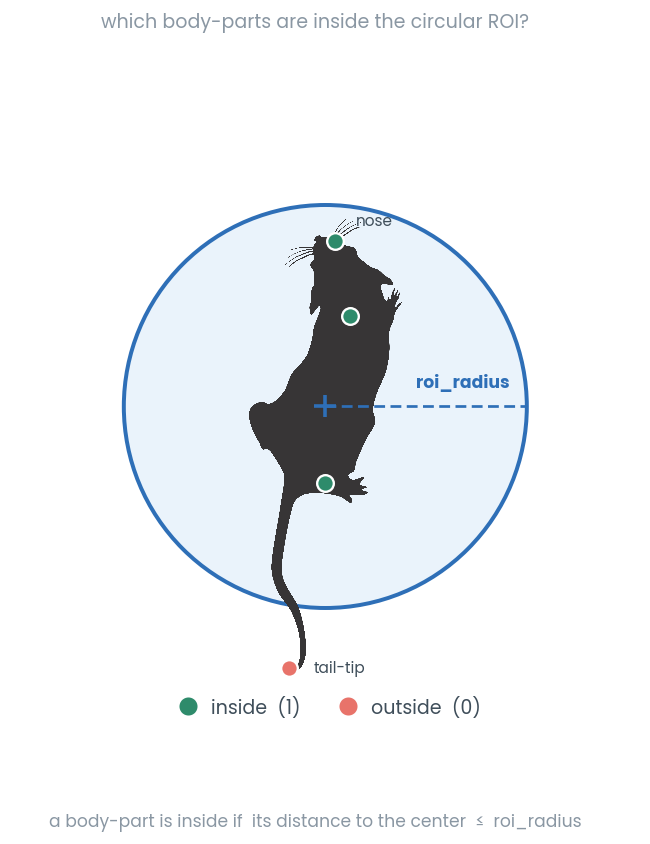
- static is_inside_circle(bp, roi_center, roi_radius)[source]
Determines whether each body part in bp is inside or outside a given circular region.
This function calculates the Euclidean distance between each body part’s (x, y) coordinates and the center of the region of interest (ROI). If the distance is less than or equal to the specified radius, the body part is considered inside the circle (marked as 1); otherwise, it is considered outside (marked as 0).
See also
For GPU acceleration, see
simba.data_processors.cuda.geometry.is_inside_circle()- Parameters
bp (np.ndarray) – A (N, 2) array containing the (x, y) coordinates of N body parts.
roi_center (np.ndarray) – A (2,) array representing the (x, y) coordinates of the circle center.
roi_radius (int) – The radius of the circular region of interest.
- Returns
A 1D numpy array of size len(bp), where 1 represents a body part inside the circle and 0 represents a body part outside the circle.
- Return type
np.ndarray
- static jitted_line_crosses_to_nonstatic_targets(left_ear_array, right_ear_array, nose_array, target_array)[source]
Jitted helper to calculate if an animal is directing towards another animals body-part coordinate, given the target body-part and the left ear, right ear, and nose coordinates of the observer.
See also
Input left ear, right ear, and nose coordinates of the observer is returned by
simba.mixins.feature_extraction_mixin.FeatureExtractionMixin.check_directionality_viable()If the target is static, consider
simba.mixins.feature_extraction_mixin.FeatureExtractionMixin.jitted_line_crosses_to_static_targets()
- Parameters
left_ear_array (np.ndarray) – 2D array of size len(frames) x 2 with the coordinates of the observer animals left ear
right_ear_array (np.ndarray) – 2D array of size len(frames) x 2 with the coordinates of the observer animals right ear
nose_array (np.ndarray) – 2D array of size len(frames) x 2 with the coordinates of the observer animals nose
target_array (np.ndarray) – 2D array of size len(frames) x 2 with the target body-part location
- Returns
2D array of size len(frames) x 4. First column represent the side of the observer that the target is in view. 0 = Left side, 1 = Right side, 2 = Not in view.
Second and third column represent the x and y location of the observer animals
eye(half-way between the ear and the nose). Fourth column represent if target is in view (bool). :rtype: np.ndarray
- static jitted_line_crosses_to_static_targets(left_ear_array, right_ear_array, nose_array, target_array)[source]
Jitted helper to calculate if an animal is directing towards a static location (e.g., ROI centroid), given the target location and the left ear, right ear, and nose coordinates of the observer.

Note
Input left ear, right ear, and nose coordinates of the observer is returned by
simba.mixins.feature_extraction_mixin.FeatureExtractionMixin.check_directionality_viable()If the target is moving, consider
simba.mixins.feature_extraction_mixin.FeatureExtractionMixin.jitted_line_crosses_to_nonstatic_targets().See also
For GPU accelerated methods, see
simba.data_processors.cuda.geometry.directionality_to_static_targets()- Parameters
left_ear_array (np.ndarray) – 2D array of size len(frames) x 2 with the coordinates of the observer animals left ear
right_ear_array (np.ndarray) – 2D array of size len(frames) x 2 with the coordinates of the observer animals right ear
nose_array (np.ndarray) – 2D array of size len(frames) x 2 with the coordinates of the observer animals nose
target_array (np.ndarray) – 1D array of with x,y of target location
- Returns
2D array of size len(frames) x 4. First column represent the side of the observer that the target is in view. 0 = Left side, 1 = Right side, 2 = Not in view.
Second and third column represent the x and y location of the observer animals
eye(half-way between the ear and the nose). Fourth column represent if target is view (bool). :rtype: np.ndarray
- static keypoint_distances(a, b, px_per_mm=1, in_centimeters=False)[source]
Compute Euclidean distances between corresponding 2D keypoints with unit conversion.
Given two arrays of 2D coordinates (x, y) sampled across frames, this function computes the frame-wise Euclidean distance between matching rows, converts from pixels to millimeters using
px_per_mm, and optionally reports distances in centimeters. Input validity is checked and the output is guaranteed to benp.float32.See also
For numba decorated function,
simba.mixins.feature_extraction_mixin.FeatureExtractionMixin.framewise_euclidean_distance()For GPU CuPy solution, seesimba.data_processors.cuda.statistics.get_euclidean_distance_cupy(). For GPU numba CUDA solution, seesimba.data_processors.cuda.statistics.get_euclidean_distance_cuda().Appears faster than numba deocrated method, and slower than GPU methods.
EXPECTED RUNTIMES
FRAMES (MILLION)
NUMPY (S)
NUMPY (STDEV)
NUMBA (S)
NUMBA (STDEV)
1
0.02587
0.003
0.36039
0.00569
10
0.19996
0.00484
3.31322
0.01281
20
0.38827
0.000451
6.61436
0.028066
40
0.78
0.026
13.37
0.234
80
1.5313
0.024014
27.597
0.106101
160
3.2029
0.1515
55.829
0.1563
ITERATIONS:3
Intel(R) Core(TM) i9-14900KF
- Parameters
a (np.ndarray) – Array of shape
(n_frames, 2)with non-negative numeric [x, y] coordinates.b (np.ndarray) – Array of shape
(n_frames, 2)with non-negative numeric [x, y] coordinates. Must have the same number of rows asa.px_per_mm (float) – Pixels-per-millimeter scaling factor (> 0). Distances are divided by this value.
in_centimeters (bool) – If
True, returned distances are reported in centimeters (mm/10).
- Returns
Frame-wise distances between corresponding rows in
aandb(mm or cm).- Return type
np.ndarray
- Example
>>> a = np.array([[0, 0], [3, 4], [6, 8]], dtype=np.float32)
>>> b = np.array([[0, 0], [0, 0], [3, 4]], dtype=np.float32)
>>> # px_per_mm = 1 -> distances reported in millimeters (same numeric scale as pixels)
>>> d_mm = FeatureExtractionMixin.keypoint_distances(a=a, b=b, px_per_mm=1.0, in_centimeters=False)
>>> d_cm = FeatureExtractionMixin.keypoint_distances(a=a, b=b, px_per_mm=1.0, in_centimeters=True)
- static line_crosses_to_static_targets(p, q, n, M, coord)[source]
Legacy non-jitted helper to calculate if an animal is directing towards a static coordinate (e.g., ROI centroid).
Important
For improved runtime, use
simba.mixins.feature_extraction_mixin.jitted_line_crosses_to_static_targets()- Parameters
- Return bool
If True, static coordinate is in view.
- Return List
If True, the coordinate of the observing animals
eye(half-way between nose and ear).
- static minimum_bounding_rectangle(points)[source]
Finds the minimum bounding rectangle from convex hull vertices.

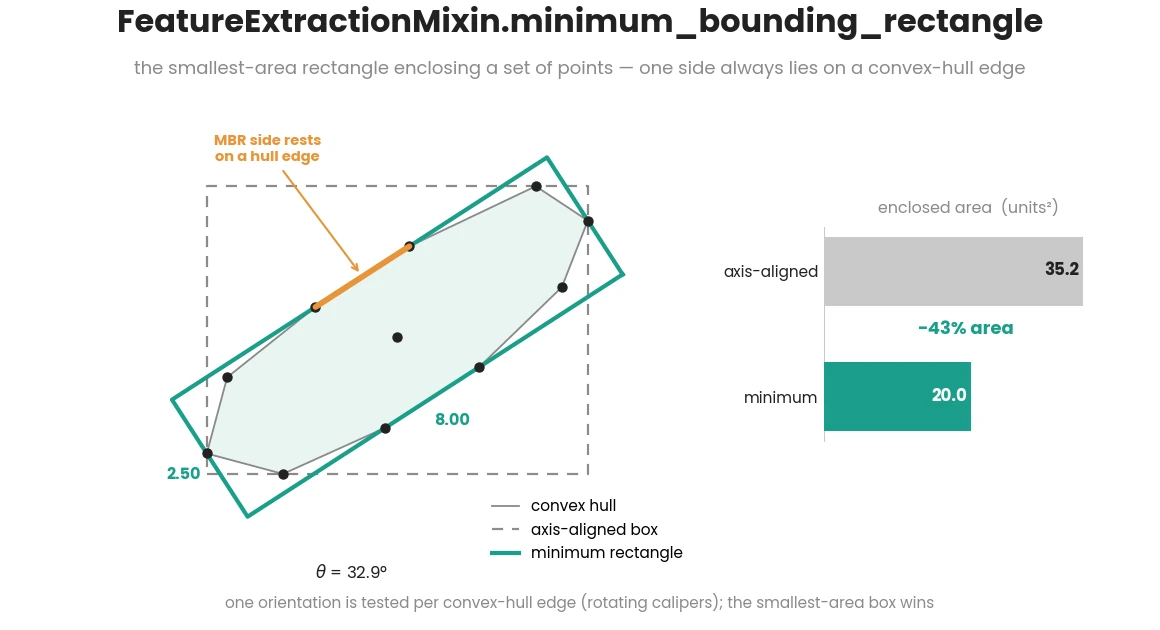
Note
Modified from JesseBuesking See
simba.mixins.feature_extractors.perimeter_jit.jitted_hull()for computing the convexhull vertices.See also
For multicore method and improved runtimes, see
simba.mixins.geometry_mixin.GeometryMixin.multiframe_minimum_rotated_rectangle()- Parameters
points (np.ndarray) – 2D array representing the convexhull vertices of the animal.
- Returns
2D array representing minimum bounding rectangle of the convexhull vertices of the animal.
- Return type
np.ndarray
- Example
>>>   points = np.random.randint(1, 10, size=(10, 2))
>>>   FeatureExtractionMixin.minimum_bounding_rectangle(points=points)
>>> [[10.7260274 ,  3.39726027], [ 1.4109589 , -0.09589041], [-0.31506849,  4.50684932], [ 9., 8. ]]
- static three_point_angle(bp_1, bp_2, bp_3)[source]
Compute frame-wise 3-point angles from three body-part trajectories.
Note
Wrapper method that validates input array/dataframe shape and dtypes before calling
simba.mixins.feature_extraction_mixin.FeatureExtractionMixin.angle3pt_vectorized().See also
For scalar (single-frame) angle computation, use
simba.mixins.feature_extraction_mixin.FeatureExtractionMixin.angle3pt(). For the numba-accelerated vectorized implementation used internally, seesimba.mixins.feature_extraction_mixin.FeatureExtractionMixin.angle3pt_vectorized().- Parameters
bp_1 (Union[np.ndarray, pd.DataFrame]) – First body-part coordinates with shape
(n_frames, 2).bp_2 (Union[np.ndarray, pd.DataFrame]) – Second body-part coordinates with shape
(n_frames, 2). Must have same frame count asbp_1.bp_3 (Union[np.ndarray, pd.DataFrame]) – Third body-part coordinates with shape
(n_frames, 2). Must have same frame count asbp_1.
- Returns
1D array of frame-wise angles in degrees.
- Return type
np.ndarray
- Example
>>> bp_1 = np.array([[120, 200], [122, 198], [124, 197]], dtype=np.float32)
>>> bp_2 = np.array([[200, 180], [201, 179], [202, 178]], dtype=np.float32)
>>> bp_3 = np.array([[260, 140], [262, 139], [264, 138]], dtype=np.float32)
>>> FeatureExtractionMixin.three_point_angle(bp_1=bp_1, bp_2=bp_2, bp_3=bp_3)
- static windowed_frequentist_distribution_tests(data, feature_name, fps)[source]
Calculates feature value distributions and feature peak counts in 1-s sequential time-bins.
Computes (i) feature value distributions in 1-s sequential time-bins: Kolmogorov-Smirnov and T-tests. Computes (ii) feature values against a normal distribution: Shapiro-Wilks. Computes (iii) peak count in rolling 1s long feature window: scipy.find_peaks.
Warning
This is a legacy method. For KS test, use
simba.mixins.statistics_mixin.Statistics.two_sample_ks(). For t-tests, usesimba.mixins.statistics_mixin.Statistics.independent_samples_t. For Shapiro-Wilks, use :func:`simba.mixins.statistics_mixin.Statistics.rolling_shapiro_wilks(). For peaks, usesimba.mixins.feature_extraction_supplement_mixin.FeatureExtractionSupplemental.peak_ratio().- Parameters
data (np.ndarray) – Single feature 1D array
feature_name (np.ndarray) – The name of the input feature.
fps (int) – The framerate of the video representing the data.
- Returns
Of size len(data) x 4 with columns representing KS, T, Shapiro-Wilks, and peak count statistics.
- Return type
pd.DataFrame
- Example
>>> feature_data = np.random.randint(1, 10, size=(100))
>>> FeatureExtractionMixin.windowed_frequentist_distribution_tests(data=feature_data, fps=25, feature_name='Anima_1_velocity')
Supplementary feature extraction methods
- class simba.mixins.feature_extraction_supplement_mixin.FeatureExtractionSupplemental[source]
Additional feature extraction method not called by default feature extraction classes from
simba.feature_extractors.- static angle3pt(ax, ay, bx, by, cx, cy)
Compute 3-point angle using thre body-parts.
See also
For multicore numba based method across multiple observations, see
simba.mixins.feature_extraction_mixin.FeatureExtractionMixin.angle3pt_vectorized(). For GPU acceleration, usesimba.data_processors.cuda.statistics.get_3pt_angle().
- Parameters
ax (float) – x coordinate of the first body-part (e.g., nape).
ay (float) – y coordinate of the first body-part (e.g., nape).
bx (float) – x coordinate of the second body-part (e.g., center).
by (float) – y coordinate of the second body-part (e.g., center).
cx (float) – x coordinate of the second body-part (e.g., tail-base).
cy (float) – y coordinate of the second body-part (e.g., tail-base).
- Returns
Angle between 0-360.
- Return type
- Example
>>> FeatureExtractionMixin.angle3pt(ax=122.0, ay=198.0, bx=237.0, by=138.0, cx=191.0, cy=109)
>>> 59.78156901181637
- static angle3pt_vectorized(data)
Numba accelerated compute of frame-wise 3-point angles.
See also
For GPU acceleration, use
simba.data_processors.cuda.statistics.get_3pt_angle()for single frame alternative, seesimba.mixins.feature_extraction_mixin.FeatureExtractionMixin.angle3pt()- Parameters
data (ndarray) – 2D numerical array with frame number on x and [ax, ay, bx, by, cx, cy] on y.
- Returns
1d float numerical array of size data.shape[0] with angles.
- Return type
ndarray
- Examples
>>> coordinates = np.random.randint(1, 10, size=(6, 6))
>>> FeatureExtractionMixin.angle3pt_vectorized(data=coordinates)
>>> [ 67.16634582,   1.84761027, 334.23067238, 258.69006753, 11.30993247, 288.43494882]
- static bodypart_distance(bp1_coords, bp2_coords, px_per_mm=1.0, in_centimeters=False)
Calculate frame-wise Euclidean distances between two sets of body part coordinates.
The function uses the standard Euclidean distance formula: distance = √((x₁-x₂)² + (y₁-y₂)²) / px_per_mm
See also
Wrapper function (ensuring data validity) for the underlying implementation
simba.mixins.feature_extraction_mixin.FeatureExtractionMixin.framewise_euclidean_distance(). For GPU CuPy solution, seesimba.data_processors.cuda.statistics.get_euclidean_distance_cupy(). For GPU numba CUDA solution, seesimba.data_processors.cuda.statistics.get_euclidean_distance_cuda(). For Euclidean distance between one moving and one static target, seesimba.mixins.feature_extraction_mixin.FeatureExtractionMixin.framewise_euclidean_distance_roi().
- Parameters
bp1_coords (np.ndarray) – First body part coordinates with shape (n_frames, 2), where each row contains [x, y] pixel coordinates for a specific frame.
bp2_coords (np.ndarray) – Second body part coordinates with shape (n_frames, 2), where each row contains [x, y] pixel coordinates for a specific frame. Must have the same number of frames as bp1_coords.
px_per_mm (float) – Conversion factor from pixels to millimeters. Must be positive. Default: 1.0.
in_centimeters (bool) – If True, returns distances in centimeters. If False, returns distances in millimeters. Default: False.
- Returns
Array of Euclidean distances with shape (n_frames,) in the specified units as float32.
- Return type
np.ndarray[np.float32]
- Example
>>> bp1_coords = np.random.randint(0, 500, size=(1000, 2))
>>> bp2_coords = np.random.randint(0, 500, size=(1000, 2))
>>> FeatureExtractionMixin().bodypart_distance(bp1_coords=bp1_coords, bp2_coords=bp2_coords, px_per_mm=1.0, in_centimeters=False)
- static border_distances(data, pixels_per_mm, img_resolution, time_window, fps)[source]
Compute the mean distance of key-point to the left, right, top, and bottom sides of the image in rolling time-windows. Uses a straight line.

Attention
Output for initial frames where [current_frm - window_size] < 0 will be populated with
-1.- Parameters
data (np.ndarray) – 2d array of size len(frames)x2 with body-part coordinates.
img_resolution (np.ndarray) – Resolution of video in WxH format.
pixels_per_mm (float) – Pixels per millimeter of recorded video.
fps (int) – FPS of the recorded video
time_windows (float) – Rolling time-window as floats in seconds. E.g.,
0.2
- Return np.ndarray
Size data.shape[0] x 4 array with millimeter distances from LEFT, RIGH, TOP, BOTTOM,
- Return type
np.ndarray
- Example
>>> data = np.array([[250, 250], [250, 250], [250, 250], [500, 500],[500, 500], [500, 500]]).astype(float)
>>> img_resolution = np.array([500, 500])
>>> FeatureExtractionSupplemental().border_distances(data=data, img_resolution=img_resolution, time_window=1, fps=2, pixels_per_mm=1)
>>> [[-1, -1, -1, -1][250, 250, 250, 250][250, 250, 250, 250][375, 125, 375, 125][500, 0, 500, 0][500, 0, 500, 0]]
- static cdist(array_1, array_2)
Analogue of meth:scipy.cdist for two 2D arrays. Use to calculate Euclidean distances between all coordinates in one array and all coordinates in a second array. E.g., computes the distances between all body-parts of one animal and all body-parts of a second animal. Acceleration though numba.
See also
For GPU acceleration, use cupyx.scipy.spatial.distance.cdist
- Parameters
array_1 (np.ndarray) – 2D array of body-part coordinates
array_2 (np.ndarray) – 2D array of body-part coordinates
- Returns
2D array of Euclidean distances between body-parts in
array_1andarray_2- Return type
np.ndarray
- Example
>>> array_1 = np.random.randint(1, 10, size=(3, 2)).astype(np.float32)
>>> array_2 = np.random.randint(1, 10, size=(3, 2)).astype(np.float32)
>>> FeatureExtractionMixin.cdist(array_1=array_1, array_2=array_2)
>>> [[7.07106781, 1.        , 3.60555124],
>>> [3.60555124, 6.3245554 , 2.        ],
>>>  [3.1622777 , 5.38516474, 4.12310553]])
- static cdist_3d(data)
Jitted analogue of meth:scipy.cdist for 3D array. Use to calculate Euclidean distances between all coordinates in of one array and itself.
- Parameters
data (np.ndarray) – 3D array of body-part coordinates of size len(frames) x -1 x 2.
- Return np.ndarray
3D array of size data.shape[0], data.shape[1], data.shape[1].
- change_in_bodypart_euclidean_distance(location_1, location_2, fps, px_per_mm, time_windows=array([0.2, 0.4, 0.8, 1.6]))
Computes the difference between the distance of two body-parts in the current frame versus N.N seconds ago. Used for computing if animal body-parts are traveling away from each other (positive values) or towards each other (negative values) within defined time-windows.
See also
For an equivalent stand-alone implementation, see
simba.mixins.feature_extraction_supplement_mixin.FeatureExtractionSupplemental.euclidean_distance_timeseries_change().
- Parameters
location_1 (np.ndarray) – 2D array (n_frames, 2) with the x,y positions of the first body-part.
location_2 (np.ndarray) – 2D array (n_frames, 2) with the x,y positions of the second body-part.
fps (int) – Frame-rate of the video.
px_per_mm (float) – Pixels per millimeter conversion factor.
time_windows (np.ndarray) – Reference time-windows (in seconds) to compare the current distance against.
- Returns
Array of shape (n_frames, len(time_windows)); positive = parts moved apart, negative = moved closer.
- Return type
np.ndarray
- Example
>>> loc1 = np.random.randint(0, 500, (200, 2)).astype(np.float64)
>>> loc2 = np.random.randint(0, 500, (200, 2)).astype(np.float64)
>>> FeatureExtractionMixin().change_in_bodypart_euclidean_distance(location_1=loc1, location_2=loc2, fps=25, px_per_mm=2.0)
- check_directionality_cords()
Helper to check if ear and nose body-parts are present within the pose-estimation data.
- Return dict
Body-part names of ear and nose body-parts as values and animal names as keys. If empty, ear and nose body-parts are not present within the pose-estimation data
- check_directionality_viable()
Check if it is possible to calculate
directionalitystatistics.Specifically, checks if nose and coordinates from pose estimation has to be present
- Return bool
If True, directionality is viable. Else, not viable.
- Return np.ndarray nose_coord
If viable, then 2D array with coordinates of the nose in all frames. Else, empty array.
- Return np.ndarray ear_left_coord
If viable, then 2D array with coordinates of the left ear in all frames. Else, empty array.
- Return np.ndarray ear_right_coord
If viable, then 2D array with coordinates of the right ear in all frames. Else, empty array.
- static consecutive_time_series_categories_count(data, fps)[source]
Compute the count of consecutive milliseconds the feature value has remained static. For example, compute for how long in milleseconds the animal has remained in the current cardinal direction or the within an ROI.

- Parameters
data (np.ndarray) – 1d array of feature values
fps (int) – Frame-rate of video.
- Return np.ndarray
Array of size data.shape[0]
- Return type
np.ndarray
- Example
>>> data = np.array([0, 1, 1, 1, 4, 5, 6, 7, 8, 9])
>>> FeatureExtractionSupplemental().consecutive_time_series_categories_count(data=data, fps=10)
>>> [0.1, 0.1, 0.2, 0.3, 0.1, 0.1, 0.1, 0.1, 0.1, 0.1]
>>> data = np.array(['A', 'B', 'B', 'B', 'C', 'D', 'E', 'F', 'G', 'H'])
>>> [0.1, 0.1, 0.2, 0.3, 0.1, 0.1, 0.1, 0.1, 0.1, 0.1]
- static convex_hull_calculator_mp(arr, px_per_mm)
Calculate single frame convex hull perimeter length in millimeters.
Note
For acceptable run-time, call using parallel processing.
See also
For numba CPU based acceleration, use
simba.feature_extractors.perimeter_jit.jitted_hull(). For multicore based acceleration, usesimba.mixins.geometry_mixin.GeometryMixin.bodyparts_to_polygon(). For numba CUDA based acceleration, usesimba.data_processors.cuda.geometry.get_convex_hull(),- Parameters
arr (np.ndarray) – 2D array of size len(body-parts) x 2.
px_per_mm (float) – Video pixels per millimeter.
- Returns
The length of the animal perimeter in millimeters.
- Return type
- Example
>>> coordinates = np.random.randint(1, 200, size=(6, 2)).astype(np.float32)
>>> FeatureExtractionMixin.convex_hull_calculator_mp(arr=coordinates, px_per_mm=4.56)
>>> 98.6676814218373
- static cosine_similarity(data)
Analogue of
sklearn.metrics.pairwise.cosine_similarity. Similar to scipy.cdist. Calculates the cosine similarity (the cosine of the angle between two vectors, so magnitude is ignored) between all pairs of rows in a 2D array. Values range from 1 (same direction) through 0 (orthogonal) to -1 (opposite). Zero-vectors yield a similarity of 0.
- Parameters
data (np.ndarray) – 2D array of observations.
- Returns
Matrix representing the cosine similarity between all observations in
data.- Return type
np.ndarray
- Example
>>> data = np.array([[1, 2, 3], [4, 5, 6], [7, 8, 9]]).astype(np.float32)
>>> FeatureExtractionMixin().cosine_similarity(data=data)
>>> [[1.0, 0.974, 0.959], [0.974, 1.0, 0.998], [0.959, 0.998, 1.0]]
- static count_values_in_range(data, ranges)
Jitted helper finding count of values that falls within ranges. E.g., count number of pose-estimated body-parts that fall within defined bracket of probabilities per frame.
See also
For GPU acceleration, use
simba.data_processors.cuda.statistics.count_values_in_ranges()- Parameters
data (np.ndarray) – 2D numpy array with frames on X.
ranges (np.ndarray) – 2D numpy array representing the brackets. E.g., [[0, 0.1], [0.1, 0.5]]
- Returns
2D numpy array of size data.shape[0], ranges.shape[1]
- Return type
np.ndarray
- Example
>>> FeatureExtractionMixin.count_values_in_range(data=np.random.random((3,10)), ranges=np.array([[0.0, 0.25], [0.25, 0.5]]))
>>> [[6, 1], [3, 2],[2, 1]]
- static create_shifted_array(data, periods=1)
Create a shifted NumPy array with edge values filled from original data.
This method mirrors
create_shifted_df()shift behavior, but for NumPy arrays. It returns only shifted values (not concatenated with original input values).See also
For pandas DataFrame input with concatenated original and shifted columns, see
simba.mixins.feature_extraction_mixin.FeatureExtractionMixin.create_shifted_df().- Parameters
data (np.ndarray) – Numeric 1D or 2D array with frames on axis 0.
periods (int) – Number of rows to shift. Positive shifts down, negative shifts up.
- Returns
Shifted array with the same shape as input (1D input is returned as 2D
(n, 1)).- Return type
np.ndarray
- Example
>>> arr = np.array([[10], [95], [85]])
>>> FeatureExtractionMixin.create_shifted_array(data=arr, periods=1)
>>> array([[10.], [10.], [95.]])
- static create_shifted_df(df, periods=1, suffix='_shifted')
Create dataframe including duplicated shifted (1) columns with
_shiftedsuffix.See also
For NumPy input and shifted-values-only output, see
simba.mixins.feature_extraction_mixin.FeatureExtractionMixin.create_shifted_array().- Parameters
df (pd.DataFrame) – Dataframe to create additional shifted fields from.
int (periods) – The rows to shift the new fields. 1 denotes that the shifted fields get shifted one row “down”. -1 and the fields would be shifted one row “up”.
suffix (str) – The suffix to add to the new, shifted, fields. Default: “shifted”.
- Return pd.DataFrame
Dataframe including original and shifted columns.
- Example
>>> df = pd.DataFrame(np.random.randint(0,100,size=(3, 1)), columns=['Feature_1'])
>>> FeatureExtractionMixin.create_shifted_df(df=df)
>>>             Feature_1  Feature_1_shifted
>>>    0         76               76.0
>>>    1         41               76.0
>>>    2         89               41.0
- dataframe_gaussian_smoother(df, fps, time_window=100)
Column-wise Gaussian smoothing of dataframe.
- Parameters
- Return pd.DataFrame
Dataframe with smoothened data
- References
- dataframe_savgol_smoother(df, fps, time_window=150)
Column-wise Savitzky-Golay smoothing of dataframe.
- Parameters
- Return pd.DataFrame
Dataframe with smoothened data
- References
- static distance_and_velocity(x, fps, pixels_per_mm, centimeters=True)[source]
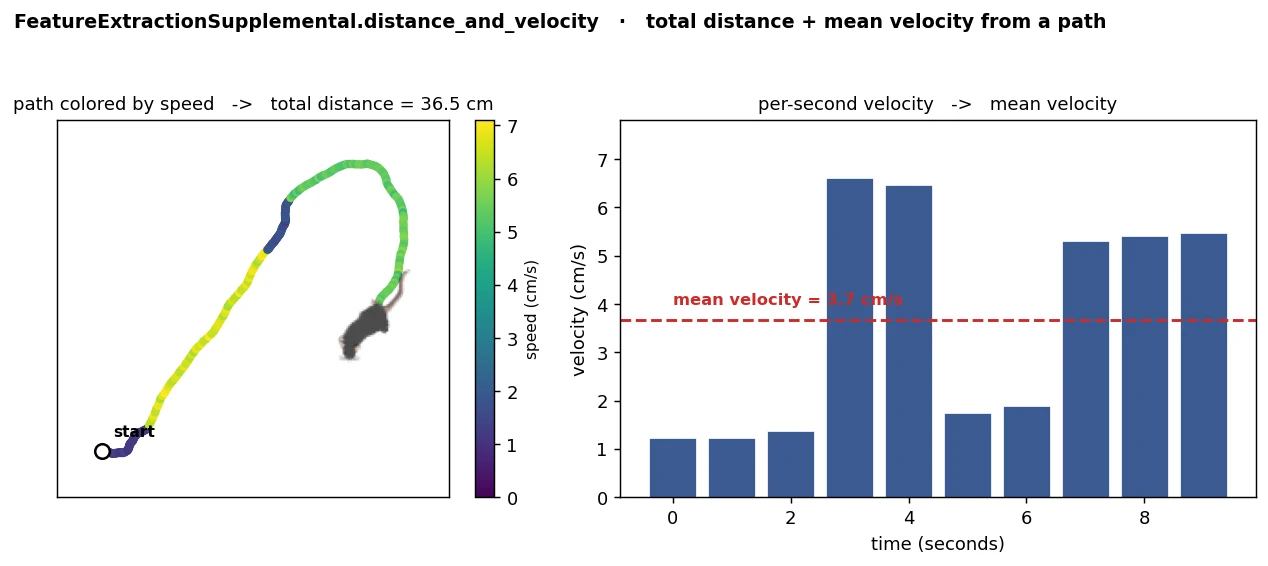
Calculate total movement and mean velocity from a sequence of position data.
- Parameters
x – Array containing movement data. For example, created by
simba.mixins.FeatureExtractionMixin.framewise_euclidean_distance. If its a 2-dimensional array, then we assume its pixel coordinates. If it’s a 1d array, we assume its frame-wise euclidean distances.fps – Frames per second of the data.
pixels_per_mm – Conversion factor from pixels to millimeters.
centimeters (Optional[bool]) – If True, results are returned in centimeters and centimeters per second. Defaults to True. If false, then milimeters and millimeters per second.
- Returns
A tuple containing total movement and mean velocity.
- Return type
- Example
>>> x = np.random.randint(0, 100, (100,))
>>> sum_movement, avg_velocity = FeatureExtractionSupplemental.distance_and_velocity(x=x, fps=10, pixels_per_mm=10, centimeters=True)
>>> x = np.random.randint(0, 100, (100, 2))
>>> sum_movement, avg_velocity = FeatureExtractionSupplemental.distance_and_velocity(x=x, fps=10, pixels_per_mm=10, centimeters=True)
- static euclidean_distance(bp_1_x, bp_2_x, bp_1_y, bp_2_y, px_per_mm)
Compute Euclidean distance in millimeters between two body-parts.
See also
For improved runtime on CPU, use
simba.mixins.feature_extraction_mixin.FeatureExtractionMixin.framewise_euclidean_distance()orsimba.mixins.feature_extraction_mixin.FeatureExtractionMixin.keypoint_distances(). For GPU acceleration through CuPy, usesimba.data_processors.cuda.statistics.get_euclidean_distance_cupy(). For GPU acceleration through numba CUDA, usesimba.data_processors.cuda.statistics.get_euclidean_distance_cuda().
- Parameters
bp_1_x (np.ndarray) – 2D array of size len(frames) x 1 with bodypart 1 x-coordinates.
bp_2_x (np.ndarray) – 2D array of size len(frames) x 1 with bodypart 2 x-coordinates.
bp_1_y (np.ndarray) – 2D array of size len(frames) x 1 with bodypart 1 y-coordinates.
bp_2_y (np.ndarray) – 2D array of size len(frames) x 1 with bodypart 2 y-coordinates.
- Returns
2D array of size len(frames) x 1 with distances between body-part 1 and body-part 2 in millimeters
- Return type
np.ndarray
- Example
>>> x1, x2 = np.random.randint(1, 10, size=(10, 1)), np.random.randint(1, 10, size=(10, 1))
>>> y1, y2 = np.random.randint(1, 10, size=(10, 1)), np.random.randint(1, 10, size=(10, 1))
>>> FeatureExtractionMixin.euclidean_distance(bp_1_x=x1, bp_2_x=x2, bp_1_y=y1, bp_2_y=y2, px_per_mm=4.56)
- euclidean_distance_timeseries_change(location_1, location_2, fps, px_per_mm, time_windows=array([0.2, 0.4, 0.8, 1.6]))[source]
Compute the difference in distance between two points in the current frame versus N.N seconds ago. E.g., computes if two points are traveling away from each other (positive output values) or towards each other (negative output values) relative to reference time-point(s)

- Parameters
location_1 (ndarray) – 2D array of size len(frames) x 2 representing pose-estimated locations of body-part one
location_2 (ndarray) – 2D array of size len(frames) x 2 representing pose-estimated locations of body-part two
fps (int) – Fps of the recorded video.
px_per_mm (float) – The pixels per millimeter in the video.
time_windows (np.ndarray) – Time windows to compare.
- Returns
Array of size location_1.shape[0] x time_windows.shape[0]
- Return type
np.array
- Example
>>> location_1 = np.random.randint(low=0, high=100, size=(2000, 2)).astype('float32')
>>> location_2 = np.random.randint(low=0, high=100, size=(2000, 2)).astype('float32')
>>> distances = self.euclidean_distance_timeseries_change(location_1=location_1, location_2=location_2, fps=10, px_per_mm=4.33, time_windows=np.array([0.2, 0.4, 0.8, 1.6]))
- static find_midpoints(bp_1, bp_2, percentile)
Compute the midpoints between two sets of 2D points based on a given percentile.
See also
For GPU acceleration, use
simba.data_processors.cuda.geometry.find_midpoints()- Parameters
bp_1 (np.ndarray) – An array of 2D points representing the first set of points. Rows represent frames. First column represent x coordinates. Second column represent y coordinates.
bp_2 (np.ndarray) – An array of 2D points representing the second set of points. Rows represent frames. First column represent x coordinates. Second column represent y coordinates.
percentile (float) – The percentile value to determine the distance between the points for calculating midpoints. When set to 0.5 it calculates midpoints at the midpoint of the two points.
- Returns
An array of 2D points representing the midpoints between the points in bp_1 and bp_2 based on the specified percentile.
- Return type
np.ndarray
- Example
>>> bp_1 = np.array([[1, 3], [30, 10]]).astype(np.int64)
>>> bp_2 = np.array([[10, 4], [20, 1]]).astype(np.int64)
>>> FeatureExtractionMixin().find_midpoints(bp_1=bp_1, bp_2=bp_2, percentile=0.5)
>>> [[ 5,  3], [25,  6]]
- static find_path_loops(data)[source]
Compute the loops detected within a 2-dimensional path.

- Parameters
data (np.ndarray) – Nx2 2-dimensional array with the x and y coordinated represented on axis 1.
- Returns
Dictionary with the coordinate tuple(x, y) as keys, and sequential frame numbers as values when animals visited, and re-visited the key coordinate.
- Return type
- Example
>>> data = read_df(file_path='/Users/simon/Desktop/envs/simba/troubleshooting/mouse_open_field/project_folder/csv/outlier_corrected_movement_location/SI_DAY3_308_CD1_PRESENT.csv', usecols=['Center_x', 'Center_y'], file_type='csv').values.astype(int)
>>> FeatureExtractionSupplemental.find_path_loops(data=data)
- static framewise_bodypart_movement(data, px_per_mm=1, centimeter=False)
Compute frame-wise movement for a single body-part trajectory.
See also
For movement between two distinct body-parts, use func:simba.mixins.feature_extraction_mixin.FeatureExtractionMixin.bodypart_distance. For direct per-frame distance computation between two coordinate arrays, use func:simba.mixins.feature_extraction_mixin.FeatureExtractionMixin.framewise_euclidean_distance.
- Parameters
data (Union[np.ndarray, pd.DataFrame]) – Body-part coordinates with shape
(n_frames, 2)where columns representxandypixel positions. Accepted as numpy array or pandas DataFrame.px_per_mm (float) – Conversion factor from pixels to millimeters. Must be positive. Default: 1.
centimeter (bool) – If True, return movement in centimeters. If False, return movement in millimeters. Default: False.
- Returns
1D array of frame-wise displacement values with shape
(n_frames,).- Return type
np.ndarray
- Example
>>> coords = np.array([[10, 10], [13, 14], [13, 20]], dtype=np.float32)
>>> FeatureExtractionMixin.framewise_bodypart_movement(data=coords, px_per_mm=2.0, centimeter=False)
- static framewise_euclidean_distance(location_1, location_2, px_per_mm, centimeter)
Compute frame-wise Euclidean distances between two sets of moving 2D locations.
This numba-jitted function efficiently calculates the straight-line distance between corresponding points in two location arrays for each frame. The distances are converted from pixels to real-world units (millimeters or centimeters) using the provided pixel-to-millimeter conversion factor.
Uses the standard Euclidean distance formula: √((x₁-x₂)² + (y₁-y₂)²) / px_per_mm
Note
This function is optimized with numba JIT parallel execution compilation for high performance on large datasets.
See also
For GPU CuPy solution, see
simba.data_processors.cuda.statistics.get_euclidean_distance_cupy(). For GPU numba CUDA solution, seesimba.data_processors.cuda.statistics.get_euclidean_distance_cuda(). For Euclidean distance between one moving and one static target, seesimba.mixins.feature_extraction_mixin.FeatureExtractionMixin.framewise_euclidean_distance_roi(). For wrapper function ensuring dtypes and data validity in this method, seesimba.mixins.feature_extraction_mixin.FeatureExtractionMixin.bodypart_distance().- Parameters
location_1 (np.ndarray) – First set of 2D coordinates with shape (n_frames, 2), where each row contains [x, y] pixel coordinates for a specific frame.
location_2 (np.ndarray) – Second set of 2D coordinates with shape (n_frames, 2), where each row contains [x, y] pixel coordinates for a specific frame. Must have same shape as location_1.
px_per_mm (float) – Conversion factor from pixels to millimeters. Must be positive.
centimeter (bool) – If True, returns distances in centimeters. If False, returns distances in millimeters. Default is False.
- Returns
Array of Euclidean distances with shape (n_frames,).
- Return type
np.ndarray
- Example
>>> # Calculate distances between two body parts across frames
>>> nose_coords = np.array([[100, 150], [102, 148], [105, 145]], dtype=np.float32)
>>> ear_coords = np.array([[90, 140], [92, 138], [95, 135]], dtype=np.float32)
>>> distances_mm = FeatureExtractionMixin.framewise_euclidean_distance(location_1=nose_coords, location_2=ear_coords, px_per_mm=4.5, centimeter=False)
>>> distances_cm = FeatureExtractionMixin.framewise_euclidean_distance(location_1=nose_coords, location_2=ear_coords, px_per_mm=4.5, centimeter=True)
- static framewise_euclidean_distance_roi(location_1, location_2, px_per_mm, centimeter=False)
Find frame-wise distances between a moving location (location_1) and static location (location_2) in millimeter or centimeter.
See also
For distances between two moving targets, use
simba.mixins.feature_extraction_mixin.FeatureExtractionMixin.framewise_euclidean_distance(), For GPU implementation, seesimba.data_processors.cuda.statistics.get_euclidean_distance_cupy()orsimba.data_processors.cuda.statistics.get_euclidean_distance_cuda()For numpy method (which appears faster than numba) usesimba.mixins.feature_extraction_mixin.FeatureExtractionMixin.keypoint_distances().- Parameters
location_1 (ndarray) – 2D numpy array of size len(frames) x 2.
location_2 (ndarray) – 1D numpy array holding the X and Y of the static location.
px_per_mm (float) – The pixels per millimeter in the video.
centimeter (bool) – If true, the value in centimeters is returned. Else the value in millimeters.
- Returns
1D array of size location_1.shape[0] with distances in millimeter or centimeter.
- Return type
np.ndarray
- Example
>>> loc_1 = np.random.randint(1, 200, size=(6, 2)).astype(np.float32)
>>> loc_2 = np.random.randint(1, 200, size=(1, 2)).astype(np.float32)
>>> FeatureExtractionMixin.framewise_euclidean_distance_roi(location_1=loc_1, location_2=loc_2, px_per_mm=4.56, centimeter=False)
>>> [11.31884926, 13.84534585,  6.09712224, 17.12773976, 19.32066031, 12.18043378]
>>> FeatureExtractionMixin.framewise_euclidean_distance_roi(location_1=loc_1, location_2=loc_2, px_per_mm=4.56, centimeter=True)
>>> [1.13188493, 1.38453458, 0.60971222, 1.71277398, 1.93206603, 1.21804338]
- static framewise_inside_polygon_roi(bp_location, roi_coords)
Jitted helper for frame-wise detection if animal is inside static polygon ROI.
Note
Modified from epifanio
See also
For GPU acceleration, use
simba.data_processors.cuda.geometry.is_inside_polygon()- Parameters
bp_location (np.ndarray) – 2d numeric np.ndarray size len(frames) x 2
roi_coords (np.ndarray) – 2d numeric np.ndarray size len(polygon points) x 2
- Returns
2d numeric boolean np.ndarray size len(frames) x 1, with 0 representing outside the polygon and 1 representing inside the polygon.
- Return type
np.ndarray
- Example
>>> bp_loc = np.random.randint(1, 10, size=(6, 2)).astype(np.float32)
>>> roi_coords = np.random.randint(1, 10, size=(10, 2)).astype(np.float32)
>>> FeatureExtractionMixin.framewise_inside_polygon_roi(bp_location=bp_loc, roi_coords=roi_coords)
>>> [0, 0, 0, 1]
- static framewise_inside_rectangle_roi(bp_location, roi_coords)
Frame-wise analysis if animal is inside static rectangular ROI.
See also
For GPU acceleration, use
simba.data_processors.cuda.geometry.is_inside_rectangle().- Parameters
bp_location (np.ndarray) – 2d numeric np.ndarray size len(frames) x 2
roi_coords (np.ndarray) – 2d numeric np.ndarray size 2x2 (top left[x, y], bottom right[x, y])
- Returns
2d numeric boolean np.ndarray size len(frames) x 1, with 0 representing outside the rectangle and 1 representing inside the rectangle.
- Return type
ndarray
- Example
>>> bp_loc = np.random.randint(1, 10, size=(6, 2)).astype(np.float32)
>>> roi_coords = np.random.randint(1, 10, size=(2, 2)).astype(np.float32)
>>> FeatureExtractionMixin.framewise_inside_rectangle_roi(bp_location=bp_loc, roi_coords=roi_coords)
>>> [0, 0, 0, 0, 0, 0]
- get_bp_headers()
Helper to create ordered list of all column header fields for SimBA project dataframes.
- get_feature_extraction_headers(pose)
Helper to return the headers names (body-part location columns) that should be used during feature extraction.
- Parameters
pose (str) – Pose-estimation setting, e.g.,
16.- Return List[str]
The names and order of the pose-estimation columns.
- static img_edge_distances(data, pixels_per_mm, img_resolution, time_window, fps)[source]
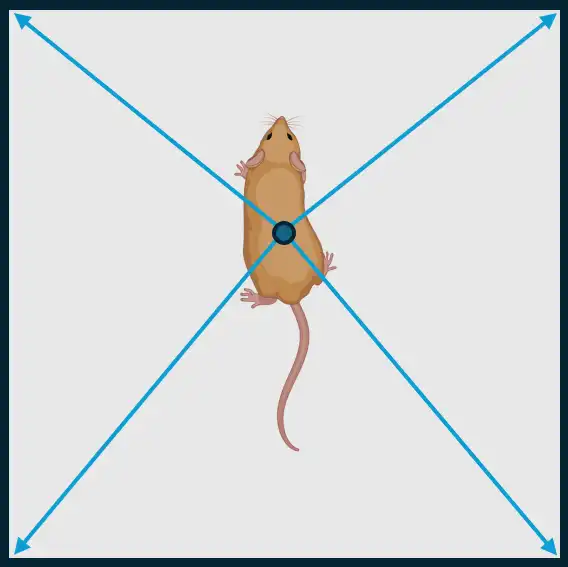
Calculate the distances from a set of points to the edges of an image over a specified time window.
This function computes the average distances from given coordinates to the four edges (top, right, bottom, left) of an image. The distances are calculated for points within a specified time window, and the results are adjusted based on the pixel-to-mm conversion.
- Parameters
data (np.ndarray) – 3d array of size len(frames) x N x 2 with body-part coordinates.
img_resolution (np.ndarray) – Resolution of video in WxH format.
pixels_per_mm (float) – Pixels per millimeter of recorded video.
fps (int) – FPS of the recorded video
time_windows (float) – Rolling time-window as floats in seconds. E.g.,
0.2
- Return np.ndarray
Size data.shape[0] x 4 array with millimeter distances from TOP LEFT, TOP RIGH, BOTTOM RIGHT, BOTTOM LEFT.
- Return type
np.ndarray
- Example I
>>> data = np.array([[0, 0], [758, 540], [0, 540], [748, 540]])
>>> img_edge_distances(data=data, pixels_per_mm=2.13, img_resolution=np.array([748, 540]), time_window=1.0, fps=1)
- Example II
>>> data = read_df(file_path=FILE_PATH, file_type='csv', usecols=['Nose_x', 'Nose_y', 'Tail_base_x', 'Tail_base_y'])
>>> data = data.values.reshape(len(data), 2, 2)
>>> FeatureExtractionSupplemental.img_edge_distances(data=data, pixels_per_mm=2.13, img_resolution=np.array([748, 540]), time_window=1.0, fps=1)
- insert_default_headers_for_feature_extraction(df, headers, pose_config, filename)
Helper to insert correct body-part column names prior to defualt feature extraction methods.
- static is_inside_circle(bp, roi_center, roi_radius)
Determines whether each body part in bp is inside or outside a given circular region.
This function calculates the Euclidean distance between each body part’s (x, y) coordinates and the center of the region of interest (ROI). If the distance is less than or equal to the specified radius, the body part is considered inside the circle (marked as 1); otherwise, it is considered outside (marked as 0).
See also
For GPU acceleration, see
simba.data_processors.cuda.geometry.is_inside_circle()- Parameters
bp (np.ndarray) – A (N, 2) array containing the (x, y) coordinates of N body parts.
roi_center (np.ndarray) – A (2,) array representing the (x, y) coordinates of the circle center.
roi_radius (int) – The radius of the circular region of interest.
- Returns
A 1D numpy array of size len(bp), where 1 represents a body part inside the circle and 0 represents a body part outside the circle.
- Return type
np.ndarray
- static jitted_line_crosses_to_nonstatic_targets(left_ear_array, right_ear_array, nose_array, target_array)
Jitted helper to calculate if an animal is directing towards another animals body-part coordinate, given the target body-part and the left ear, right ear, and nose coordinates of the observer.
See also
Input left ear, right ear, and nose coordinates of the observer is returned by
simba.mixins.feature_extraction_mixin.FeatureExtractionMixin.check_directionality_viable()If the target is static, consider
simba.mixins.feature_extraction_mixin.FeatureExtractionMixin.jitted_line_crosses_to_static_targets()
- Parameters
left_ear_array (np.ndarray) – 2D array of size len(frames) x 2 with the coordinates of the observer animals left ear
right_ear_array (np.ndarray) – 2D array of size len(frames) x 2 with the coordinates of the observer animals right ear
nose_array (np.ndarray) – 2D array of size len(frames) x 2 with the coordinates of the observer animals nose
target_array (np.ndarray) – 2D array of size len(frames) x 2 with the target body-part location
- Returns
2D array of size len(frames) x 4. First column represent the side of the observer that the target is in view. 0 = Left side, 1 = Right side, 2 = Not in view.
Second and third column represent the x and y location of the observer animals
eye(half-way between the ear and the nose). Fourth column represent if target is in view (bool). :rtype: np.ndarray
- static jitted_line_crosses_to_static_targets(left_ear_array, right_ear_array, nose_array, target_array)
Jitted helper to calculate if an animal is directing towards a static location (e.g., ROI centroid), given the target location and the left ear, right ear, and nose coordinates of the observer.
Note
Input left ear, right ear, and nose coordinates of the observer is returned by
simba.mixins.feature_extraction_mixin.FeatureExtractionMixin.check_directionality_viable()If the target is moving, consider
simba.mixins.feature_extraction_mixin.FeatureExtractionMixin.jitted_line_crosses_to_nonstatic_targets().See also
For GPU accelerated methods, see
simba.data_processors.cuda.geometry.directionality_to_static_targets()- Parameters
left_ear_array (np.ndarray) – 2D array of size len(frames) x 2 with the coordinates of the observer animals left ear
right_ear_array (np.ndarray) – 2D array of size len(frames) x 2 with the coordinates of the observer animals right ear
nose_array (np.ndarray) – 2D array of size len(frames) x 2 with the coordinates of the observer animals nose
target_array (np.ndarray) – 1D array of with x,y of target location
- Returns
2D array of size len(frames) x 4. First column represent the side of the observer that the target is in view. 0 = Left side, 1 = Right side, 2 = Not in view.
Second and third column represent the x and y location of the observer animals
eye(half-way between the ear and the nose). Fourth column represent if target is view (bool). :rtype: np.ndarray
- static keypoint_distances(a, b, px_per_mm=1, in_centimeters=False)
Compute Euclidean distances between corresponding 2D keypoints with unit conversion.
Given two arrays of 2D coordinates (x, y) sampled across frames, this function computes the frame-wise Euclidean distance between matching rows, converts from pixels to millimeters using
px_per_mm, and optionally reports distances in centimeters. Input validity is checked and the output is guaranteed to benp.float32.See also
For numba decorated function,
simba.mixins.feature_extraction_mixin.FeatureExtractionMixin.framewise_euclidean_distance()For GPU CuPy solution, seesimba.data_processors.cuda.statistics.get_euclidean_distance_cupy(). For GPU numba CUDA solution, seesimba.data_processors.cuda.statistics.get_euclidean_distance_cuda().Appears faster than numba deocrated method, and slower than GPU methods.
EXPECTED RUNTIMES
FRAMES (MILLION)
NUMPY (S)
NUMPY (STDEV)
NUMBA (S)
NUMBA (STDEV)
1
0.02587
0.003
0.36039
0.00569
10
0.19996
0.00484
3.31322
0.01281
20
0.38827
0.000451
6.61436
0.028066
40
0.78
0.026
13.37
0.234
80
1.5313
0.024014
27.597
0.106101
160
3.2029
0.1515
55.829
0.1563
ITERATIONS:3
Intel(R) Core(TM) i9-14900KF
- Parameters
a (np.ndarray) – Array of shape
(n_frames, 2)with non-negative numeric [x, y] coordinates.b (np.ndarray) – Array of shape
(n_frames, 2)with non-negative numeric [x, y] coordinates. Must have the same number of rows asa.px_per_mm (float) – Pixels-per-millimeter scaling factor (> 0). Distances are divided by this value.
in_centimeters (bool) – If
True, returned distances are reported in centimeters (mm/10).
- Returns
Frame-wise distances between corresponding rows in
aandb(mm or cm).- Return type
np.ndarray
- Example
>>> a = np.array([[0, 0], [3, 4], [6, 8]], dtype=np.float32)
>>> b = np.array([[0, 0], [0, 0], [3, 4]], dtype=np.float32)
>>> # px_per_mm = 1 -> distances reported in millimeters (same numeric scale as pixels)
>>> d_mm = FeatureExtractionMixin.keypoint_distances(a=a, b=b, px_per_mm=1.0, in_centimeters=False)
>>> d_cm = FeatureExtractionMixin.keypoint_distances(a=a, b=b, px_per_mm=1.0, in_centimeters=True)
- static line_crosses_to_static_targets(p, q, n, M, coord)
Legacy non-jitted helper to calculate if an animal is directing towards a static coordinate (e.g., ROI centroid).
Important
For improved runtime, use
simba.mixins.feature_extraction_mixin.jitted_line_crosses_to_static_targets()- Parameters
- Return bool
If True, static coordinate is in view.
- Return List
If True, the coordinate of the observing animals
eye(half-way between nose and ear).
- static minimum_bounding_rectangle(points)
Finds the minimum bounding rectangle from convex hull vertices.
Note
Modified from JesseBuesking See
simba.mixins.feature_extractors.perimeter_jit.jitted_hull()for computing the convexhull vertices.See also
For multicore method and improved runtimes, see
simba.mixins.geometry_mixin.GeometryMixin.multiframe_minimum_rotated_rectangle()- Parameters
points (np.ndarray) – 2D array representing the convexhull vertices of the animal.
- Returns
2D array representing minimum bounding rectangle of the convexhull vertices of the animal.
- Return type
np.ndarray
- Example
>>>   points = np.random.randint(1, 10, size=(10, 2))
>>>   FeatureExtractionMixin.minimum_bounding_rectangle(points=points)
>>> [[10.7260274 ,  3.39726027], [ 1.4109589 , -0.09589041], [-0.31506849,  4.50684932], [ 9., 8. ]]
- static movement_stats_from_bouts_df(bp_data, event_name, bout_df, fps, px_per_mm)[source]
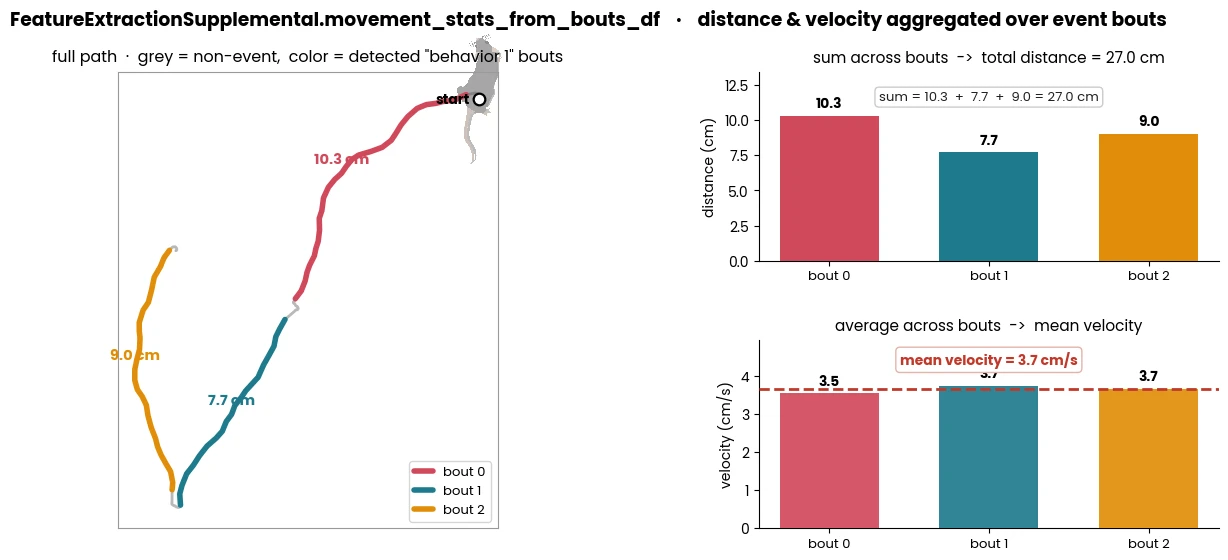
Compute the sum distance moved and the mean velocity during a defined event.
See also
To compute
bout_df, usesimba.utils.data.detect_bouts()- Parameters
bp_data (np.ndarray) – 2D array with position data.
event_name (str) – Name of the event to compute velocity and movement from. E.g., can be a classified behavior or an ROI name.
bout_df (pd.DataFrame) – Dataframe with detected events. Returned by
simba.utils.data.detect_bouts().fps (float) – The sample rate of the video.
px_per_mm (float) – The pixel per millimeter conversion factor of the video.
- Returns
Tuple of two floats representing movement and velocity. If no events of
event_nameis detected, then 0 and ``None.- Return type
- static peak_ratio(data, bin_size_s, fps)[source]
Compute the ratio of peak values relative to number of values within each seqential time-period represented of
bin_size_sseconds. Peak is defined as value is higher than in the prior observation (i.e., no future data is involved in comparison).
- Parameters
- Returns
Array of size data.shape[0] with peak counts as ratio of len(frames).
- Return type
np.ndarray
- Example
>>> data = np.array([0, 1, 2, 3, 4, 5, 6, 7, 8, 9])
>>> FeatureExtractionSupplemental().peak_ratio(data=data, bin_size_s=1, fps=10)
>>> [0.9 0.9 0.9 0.9 0.9 0.9 0.9 0.9 0.9 0.9]
>>> data = np.array([0, 1, 2, 3, 4, 5, 6, 7, 8, 9, 0, 0, 0, 0, 0, 0, 0, 0, 0, 0])
>>> FeatureExtractionSupplemental().peak_ratio(data=data, bin_size_s=1, fps=10)
>>> [0.9 0.9 0.9 0.9 0.9 0.9 0.9 0.9 0.9 0.9 0.  0.  0.  0.  0.  0.  0.  0. 0.  0. ]
- static rolling_categorical_switches_ratio(data, time_windows, fps)[source]
Compute the ratio of categorical feature switches within rolling windows.
Attention
Output for initial frames where [current_frm - window_size] < 0, are populated with
-1.
- Parameters
data (np.ndarray) – 1d array of feature values
time_windows (np.ndarray) – Rolling time-windows as floats in seconds. E.g., [0.2, 0.4, 0.6]
fps (int) – fps of the recorded video
- Returns
Size data.shape[0] x time_windows.shape[0] array
- Return type
np.ndarray
- Example
>>> data = np.array([0, 1, 1, 1, 4, 5, 6, 7, 8, 9])
>>> FeatureExtractionSupplemental().rolling_categorical_switches_ratio(data=data, time_windows=np.array([1.0]), fps=10)
>>> [[-1][-1][-1][-1][-1][-1][-1][-1][-1][ 0.7]]
>>> data = np.array(['A', 'B', 'B', 'B', 'C', 'D', 'E', 'F', 'G', 'H'])
>>> FeatureExtractionSupplemental().rolling_categorical_switches_ratio(data=data, time_windows=np.array([1.0]), fps=10)
>>> [[-1][-1][-1][-1][-1][-1][-1][-1][-1][ 0.7]]
- static rolling_horizontal_vs_vertical_movement(data, pixels_per_mm, time_windows, fps)[source]
Compute the movement along the x-axis relative to the y-axis in rolling time bins.
Attention
Output for initial frames where [current_frm - window_size] < 0, are populated with
0.
- Parameters
- Returns
Size data.shape[0] x time_windows.shape[0]. Greater values denote greater movement on x-axis relative to y-axis.
- Return type
np.ndarray
- Example
>>> data = np.array([[250, 250], [250, 250], [250, 250], [250, 500], [500, 500], 500, 500]]).astype(float)
>>> FeatureExtractionSupplemental().rolling_horizontal_vs_vertical_movement(data=data, time_windows=np.array([1.0]), fps=2, pixels_per_mm=1)
>>> [[  -1.][   0.][   0.][-250.][ 250.][   0.]]
- static rolling_peak_count_ratio(data, time_windows, fps)[source]
Computes the ratio of peak counts within rolling windows over time for a given dataset.
The function calculates the ratio of local peaks (points that are greater than their neighbors) in a sliding time window of varying durations defined by time_windows. Peaks at the beginning and end of each window are also included in the count if they satisfy the peak condition. This is performed across multiple windows and for each timestep in the input data.
See also
For single time-series analysis, see
simba.mixins.feature_extraction_supplement_mixin.FeatureExtractionSupplemental.peak_ratio()- Parameters
data (np.ndarray) – A 1D array of numerical data for which the rolling peak count ratio is calculated.
time_windows (np.ndarray) – A 1D array of time durations (in seconds) defining the size of each sliding window.
fps (int) – Frames per second conversion factor.
- Returns
A 2D array where each row corresponds to a timestep in data, and each column corresponds to a time window. Each element represents the peak count ratio for that timestep and time window.
- Return type
np.ndarray
- static sequential_lag_analysis(data, criterion, target, time_window, fps)[source]
Perform sequential lag analysis to determine the temporal relationship between two events.
For every onset of behavior C, count the proportions of behavior T onsets in the time-window preceding the onset of behavior C vs the proportion of behavior T onsets in the time-window proceeding the onset of behavior C.
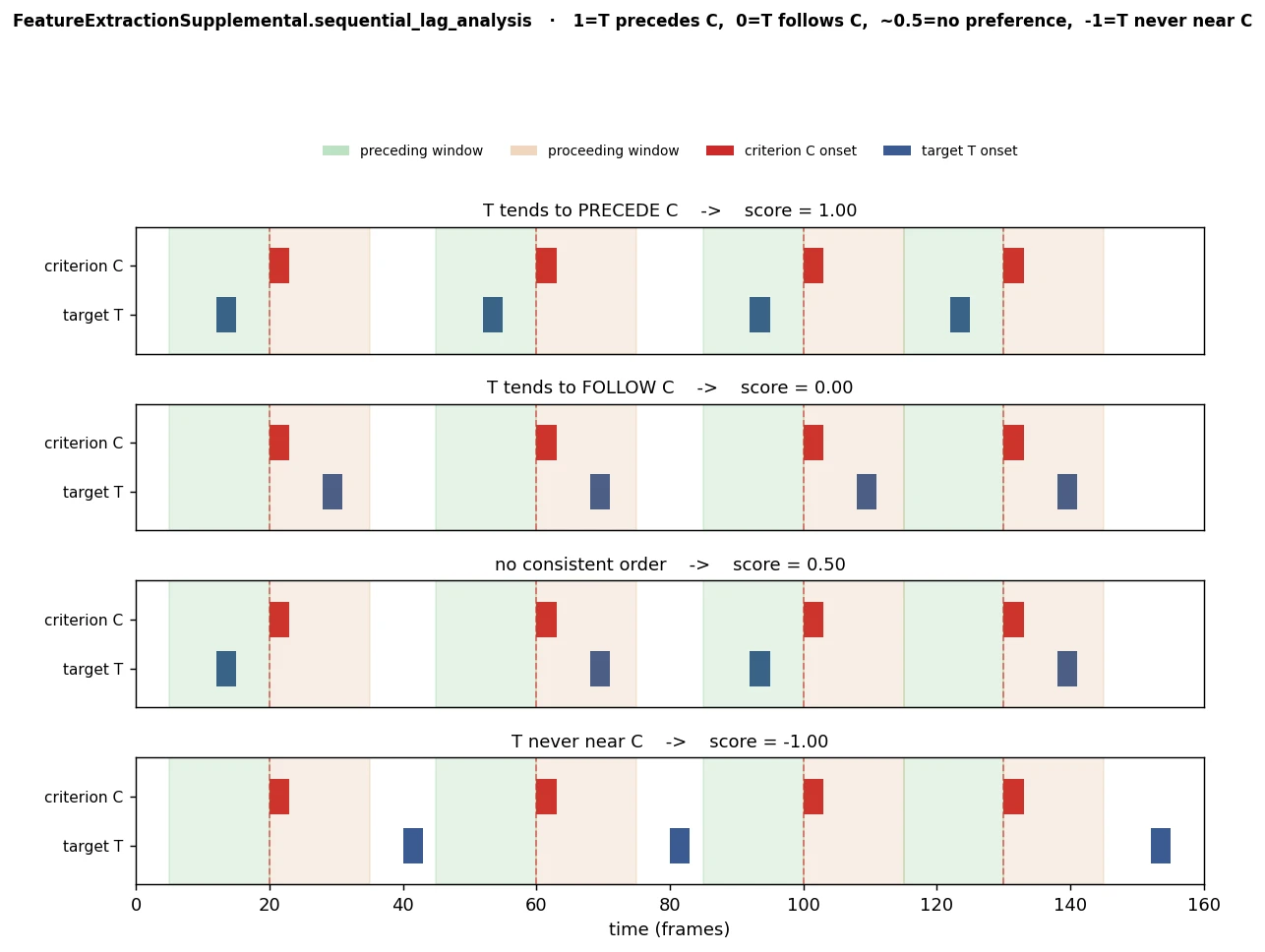
See also
For altenative method, see
FSTTCCalculator()- Parameters
data (pd.DataFrame) – Dataframe with boolean values representing frame-wise precense of behaviors.
criterion (str) – Name of the field in
datarepresenting behavior C.target (str) – Name of the field in
datarepresenting behavior T.time_window (float) – The time-window to scan proceeding and preceding behavior T.
fps (float) – The sample rate of the video used as conversion factor.
- Returns
A value between -1 and 1 representing the relationship. A value closer to 1.0 indicates that behavior T always precede behavior C. A value closer to 0.0 indicates that behavior T follows behavior C. A value of -1.0 indicates that behavior T never precede nor proceed behavior C.
- Return type
float.
- Example
>>> df = pd.DataFrame(np.random.randint(0, 2, (100, 2)), columns=['Attack', 'Sniffing'])
>>> FeatureExtractionSupplemental.sequential_lag_analysis(data=df, criterion='Attack', target='Sniffing', fps=5, time_window=2.0)
References
- 1
Casarrubea, M., Leca, J.-B., Gunst, N., Jonsson, G. K., Portell, M., Di Giovanni, G., Aiello, S., & Crescimanno, G. (2022). Structural analyses in the study of behavior: From rodents to non-human primates. Frontiers in Psychology, 13. https://doi.org/10.3389/fpsyg.2022.1033561
- 2
Lloyd, B. P., Yoder, P. J., Tapp, J., & Staubitz, J. L. (2016). The relative accuracy and interpretability of five sequential analysis methods: A simulation study. Behavior Research Methods, 48(4), 1482–1491. https://doi.org/10.3758/s13428-015-0661-5
- static spontaneous_alternations(data, arm_names, center_name)[source]
Detects spontaneous alternations between a set of user-defined ROIs.

- Parameters
data (pd.DataFrame) – DataFrame containing shape data where each row represents a frame and each column represents a shape where 0 represents not in ROI and 1 represents inside the ROI
shape_names (List[str]) – List of column names in the DataFrame corresponding to shape names.
- Return Dict[Union[str, Tuple[str], Union[int, float, List[int]]]]
Dict with the following keys and values:
Dict with the following keys and values:
‘pct_alternation’: Percent alternation computed as (spontaneous alternation cnt / (total number of arm entries - (number of arms - 1))) × 100
‘alternation_cnt’: The sliding count of ROI entry sequences of length len(shape_names) that are all unique.
‘same_arm_returns_cnt’: Aggregate count of sequential visits to the same ROI.
‘alternate_arm_returns_cnt’: Aggregate count of errors which are not same-arm-return errors.
‘error_cnt’: Aggregate error count (same_arm_returns_cnt + alternate_arm_returns_cnt),
‘same_arm_returns_dict’: Dictionary with the keys being the name of the ROI and values are a list of frames when the same-arm-return errors were committed.
‘alternate_arm_returns_cnt’: Dictionary with the keys being the name of the ROI and values are a list of frames when the alternate-arm-return errors were committed.
‘alternations_dict’: Dictionary with the keys being unique ROI name tuple sequences of length len(shape_names) and values are a list of frames when the sequence was completed.
‘arm_entry_sequence’: Pandas dataframe with two columns: sequence of arm names entered, the frame the animal entered the arm, the frame that the animal left the arm.
- Example
>>> data = np.zeros((100, 4), dtype=int)
>>> random_indices = np.random.randint(0, 4, size=100)
>>> for i in range(100): data[i, random_indices[i]] = 1
>>> df = pd.DataFrame(data, columns=['left', 'top', 'right', 'bottom'])
>>> spontanous_alternations = FeatureExtractionSupplemental.spontaneous_alternations(data=df, shape_names=['left', 'top', 'right', 'bottom'])
- static three_point_angle(bp_1, bp_2, bp_3)
Compute frame-wise 3-point angles from three body-part trajectories.
Note
Wrapper method that validates input array/dataframe shape and dtypes before calling
simba.mixins.feature_extraction_mixin.FeatureExtractionMixin.angle3pt_vectorized().See also
For scalar (single-frame) angle computation, use
simba.mixins.feature_extraction_mixin.FeatureExtractionMixin.angle3pt(). For the numba-accelerated vectorized implementation used internally, seesimba.mixins.feature_extraction_mixin.FeatureExtractionMixin.angle3pt_vectorized().- Parameters
bp_1 (Union[np.ndarray, pd.DataFrame]) – First body-part coordinates with shape
(n_frames, 2).bp_2 (Union[np.ndarray, pd.DataFrame]) – Second body-part coordinates with shape
(n_frames, 2). Must have same frame count asbp_1.bp_3 (Union[np.ndarray, pd.DataFrame]) – Third body-part coordinates with shape
(n_frames, 2). Must have same frame count asbp_1.
- Returns
1D array of frame-wise angles in degrees.
- Return type
np.ndarray
- Example
>>> bp_1 = np.array([[120, 200], [122, 198], [124, 197]], dtype=np.float32)
>>> bp_2 = np.array([[200, 180], [201, 179], [202, 178]], dtype=np.float32)
>>> bp_3 = np.array([[260, 140], [262, 139], [264, 138]], dtype=np.float32)
>>> FeatureExtractionMixin.three_point_angle(bp_1=bp_1, bp_2=bp_2, bp_3=bp_3)
- static velocity_aggregator(config_path, data_dir, body_part, ts_plot=True)[source]
Aggregate and plot velocity data from multiple pose-estimation files.
- Parameters
config_path (Union[str, os.PathLike]) – Path to SimBA configuration file.
data_dir (Union[str, os.PathLike]) – Directory containing data files.
body_part (str data_dir) – Body part to use when calculating velocity.
ts_plot (Optional[bool] data_dir) – Whether to generate a time series plot of velocities for each data file. Defaults to True.
- Example
>>> config_path = '/Users/simon/Desktop/envs/simba/troubleshooting/two_black_animals_14bp/project_folder/project_config.ini'
>>> data_dir = '/Users/simon/Desktop/envs/simba/troubleshooting/two_black_animals_14bp/project_folder/csv/outlier_corrected_movement_location'
>>> body_part = 'Nose_1'
>>> FeatureExtractionSupplemental.velocity_aggregator(config_path=config_path, data_dir=data_dir, body_part=body_part)
- static windowed_frequentist_distribution_tests(data, feature_name, fps)
Calculates feature value distributions and feature peak counts in 1-s sequential time-bins.
Computes (i) feature value distributions in 1-s sequential time-bins: Kolmogorov-Smirnov and T-tests. Computes (ii) feature values against a normal distribution: Shapiro-Wilks. Computes (iii) peak count in rolling 1s long feature window: scipy.find_peaks.
Warning
This is a legacy method. For KS test, use
simba.mixins.statistics_mixin.Statistics.two_sample_ks(). For t-tests, usesimba.mixins.statistics_mixin.Statistics.independent_samples_t. For Shapiro-Wilks, use :func:`simba.mixins.statistics_mixin.Statistics.rolling_shapiro_wilks(). For peaks, usesimba.mixins.feature_extraction_supplement_mixin.FeatureExtractionSupplemental.peak_ratio().- Parameters
data (np.ndarray) – Single feature 1D array
feature_name (np.ndarray) – The name of the input feature.
fps (int) – The framerate of the video representing the data.
- Returns
Of size len(data) x 4 with columns representing KS, T, Shapiro-Wilks, and peak count statistics.
- Return type
pd.DataFrame
- Example
>>> feature_data = np.random.randint(1, 10, size=(100))
>>> FeatureExtractionMixin.windowed_frequentist_distribution_tests(data=feature_data, fps=25, feature_name='Anima_1_velocity')