Geometry transformations
On this page
Geometric methods from GeometryMixin, grouped by purpose. Most single-shape methods have a multiframe_ counterpart that processes a full video in parallel.
Body-parts to geometries
- static GeometryMixin.bodyparts_to_polygon(data, cap_style='round', parallel_offset=1, pixels_per_mm=1, simplify_tolerance=2, preserve_topology=True, convex_hull=True)[source]
Converts the body-part points into polygonal representations.
See also
If multicore method, see
simba.mixins.geometry_mixin.GeometryMixin.multiframe_bodyparts_to_polygon(). For GPU method, seesimba.data_processors.cuda.geometry.get_convex_hull()
- Parameters
data (np.ndarray) – 3D array with body-part coordinates where rows are frames and columns are x and y coordinates.
cap_style (Literal["round", "square", "flat"]) – How intersections between lines are handled in the polygon. Default: round.
parallel_offset (int) – How much to “buffer” the polygon from the original size in millimeters. Default: 1.
pixels_per_mm (int) – The pixels per millimeter conversion factor used for buffering. Default: 1.
simplify_tolerance (float) – The higher this value, the smaller the number of vertices in the resulting polygon. Default 2.
preserve_topology (bool) – If True, operation will avoid creating invalid geometries (checking for collapses, ring-intersections, etc). Default True.
convex_hull (bool) – If True, creates the convex hull of the shape, which is the smallest convex polygon that encloses the shape. Default True.
- Returns
List of polygons, with one entry for every 2D input array.
- Example
>>> data = [[[364, 308],[383, 323],[403, 335], [423, 351]]]
>>> GeometryMixin().bodyparts_to_polygon(data=data)
- static GeometryMixin.bodyparts_to_points(data, buffer=None, px_per_mm=None)[source]
Convert body-parts coordinate to Point geometries.
Note
If buffer and px_per_mm is not None, then the points will be buffered and a 2D share polygon created with the specified buffered area. If buffer is provided, then also provide px_per_mm for accurate conversion factor between pixels and millimeters.
See also
If having a large number of body-parts, consider using
simba.mixins.geometry_mixin.GeometryMixin.multiframe_bodypart_to_point()which uses CPU multiprocessing.- Parameters
data (np.ndarray) – 2D array with body-part coordinates where rows are frames and columns are x and y coordinates.
buffer (Optional[int]) – If not None, then the area of the Point. Thus, if not None, then returns Polygons representing the Points.
px_per_mm (Optional[int]) – Pixels to millimeter conversion factor. Required if buffer is not None.
- Returns
List of shapely Points (or polygons if buffer is not None).
- Return type
- Example
>>> data = np.random.randint(0, 100, (1, 2))
>>> GeometryMixin().bodyparts_to_points(data=data)
- static GeometryMixin.bodyparts_to_circle(data, parallel_offset=1, pixels_per_mm=1, verbose=True)[source]
Create circle geometries from body-part (x,y) coordinates.
Creates circular polygons around body-part coordinates. Can handle single coordinates (1D array) or multiple coordinates (2D array). The radius is calculated by dividing parallel_offset by pixels_per_mm.
Note
For multicore method, see
simba.mixins.geometry_mixin.GeometryMixin.multiframe_bodyparts_to_circle()
- Parameters
data (np.ndarray) – Body-part coordinate(s) as 1D array [x, y] or 2D array [[x1, y1], [x2, y2], …]. E.g., np.array([364, 308]) or np.array([[364, 308], [100, 200]]).
parallel_offset (float) – The radius of the resultant circle(s). Default: 1.
pixels_per_mm (float) – The pixels per millimeter conversion factor. If 1, radius is in pixels. Default: 1.
- Returns
Single Shapely Polygon for 1D input, or List[Polygon] for 2D input.
- Return type
- Example
>>> # Single coordinate
>>> data = np.array([364, 308])
>>> polygon = GeometryMixin.bodyparts_to_circle(data=data, parallel_offset=10, pixels_per_mm=4)
>>> # Multiple coordinates
>>> data = np.array([[364, 308], [100, 200]])
>>> polygons = GeometryMixin.bodyparts_to_circle(data=data, parallel_offset=10, pixels_per_mm=4)
- static GeometryMixin.bodyparts_to_line(data, buffer=None, px_per_mm=None)[source]
Convert body-part coordinates to a Linestring.
Note
If buffer and px_per_mm is provided, then the returned object will be linestring buffered to a 2D object rectangle with specificed area.

See also
For multicore method, see
simba.mixins.geometry_mixin.GeometryMixin.multiframe_bodyparts_to_line()- Parameters
- Returns
- Return type
Union[Polygon, LineString]
- Example
>>> data = np.array([[364, 308],[383, 323], [403, 335],[423, 351]])
>>> line = GeometryMixin().bodyparts_to_line(data=data)
>>> GeometryMixin().bodyparts_to_line(data=data, buffer=10, px_per_mm=4)
- static GeometryMixin.bodyparts_to_multistring_skeleton(data)[source]
Create a multistring skeleton from a 3d array where each 2d array represents start and end coordinates of a linewithin the skeleton.
- Parameters
data (np.ndarray) – A 3D numpy array where each 2D array represents the start position and end position of each LineString.
- Returns
Shapely MultiLineString representing animal skeleton.
- Return type

- Example
>>> skeleton = np.array([[[5, 5], [1, 10]], [[5, 5], [9, 10]], [[9, 10], [1, 10]], [[9, 10], [9, 25]], [[1, 10], [1, 25]], [[9, 25], [5, 50]], [[1, 25], [5, 50]]])
>>> shape_multistring = GeometryMixin().bodyparts_to_multistring_skeleton(data=skeleton)
- static GeometryMixin.to_linestring(data)[source]
Convert a 2D array of x and y coordinates to a shapely linestring.
Note
Linestrings are useful for representing an animal path, and to answer questions like (i) “How far along the animals paths was the animal most proximal to geometry X”? “How far had the animal travelled at time T?” “When does the animal path intersect geometry X?”
- Parameters
data (np.ndarray) – 2D array with floats or ints of size Nx2 representing body-part coordinates.
- Return type
- Example
>>> data = np.load('/Users/simon/Desktop/envs/simba/simba/simba/sandbox/data.npy')
>>> linestring = GeometryMixin.to_linestring(data=data)
- static GeometryMixin.contours_to_geometries(contours, force_rectangles=True, convex_hull=False)[source]
Convert a list of contours to a list of geometries.
E.g., convert a list of contours detected with
simba.mixins.image_mixin.ImageMixin.find_contours()to a list of Shapely geometries that can be used within thesimba.mixins.geometry_mixin.GeometryMixin().- Parameters
contours (List[np.ndarray]) – List of contours represented as 2D arrays.
force_rectangles – If True, then force the resulting geometries to be rectangular.
convex_hull (bool) – If True, creates the convex hull of the shape, which is the smallest convex polygon that encloses the shape. Default True.
- Returns
List of Shapley Polygons.
- Return type
List[Polygon]
- Example
>>> video_frm = read_frm_of_video(video_path='/Users/simon/Desktop/envs/platea_featurizer/data/video/3D_Mouse_5-choice_MouseTouchBasic_s9_a4_grayscale.mp4')
>>> contours = ImageMixin.find_contours(img=video_frm)
>>> GeometryMixin.contours_to_geometries(contours=contours)
- static GeometryMixin.keypoints_to_axis_aligned_bounding_box(keypoints)[source]
Computes the axis-aligned bounding box for each set of keypoints.
Each set of keypoints consists of a 2D array of coordinates representing points. The function calculates the minimum and maximum x and y values from the keypoints to form a rectangle (bounding box) aligned with the x and y axes.

See also
For minimum rotated bounding boxes, see
simba.mixins.geometry_mixin.GeometryMixin.minimum_rotated_rectangle()orsimba.mixins.geometry_mixin.GeometryMixin.multiframe_minimum_rotated_rectangle()
- Parameters
keypoints (np.ndarray) – A 3D array of shape (N, M, 2) where N is the number of observations, and each observation contains M points in 2D space (x, y).
- Returns
A 3D array of shape (N, 4, 2), where each entry represents the four corners of the axis-aligned bounding box corresponding to each set of keypoints.
- Return type
np.ndarray
- Example
>>> data = np.random.randint(0, 360, (30000, 7, 2))
>>> results = GeometryMixin.keypoints_to_axis_aligned_bounding_box(keypoints=data)
- static GeometryMixin.delaunay_triangulate_keypoints(data)[source]
Triangulates a set of 2D keypoints. E.g., use to polygonize animal hull, or triangulate a gridpoint areana.
This method takes a 2D numpy array representing a set of keypoints and triangulates them using the Delaunay triangulation algorithm. The input array should have two columns corresponding to the x and y coordinates of the keypoints.


- Parameters
data (np.ndarray) – NumPy array of body part coordinates. Each subarray represents the coordinates of a body part.
- Returns
A list of Polygon objects representing the triangles formed by the Delaunay triangulation.
- Return type
List[Polygon]
- Example
>>> data = np.array([[126, 122],[152, 116],[136,  85],[167, 172],[161, 206],[197, 193],[191, 237]])
>>> triangulated_hull = GeometryMixin().delaunay_triangulate_keypoints(data=data)
- static GeometryMixin.simba_roi_to_geometries(rectangles_df=None, circles_df=None, polygons_df=None, color=False)[source]
Convert SimBA dataframes holding ROI geometries to nested dictionary holding Shapley polygons.
- Example
>>> config_path = '/Users/simon/Desktop/envs/simba/troubleshooting/spontenous_alternation/project_folder/project_config.ini'
>>> config = ConfigReader(config_path=config_path)
>>> config.read_roi_data()
>>> GeometryMixin.simba_roi_to_geometries(rectangles_df=config.rectangles_df, circles_df=config.circles_df, polygons_df=config.polygon_df)
- static GeometryMixin.sleap_csv_to_geometries(data, buffer=50, save_path=None, by_track=True)[source]
Convert SLEAP CSV tracking data to polygon geometries for each track and frame.
This function reads SLEAP-exported CSV files containing pose estimation data and converts the body part coordinates into polygon geometries. The polygons are created by connecting the body parts with a specified buffer around the animal’s body outline.
- param Union[str, os.PathLike] data
Path to SLEAP CSV file containing tracking data with columns ‘track’, ‘frame_idx’, and body part coordinates.
- param int buffer
Buffer size in pixels to add around the body part polygon. Default: 10.
- param Optional[bool] by_track
If True, create one circle per animal track. If False, then one circle per body-part. Default False.
- param Optional[Union[str, os.PathLike]] save_path
Optional path to save the results as a pickle file. If None, returns the data directly.
- return
Dictionary with track IDs (or body-part ID) or body-part as keys and frame-to-polygon mappings as values.
- rtype
Union[None, Dict[Any, dict]]
- example I
>>> results = GeometryMixin.sleap_csv_to_geometries(data=r"C:/troubleshooting/ants/pose_data/ant.csv")
>>> # Results structure: {track_id: {frame_idx: Polygon, ...}, ...}
:example II >>> data_path = r”/Users/simon/Desktop/envs/simba/troubleshooting/ant/ant.csv” >>> save_path = r”/Users/simon/Desktop/envs/simba/troubleshooting/ant/ant_geometries.pickle” >>> results = GeometryMixin.sleap_csv_to_geometries(data=data_path, save_path=save_path)
- static GeometryMixin.filter_low_p_bps_for_shapes(x, p, threshold)[source]
Filter body-part data for geometry construction while maintaining valid geometry arrays.
Having a 3D array representing body-parts across time, and a second 3D array representing probabilities of those body-parts across time, we want to “remove” body-parts with low detection probabilities whilst also keeping the array sizes intact and suitable for geometry construction. To do this, we find body-parts with detection probabilities below the threshold, and replace these with a body-part that doesn’t fall below the detection probability threshold within the same frame. However, to construct a geometry, we need >= 3 unique key-point locations. Thus, no substitution can be made to when there are less than three unique body-part locations within a frame that falls above the threshold.
- Example
>>> x = np.random.randint(0, 500, (18000, 7, 2))
>>> p = np.random.random(size=(18000, 7, 1))
>>> x = GeometryMixin.filter_low_p_bps_for_shapes(x=x, p=p, threshold=0.1)
>>> x = x.reshape(x.shape[0], int(x.shape[1] * 2))
Shape transformations
- static GeometryMixin.buffer_shape(shape, size_mm, pixels_per_mm, resolution=16, join_style=1, cap_style='round')[source]
Create a buffered shape by applying a buffer operation to the input polygon or linestring.

See also
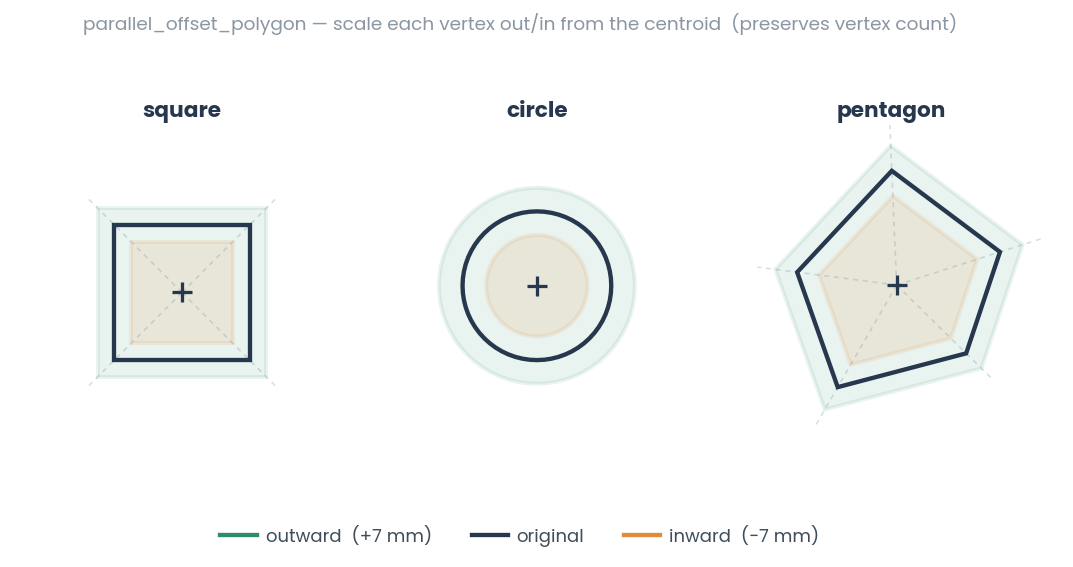
simba.mixins.geometry_mixin.GeometryMixin.parallel_offset_polygon()scales vertices from the centroid (sharp corners, fixed vertex count);buffer_shapeis a true constant-distance buffer (rounds corners, works on LineStrings).- Parameters
shape (Union[Polygon, LineString]) – The input Polygon or LineString to be buffered. Or a list of Polygons or LineStrings to be buffered.
size_mm (int) – The size of the buffer in millimeters. Use a negative value for an inward buffer.
pixels_per_mm (float) – The conversion factor from millimeters to pixels.
cap_style (Literal['round', 'square', 'flat']) – The cap style for the buffer. Valid values are ‘round’, ‘square’, or ‘flat’. Defaults to ‘round’.
- Returns
The buffered shape.
- Return type
- Example
>>> polygon = GeometryMixin().bodyparts_to_polygon(np.array([[100, 110],[100, 100],[110, 100],[110, 110]]))
>>> buffered_polygon = GeometryMixin().buffer_shape(shape=polygon[0], size_mm=-1, pixels_per_mm=1)
- static GeometryMixin.parallel_offset_polygon(polygon, size_mm, pixels_per_mm)[source]
Offset polygon by scaling from centroid while preserving the exact vertex count.
This is a simple method that moves each vertex along the line from the centroid, preserving the vertex count and shape proportions.
- Parameters
- Returns
The offset polygon with the same vertex count.
- Return type
- Example
>>> polygon = Polygon([(0, 0), (10, 0), (10, 10), (0, 10)])
>>> offset = GeometryMixin().parallel_offset_polygon(polygon=polygon, size_mm=2.0, pixels_per_mm=1.0)
- static GeometryMixin.adjust_geometry_locations(geometries, shift, pixels_per_mm=None, minimum=(0, 0), maximum=(inf, inf))[source]
Shift a set of geometries specified distance in the x and/or y-axis.

- Parameters
geometries (List[Polygon]) – List of
shapely.geometry.Polygonobjects which locations are to be adjusted.shift (Tuple[int, int]) – Tuple specifying the shift distances in the x and y-axis. Interpreted as pixels if
pixels_per_mmis None. Else interpreted as millimeter.pixels_per_mm (float) – Pixel per millimeter conversion factor.
minimum (Optional[Tuple[int, int]]) – Minimim allowed coordinates of Polygon points on x and y axes. Default: (0,0).
maximum (Optional[Tuple[int, int]]) – Maximum allowed coordinates of Polygon points on x and y axes. Default: (np.inf, np.inf).
- Return List[Polygon]
List of adjusted polygons.
- Example
>>> shapes = GeometryMixin().adjust_geometry_locations(geometries=shapes, shift=(0, 333))
- static GeometryMixin.minimum_rotated_rectangle(shape, buffer=None, return_type='geometry')[source]
Calculate the minimum rotated rectangle that bounds a given polygon or set of points.
The minimum rotated rectangle, also known as the minimum bounding rectangle (MBR) or oriented bounding box (OBB), is the smallest rectangle that can fully contain a given polygon or set of points while allowing rotation. It is defined by its center, dimensions (length and width), and rotation angle.

See also
For multicore call, use
simba.mixins.geometry_mixin.GeometryMixin.multiframe_minimum_rotated_rectangle()For axis-aligned bboxes, see
simba.mixins.geometry_mixin.GeometryMixin.keypoints_to_axis_aligned_bounding_box()
- Parameters
shape (Union[Polygon, np.ndarray]) – The polygon or points to bound. A Shapely
Polygonor a 2D array of shape (N, 2) with at least 3 vertices (x, y). Arrays are converted to the convex hull of the points before computing the rectangle.buffer (Optional[int]) – If not None, a buffer in pixels to expand the polygon area with prior to computing the minimum rotated rectangle. Must be >= 1.
return_type (Literal['array', 'geometry']) – If
'geometry'(default), return a ShapelyPolygon. If'array', return the rectangle as an integer array of shape (4, 2) or (5, 2) (exterior coords, last point may repeat first).
- Returns
The minimum rotated rectangle as a
Polygonornp.ndarrayof corner coordinates, depending onreturn_type.- Return type
Polygon | np.ndarray
- Example
>>> polygon = GeometryMixin().bodyparts_to_polygon(np.array([[364, 308],[383, 323],[403, 335],[423, 351]]))
>>> rectangle = GeometryMixin().minimum_rotated_rectangle(shape=polygon[0])
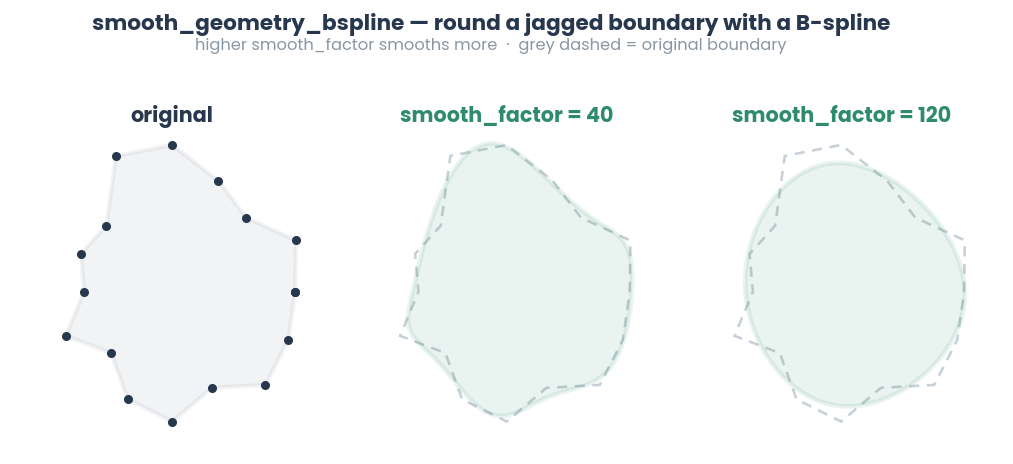
- static GeometryMixin.smooth_geometry_bspline(data, smooth_factor=1.0, points=50)[source]
Smooths the geometry of polygons or coordinate arrays using B-spline interpolation.
Accepts an input geometry, which can be a NumPy array, a single Polygon, or a list of Polygons, and applies a B-spline smoothing operation. The degree of smoothing is controlled by smooth_factor, and the number of interpolated points along the new smoothed boundary is determined by points.
- Parameters
data (Union[np.ndarray, Polygon, List[Polygon]]) – The input geometry to be smoothed. This can be: A NumPy array of shape (N, 2) representing a single polygon. A NumPy array of shape (M, N, 2) representing multiple polygons. A Polygon object from Shapely. A list of Polygon objects.
smooth_factor (float) – The smoothing factor for the B-spline. Higher values result in smoother curves. Must be >= 0.1.
points (int) – The number of interpolated points used to redefine the smoothed polygon boundary. Must be >= 3.
- Returns
A list of smoothed polygons obtained by applying B-spline interpolation to the input geometry.
- Return type
List[Polygon]
- Example
>>> polygon = np.array([[0, 0], [2, 1], [3, 3], [1, 4], [0, 3], [0, 0]])
>>> polygon = Polygon(polygon)
>>> smoothed_polygon = smooth_geometry_bspline(polygon)
- static GeometryMixin.union(shapes)[source]
Compute the union of multiple geometries.

See also
For multicore method, see
simba.mixins.geometry_mixin.GeometryMixin.multiframe_union()- Parameters
shapes (List[Union[LineString, Polygon, MultiPolygon]]) – A list of LineString, Polygon, or MultiPolygon geometries to be unioned.
- Returns
The resulting geometry after performing the union operation.
- Return type
Union[MultiPolygon, Polygon]
- Example
>>> polygon_1 = GeometryMixin().bodyparts_to_polygon(np.array([[10, 10], [10, 100], [100, 10], [100, 100]]))
>>> polygon_2 = GeometryMixin().bodyparts_to_polygon(np.array([[1, 25],[1, 75],[110, 25],[110, 75]]))
>>> union = GeometryMixin().union(shape = polygon_1, overlap_shapes=[polygon_2, polygon_2])
- static GeometryMixin.difference(shapes=typing.List[typing.Union[shapely.geometry.linestring.LineString, shapely.geometry.polygon.Polygon, shapely.geometry.multipolygon.MultiPolygon]])[source]
Calculate the difference between a shape and one or more potentially overlapping shapes.


See also
For multicore method, see
simba.mixins.geometry_mixin.GeometryMixin.multiframe_difference()- Parameters
shapes (List[Union[LineString, Polygon, MultiPolygon]]) – A list of geometries.
- Returns
The first geometry in
shapesis returned where all parts that overlap with the other geometries in ``shapes have been removed.- Return type
- Example
>>> polygon_1 = GeometryMixin().bodyparts_to_polygon(np.array([[10, 10], [10, 100], [100, 10], [100, 100]]))
>>> polygon_2 = GeometryMixin().bodyparts_to_polygon(np.array([[25, 25],[25, 75],[90, 25],[90, 75]]))
>>> polygon_3 = GeometryMixin().bodyparts_to_polygon(np.array([[1, 25],[1, 75],[110, 25],[110, 75]]))
>>> difference = GeometryMixin().difference(shapes = [polygon_1, polygon_2, polygon_3])
- static GeometryMixin.symmetric_difference(shapes)[source]
Computes a new geometry consisting of the parts that are exclusive to each input geometry.
In other words, it includes the parts that are unique to each geometry while excluding the parts that are common to both.

See also
For multicore call, see
simba.mixins.geometry_mixin.GeometryMixin.multiframe_symmetric_difference().- Parameters
shapes (List[Union[LineString, Polygon, MultiPolygon]]) – A list of LineString, Polygon, or MultiPolygon geometries to find the symmetric difference.
- Returns
A list containing the resulting geometries after performing symmetric difference operations.
- Return type
List[Union[Polygon, MultiPolygon]]
- Example
>>> polygon_1 = GeometryMixin().bodyparts_to_polygon(np.array([[10, 10], [10, 100], [100, 10], [100, 100]]))
>>> polygon_2 = GeometryMixin().bodyparts_to_polygon(np.array([[1, 25], [1, 75], [110, 25], [110, 75]]))
>>> symmetric_difference = symmetric_difference(shapes=[polygon_1, polygon_2])
- static GeometryMixin.geometries_to_exterior_keypoints(geometries, core_cnt=- 1, pool=None)[source]
Extract exterior keypoints from a list of Polygon geometries in parallel, with optional core count specification for multiprocessing.

- Parameters
geometries (List[Polygon]) – A list of Shapely Polygon objects representing geometries whose exterior keypoints will be extracted.
core_cnt (Optional[int]) – The number of CPU cores to use for multiprocessing. If -1, it uses the maximum number of available cores. Ignored if pool is provided.
pool (Optional[multiprocessing.Pool]) – Optional multiprocessing pool to reuse. If None, creates a new pool. Default None.
- Returns
A numpy array of exterior keypoints extracted from the input geometries.
- Return type
np.ndarray
- Example
>>> data_path = r"C:/troubleshooting/mitra/project_folder/csv/outlier_corrected_movement_location/FRR_gq_Saline_0624.csv"
>>> animal_data = read_df(file_path=data_path, file_type='csv', usecols=['Nose_x', 'Nose_y', 'Tail_base_x', 'Tail_base_y', 'Left_side_x', 'Left_side_y', 'Right_side_x', 'Right_side_y']).values.reshape(-1, 4, 2)[0:20].astype(np.int32)
>>> animal_polygons = GeometryMixin().bodyparts_to_polygon(data=animal_data)
>>> GeometryMixin.geometries_to_exterior_keypoints(geometries=animal_polygons)
Overlap, containment & contact
- static GeometryMixin.compute_pct_shape_overlap(shapes, denominator='difference')[source]
Compute the percentage of overlap between two shapes.

See also
simba.mixins.geometry_mixin.GeometryMixin.multiframe_compute_pct_shape_overlap()with parallel CPU acceleration. Seesimba.mixins.geometry_mixin.GeometryMixin.compute_shape_overlap()to compute boolean if shapes overlap.- Parameters
shapes (List[Union[LineString, Polygon]]) – A 2D array, where each sub-array has two Polygon or LineString shapes.
denominator (Optional[Literal['union', 'shape_1', 'shape_2']]) – If
difference, then percent overlap is calculated using non-intersection area as denominator. Ifshape_1, percent overlap is calculated using the area of the first shape as denominator. Ifshape_2, percent overlap is calculated using the area of the second shape as denominator. Default:difference.
- Returns
The percentage of overlap between the two shapes (0 - 100) as integer.
- Return type
- Example
>>> polygon_1 = GeometryMixin().bodyparts_to_polygon(np.array([[364, 308],[383, 323],[403, 335],[423, 351]]))
>>> polygon_2 = GeometryMixin().bodyparts_to_polygon(np.array([[356, 307],[376, 319],[396, 331],[419, 347]]))
>>> polygon_1 = [polygon_1 for x in range(100)]
>>> polygon_2 = [polygon_2 for x in range(100)]
>>> data = np.column_stack((polygon_1, polygon_2))
>>> results = GeometryMixin.compute_pct_shape_overlap(shapes=data)
- static GeometryMixin.compute_shape_overlap(shapes, verbose=False)[source]
Computes if two geometrical shapes (Polygon or LineString) overlaps or are disjoint.
See also
For multicore method, see
simba.mixins.geometry_mixin.GeometryMixin.multiframe_compute_shape_overlap()Only returns if two shapes are overlapping or not overlapping. If the amount of overlap is required, useGeometryMixin().compute_shape_overlap().
- Parameters
shapes (List[Union[LineString, Polygon, None]]) – A 2d array of Polygon or LineString shapes. If the array contains a row with None, no overlap will be returned for that row.
- Returns
Returns 1 if the two shapes overlap, otherwise returns 0.
- Return type
np.ndarray
- static GeometryMixin.is_shape_covered(shapes)[source]
Check if one geometry fully covers another.

- Parameters
shapes (Union[LineString, Polygon, MultiPolygon, MultiPoint]) – List of 2 geometries, checks if the second geometry fully covers the first geometry.
- Returns
True if the second geometry fully covers the first geometry, otherwise False.
- Return type
>>> polygon_1 = GeometryMixin().bodyparts_to_polygon(np.array([[10, 10], [10, 100], [100, 10], [100, 100]]))
>>> polygon_2 = GeometryMixin().bodyparts_to_polygon(np.array([[25, 25], [25, 75], [90, 25], [90, 75]]))
>>> GeometryMixin().is_shape_covered(shapes=[polygon_2[0], polygon_1[0]])
>>> True
- static GeometryMixin.is_containing(shapes=typing.Iterable[typing.Union[shapely.geometry.linestring.LineString, shapely.geometry.polygon.Polygon]])[source]
Check if the first shape in a list contains a second shape in the same list.

- Example
>>> polygon1 = Polygon([(0, 0), (10, 0), (10, 10), (0, 10), (0, 0)])
>>> polygon2 = Polygon([(3, 3), (7, 3), (7, 7), (3, 7), (3, 3)])
>>> GeometryMixin.is_containing(shapes=[polygon1, polygon2])
- static GeometryMixin.is_touching(shapes=typing.List[typing.Union[shapely.geometry.polygon.Polygon, shapely.geometry.linestring.LineString]])[source]
Check if two geometries touch each other.

Note
Different from GeometryMixin().crosses: Touches requires a common boundary, and does not require the sharing of interior space.
- Parameters
shapes (List[Union[LineString, Polygon]]) – A list containing two LineString or Polygon geometries.
- Returns
True if the geometries touch each other, False otherwise.
- Return type
- Example
>>> rectangle_1 = Polygon(np.array([[0, 0], [10, 10], [0, 10], [10, 0]]))
>>> rectangle_2 = Polygon(np.array([[20, 20], [30, 30], [20, 30], [30, 20]]))
>>> GeometryMixin().is_touching(shapes=[rectangle_1, rectangle_2])
>>> False
- static GeometryMixin.crosses(shapes)[source]
Check if two LineString objects cross each other.

- Parameters
shapes (List[LineString]) – A list containing two LineString objects.
- Returns
True if the LineStrings cross each other, False otherwise.
- Return type
- Example
>>> line_1 = GeometryMixin().bodyparts_to_line(np.array([[10, 10],[20, 10],[30, 10],[40, 10]]))
>>> line_2 = GeometryMixin().bodyparts_to_line(np.array([[25, 5],[25, 20],[25, 30],[25, 40]]))
>>> GeometryMixin().crosses(shapes=[line_1, line_2])
>>> True
- static GeometryMixin.points_in_polygon(x)[source]
Finds the points that fall inside the respective polygons.

- Parameters
x (numba.typed.List) – List of numpy arrays of size Nx2 representing polygon vertices.
- Returns
List of size len(x) of numpy arrays with coordinates representing points inside the polygons.
- Return type
numba.typed.List[numba.types.Array]
- Example
>>> data_path = r"/mnt/c/troubleshooting/two_black_animals_14bp/project_folder/csv/outlier_corrected_movement_location/Together_1.csv" # PATH TO A DATA FILE
>>> array_1 = read_df(file_path=data_path, file_type='csv', usecols=['Nose_1_x', 'Nose_1_y', 'Tail_base_1_x', 'Tail_base_1_y', 'Lat_left_1_x', 'Lat_left_1_y', 'Lat_right_1_x', 'Lat_right_1_y', 'Ear_left_1_x', 'Ear_left_1_y', 'Ear_right_1_x', 'Ear_right_1_y']).values.reshape(-1, 6, 2)[0:150]## READ THE BODY-PART THAT DEFINES THE HULL AND CONVERT TO ARRAY
>>> polygons = GeometryMixin().multiframe_bodyparts_to_polygon(data=array_1, parallel_offset=50, simplify_tolerance=2, preserve_topology=True)
>>> polygons_lst = typed.List()
>>> for i in polygons: polygons_lst.append(np.array(i.exterior.coords).astype(np.int32))
>>> results = points_in_polygon(polygons_lst)
Measurements
- static GeometryMixin.area(shape, pixels_per_mm)[source]
Calculate the area of a geometry in square millimeters.
Note
If certain that the input data is a valid Polygon, consider using
simba.feature_extractors.perimeter_jit.jitted_hull()orsimba.data_processors.cuda.geometry.poly_area()for numba jit and CUDA acceleration, respectively.See also
For multiprocessing, see
simba.mixins.geometry_mixin.GeometryMixin.multiframe_area()- Parameters
shape (Union[MultiPolygon, Polygon]) – The geometry (MultiPolygon or Polygon) for which to calculate the area.
pixels_per_mm (float) – The pixel-to-millimeter conversion factor.
- Returns
The area of the geometry in square millimeters.
- Return type
- Example
>>> polygon = GeometryMixin().bodyparts_to_polygon(np.array([[10, 10], [10, 100], [100, 10], [100, 100]]))
>>> GeometryMixin().area(shape=polygon[0], pixels_per_mm=4.9)
>>> 1701.556313816644
- static GeometryMixin.length(shape, pixels_per_mm, unit='mm')[source]
Calculate the length of a LineString geometry.

See also
simba.mixins.geometry_mixin.GeometryMixin.multiframe_bodyparts_to_line(),simba.mixins.geometry_mixin.GeometryMixin.multiframe_length()- Parameters
shape (LineString) – The LineString geometry for which the length is to be calculated.
unit (Literal['mm', 'cm', 'dm', 'm']) – The desired unit for the length measurement (‘mm’, ‘cm’, ‘dm’, ‘m’).
- Returns
The length of the LineString geometry in the specified unit.
- Return type
- Example
>>> line_1 = GeometryMixin().bodyparts_to_line(np.array([[10, 70],[20, 60],[30, 50],[40, 70]]))
>>> GeometryMixin().length(shape=line_1, pixels_per_mm=1.0)
>>> 50.6449510224598
- static GeometryMixin.shape_distance(shapes, pixels_per_mm, unit='mm')[source]
Calculate the distance between two lists of geometries in specified units.
The distance method will compute the shortest distance between the boundaries of the two shapes. If the shapes overlap, the distance will be zero.
- Parameters
shapes (List[Union[LineString, Polygon, Point]]) – I 2d numpy array with 2 columns. Rows represent frames and columns represents the shapes to be compared. Or A list of list where each list has two LineString, Polygon or Point geometries.
pixels_per_mm (float) – The conversion factor from pixels to millimeters.
unit (Literal['mm', 'cm', 'dm', 'm']) – The desired unit for the distance calculation. Options: ‘mm’, ‘cm’, ‘dm’, ‘m’. Defaults to ‘mm’.
- Returns
A list of distances between corresponding geometries in the specified unit.
- Return type
List[float]
Note
The distance is the minimum Euclidean distance between any point on geometry A and any point on geometry B.
See also
For multicore wrapper method, see
simba.mixins.geometry_mixin.GeometryMixin.multiframe_shape_distance()

>>> from shapely.geometry import Polygon
>>> shape_1 = Polygon([(0, 0), (10, 0), (10, 10), (0, 10)])
>>> shape_2 = Polygon([(5, 5), (15, 5), (15, 15), (5, 15)])
>>> GeometryMixin.shape_distance(shapes_a=[shape_1], shapes_b=[shape_2], pixels_per_mm=1.0)
[0.0]
- static GeometryMixin.get_center(shape)[source]
Get the center coordinate of a shape or a list of shapes.

- Parameters
shape (Union[LineString, Polygon, MultiPolygon, List[Union[LineString, Polygon, MultiPolygon]]]) – A single geometry or a list of geometries. If None, then None is returned.
- Returns
Array sith x, y coordinates of
shapecenters.- Return type
np.ndarray
- Example
>>> multipolygon = MultiPolygon([Polygon([[200, 110],[200, 100],[200, 100],[200, 110]]), Polygon([[70, 70],[70, 60],[10, 50],[1, 70]])])
>>> GeometryMixin().get_center(shape=multipolygon)
>>> [33.96969697, 62.32323232]
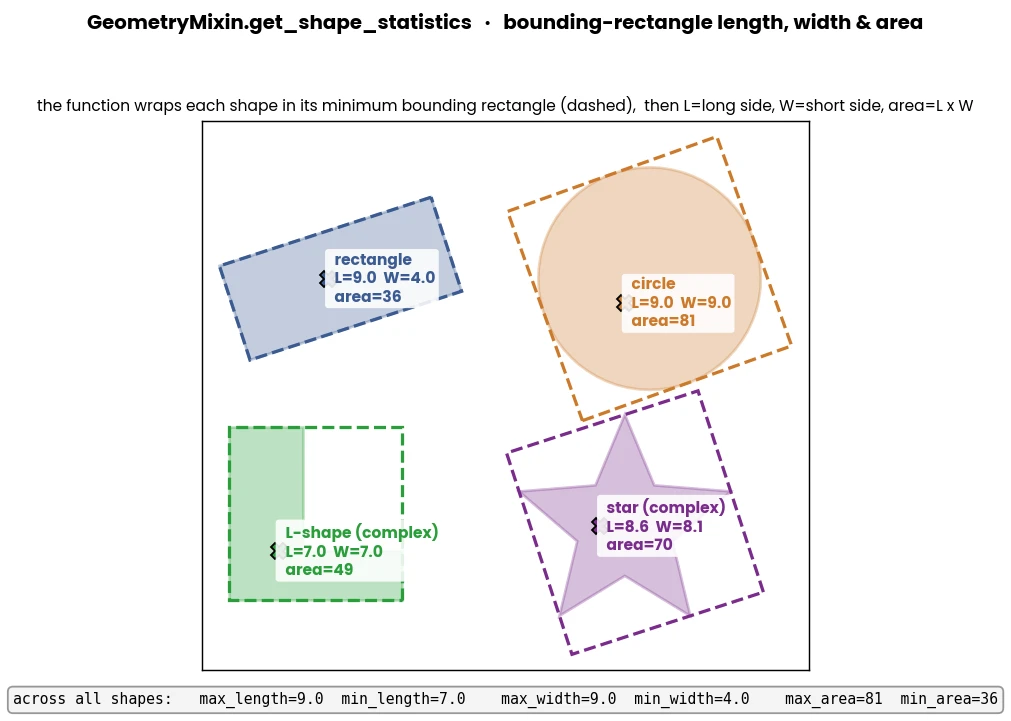
- static GeometryMixin.get_shape_statistics(shapes)[source]
Calculate the lengths and widths of the minimum bounding rectangles of polygons.
- Parameters
shapes (Union[List[Polygon], Polygon]) – A single Polygon, a list of Polygons, or 3d array of vertices, for which the MBR dimensions are calculated.
- Returns
A dictionary containing: - ‘lengths’: A list of the lengths (longer side of the MBR) for each polygon. - ‘widths’: A list of the widths (shorter side of the MBR) for each polygon. - ‘areas’: A list of the MBR areas (length x width) for each polygon. - ‘centers’: A list of the [x, y] centroid of each polygon. - ‘max_length’ / ‘min_length’: The maximum / minimum length found among all polygons. - ‘max_width’ / ‘min_width’: The maximum / minimum width found among all polygons. - ‘max_area’ / ‘min_area’: The maximum / minimum MBR area found among all polygons.
- Return type
Dict[str, Any]
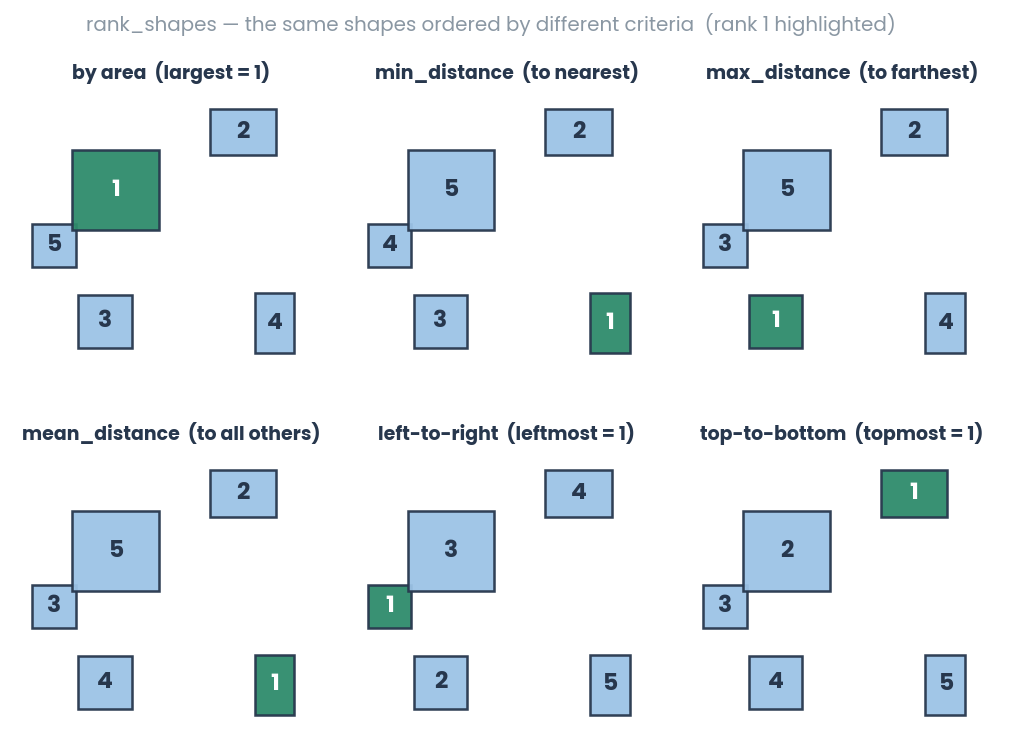
- static GeometryMixin.rank_shapes(shapes, method, deviation=False, descending=True)[source]
Rank a list of polygon geometries based on a specified method. E.g., order the list of geometries according to sizes or distances to each other or from left to right etc.
- Parameters
shapes (List[Polygon]) – List of Shapely polygons to be ranked. List has to contain two or more shapes.
method (Literal["area", "min_distance", "max_distance", "mean_distance", "left_to_right", "top_to_bottom"]) – The ranking method to use.
deviation (Optional[bool]) – If True, rank based on absolute deviation from the mean. Default: False.
descending (Optional[bool]) – If True, rank in descending order; otherwise, rank in ascending order. Default: False.
- Returns
A list of Shapely polygons sorted according to the specified ranking method.
- Return type
List[Polygon]
Lines, paths & trajectory similarity
- static GeometryMixin.static_point_lineside(lines, point)[source]
Determine the relative position (left vs right) of a static point with respect to multiple lines.
Note
Modified from rayryeng.
- Parameters
lines (numpy.ndarray) – An array of shape (N, 2, 2) representing N lines, where each line is defined by two points. The first point that denotes the beginning of the line, the second point denotes the end of the line.
point (numpy.ndarray) – A 2-element array representing the coordinates of the static point.
- Returns
An array of length N containing the results for each line.
2if the point is on the right side of the line,1if the point is on the left side of the line, and0if the point is on the line.- Return type
np.ndarray
- Example
>>> line = np.array([[[25, 25], [25, 20]], [[15, 25], [15, 20]], [[15, 25], [50, 20]]]).astype(np.float32)
>>> point = np.array([20, 0]).astype(np.float64)
>>> GeometryMixin().static_point_lineside(lines=line, point=point)
>>> [1. 2. 1.]
- static GeometryMixin.point_lineside(lines, points)[source]
Determine the relative position of a point (left vs right) with respect to a lines in each frame.

- Parameters
lines (numpy.ndarray) – An array of shape (N, 2, 2) representing N lines, where each line is defined by two points. The first point that denotes the beginning of the line, the second point denotes the end of the line.
point (numpy.ndarray) – An array of shape (N, 2) representing N points.
- Return np.ndarray
An array of length N containing the results for each line. 2 if the point is on the right side of the line. 1 if the point is on the left side of the line. 0 if the point is on the line.
- Example
>>> lines = np.array([[[25, 25], [25, 20]], [[15, 25], [15, 20]], [[15, 25], [50, 20]]]).astype(np.float32)
>>> points = np.array([[20, 0], [15, 20], [90, 0]]).astype(np.float32)
>>> GeometryMixin().point_lineside(lines=lines, points=points)
>>> [1., 0., 1.]
- static GeometryMixin.extend_line_to_bounding_box_edges(line_points, bounding_box)[source]
Jitted extend a line segment defined by two points to fit within a bounding box.

- Parameters
line_points (np.ndarray) – Coordinates of the line segment’s two points. Two rows and each row represents a point (x, y).
bounding_box (np.ndarray) – Bounding box coordinates in the format (min_x, min_y, max_x, max_y).
- Returns
Intersection points where the extended line crosses the bounding box edges. The shape of the array is (2, 2), where each row represents a point (x, y).
- Return type
np.ndarray
- Example
>>> line_points = np.array([[25, 25], [45, 25]]).astype(np.int64)
>>> bounding_box = np.array([0, 0, 50, 50]).astype(np.int64)
>>> GeometryMixin().extend_line_to_bounding_box_edges(line_points, bounding_box)
>>> [[ 0. 25.] [50. 25.]]
- static GeometryMixin.line_split_bounding_box(intersections, bounding_box)[source]
Split a bounding box into two parts using an extended line.
Note
Extended line can be found by body-parts using
simba.mixins.geometry_mixin.GeometryMixin.extend_line_to_bounding_box_edges().
- Parameters
line_points (np.ndarray) – Intersection points where the extended line crosses the bounding box edges. The shape of the array is (2, 2), where each row represents a point (x, y).
bounding_box (np.ndarray) – Bounding box coordinates in the format (min_x, min_y, max_x, max_y).
- Returns
A collection of polygons resulting from splitting the bounding box with the extended line.
- Return type
GeometryCollection
- Example
>>> line_points = np.array([[25, 25], [45, 25]]).astype(np.float32)
>>> bounding_box = np.array([0, 0, 50, 50]).astype(np.float32)
>>> intersection_points = GeometryMixin().extend_line_to_bounding_box_edges(line_points, bounding_box)
>>> GeometryMixin().line_split_bounding_box(intersections=intersection_points, bounding_box=bounding_box)
- static GeometryMixin.locate_line_point(path, geometry, px_per_mm=1, fps=1, core_cnt=- 1, distance_min=True, time_prior=True)[source]
Compute the time and distance travelled along a path to reach the most proximal point in reference to a second geometry.
Note
To compute the time and distance travelled to along a path to reach the most distal point to a second geometry, pass
distance_min = False.To compute the time and distance travelled along a path after reaching the most distal or proximal point to a second geometry, pass
time_prior = False.

- Parameters
path (Union[LineString, np.ndarray]) – A LineString or a 2D array with keypoints across time.
geometry (Union[LineString, Polygon, Point]) – A geometry of intrest.
px_per_mm (float) – Pixels per millimeter conversion factor.
sample_rate (Optional[Union[float, int]]) – The FPS of the recording used as conversion factor for time.
core_cnt (Optional[int]) – The number of cores to use for parallel processing. Default is -1, which uses the maximum available cores.
distance_min (Optional[bool]) – If True, uses the minimim distance between the geometry and the path as the reference point. Else, uses the maximum. Default: True.
time_prior (Optional[bool]) – If True, returns the time/distance BEFORE reaching the proximal/distal point in relation to the geometry. Else, returns the time/distance AFTER reaching the proximal/distal point in relation to the geometry. Default True.
- Return type
- Example
>>> line = LineString([[10, 10], [7.5, 7.5], [15, 15], [7.5, 7.5]])
>>> polygon = Polygon([[0, 5], [0, 0], [5, 0], [5, 5]])
>>> GeometryMixin.locate_line_point(path=line, geometry=polygon)
>>> {'distance_value': 3.5355339059327378, 'distance_travelled': 3.5355339059327378, 'time_travelled': 1.0, 'distance_index': 1}
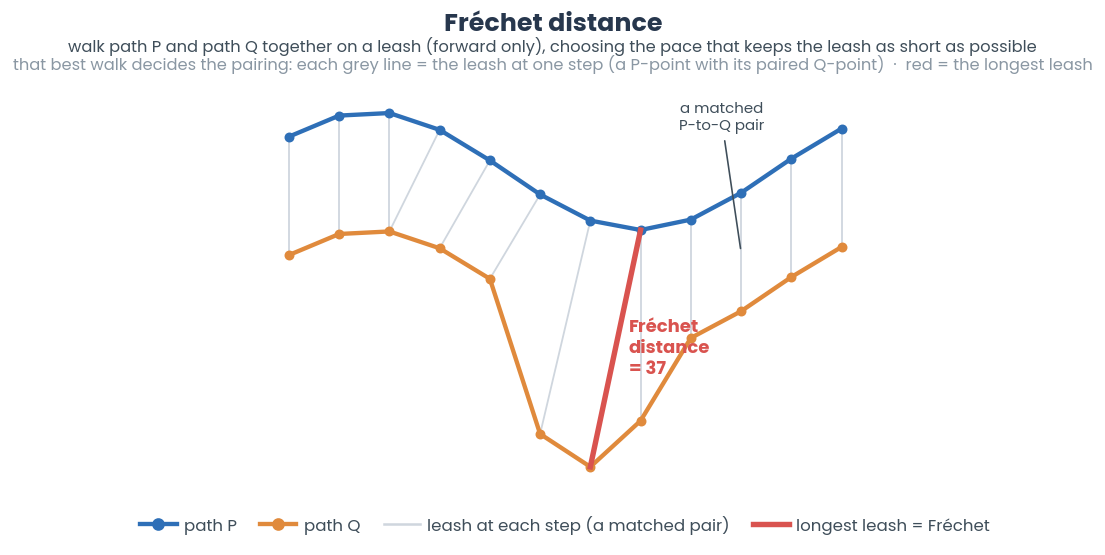
- static GeometryMixin.linear_frechet_distance(x, y, sample=100)[source]
Jitted compute the Linear Fréchet Distance between two trajectories.
The Fréchet Distance measures the dissimilarity between two continuous curves or trajectories represented as sequences of points in a 2-dimensional space.
- Parameters
x (ndarray) – First 2D array of size len(frames) representing body-part coordinates x and y.
y (ndarray) – Second 2D array of size len(frames) representing body-part coordinates x and y.
sample (int) – The downsampling factor for the trajectories (default is 100If sample > 1, the trajectories are downsampled by selecting every sample-th point.
- Returns
Linear Fréchet Distance between two trajectories
- Return type
Note
Modified from João Paulo Figueira
- Example
>>> x = np.random.randint(0, 100, (10000, 2)).astype(np.float32)
>>> y = np.random.randint(0, 100, (10000, 2)).astype(np.float32)
>>> distance = GeometryMixin.linear_frechet_distance(x=x, y=y, sample=100)
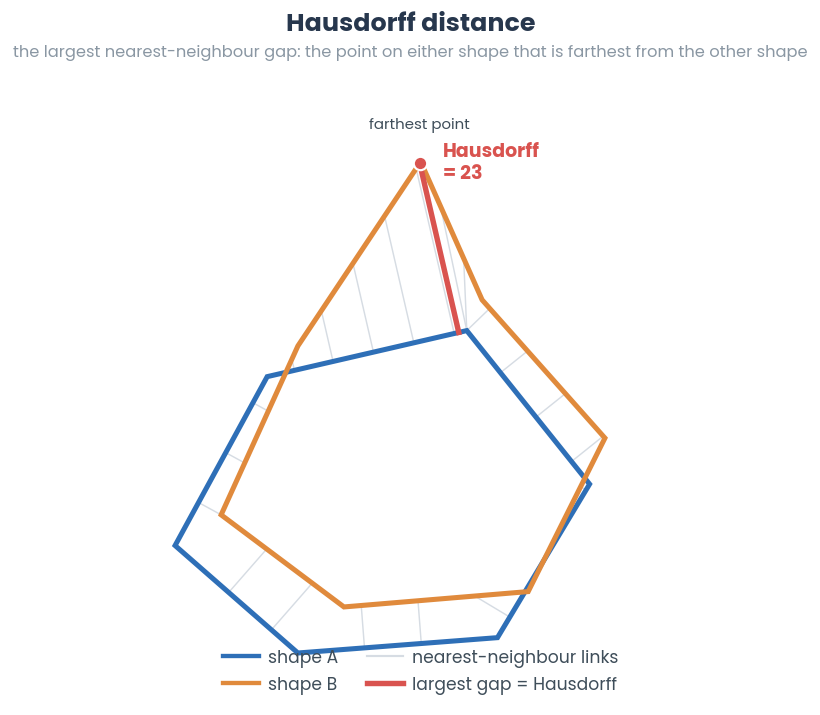
- static GeometryMixin.hausdorff_distance(geometries)[source]
The Hausdorff distance measure of the similarity between time-series sequential geometries. It is defined as the maximum of the distances from each point in one set to the nearest point in the other set.
Hausdorff distance can be used to measure the similarity of the geometry in one frame relative to the geometry in the next frame. Larger values indicate that the animal has a different shape than in the preceding shape.
- Parameters
geometries (List[List[Union[Polygon, LineString]]]) – List of list where each list has two geometries.
- Returns
1D array of hausdorff distances of geometries in each list.
- Return type
np.ndarray
- Example
>>> x = Polygon([[0,1], [0, 2], [1,1]])
>>> y = Polygon([[0,1], [0, 2], [0,1]])
>>> GeometryMixin.hausdorff_distance(geometries=[[x, y]])
>>> [1.]
Image grids & occupancy
- static GeometryMixin.bucket_img_into_grid_points(point_distance, px_per_mm, img_size, border_sites=True)[source]
Create a grid of evenly spaced points within an image. Use for creating spatial markers within an arena.

See also
To segment image into hexagons, see
simba.mixins.geometry_mixin.GeometryMixin.bucket_img_into_grid_hexagon(). To segment image into rectangles, seesimba.mixins.geometry_mixin.GeometryMixin.bucket_img_into_grid_square()- Parameters
point_distance (int) – Distance between adjacent points in millimeters.
px_per_mm (float) – Pixels per millimeter conversion factor.
img_size (Tuple[int, int]) – Size of the image in pixels (width, height).
border_sites (Optional[bool]) – If True, includes points on the border of the image. Default is True.
- Returns
Dictionary where keys are (row, column) indices of the point, and values are Shapely Point objects.
- Return type
- Example
>>> GeometryMixin.bucket_img_into_grid_points(point_distance=20, px_per_mm=4, img_size=img.shape, border_sites=False)
- static GeometryMixin.bucket_img_into_grid_square(img_size, bucket_grid_size_mm=None, bucket_grid_size=None, px_per_mm=None, add_correction=True, verbose=False)[source]
Segment an image into squares and return a dictionary of polygons representing the bucket locations.

See also
To segment image into hexagons, see
simba.mixins.geometry_mixin.GeometryMixin.bucket_img_into_grid_hexagon(). To segment image into points, seesimba.mixins.geometry_mixin.GeometryMixin.bucket_img_into_grid_points()- Parameters
img_size (Iterable[int]) – 2-value tuple, list or array representing the width and height of the image in pixels.
bucket_grid_size_mm (Optional[float]) – The width/height of each square bucket in millimeters. E.g., 50 will create 5cm by 5cm squares. If None, then buckets will by defined by
bucket_grid_sizeargument.bucket_grid_size (Optional[Iterable[int, int]]) – 2-value tuple, list or array representing the grid square in number of horizontal squares x number of vertical squares. If None, then buckets will be defined by the
bucket_size_mmargument.px_per_mm (Optional[float]) – Pixels per millimeter conversion factor. Necessery if buckets are defined by
bucket_size_mmargument.add_correction (Optional[bool]) – If True, performs correction by adding extra columns or rows to cover any remaining space if using
bucket_size_mm. Default True.verbose (Optional[bool]) – If True, prints progress / completion information. Default False.
- Returns
Size-2 Tuple with (i) Dictionary where the segment index is the key and polygon is the value, and (ii) float representing aspect ratio of each bucket.
- Example
>>> img = cv2.imread('/Users/simon/Desktop/Screenshot 2024-01-21 at 10.15.55 AM.png', 1)
>>> polygons = GeometryMixin().bucket_img_into_grid_square(bucket_grid_size=(10, 5), bucket_grid_size_mm=None, img_size=(img.shape[1], img.shape[0]), px_per_mm=5.0)
>>> for k, v in polygons[0].items(): cv2.polylines(img, [np.array(v.exterior.coords).astype(int)], True, (255, 0, 133), 2)
>>> cv2.imshow('img', img)
>>> cv2.waitKey()
- static GeometryMixin.bucket_img_into_grid_hexagon(bucket_size_mm, img_size, px_per_mm, verbose=True)[source]
Bucketize an image into hexagons and return a dictionary of polygons representing the hexagon locations.

See also
To segment image into rectangles, see
simba.mixins.geometry_mixin.GeometryMixin.bucket_img_into_grid_square()To segment image into points, seesimba.mixins.geometry_mixin.GeometryMixin.bucket_img_into_grid_points()- Parameters
- Returns
First value is a dictionary where keys are (row, column) indices of the bucket, and values are Shapely Polygon objects representing the corresponding hexagon buckets. Second value is the aspect ratio of the hexagonal grid.
- Return type
- Example
>>> polygons, aspect_ratio = GeometryMixin().bucket_img_into_grid_hexagon(bucket_size_mm=10, img_size=(800, 600), px_per_mm=5.0, add_correction=True)
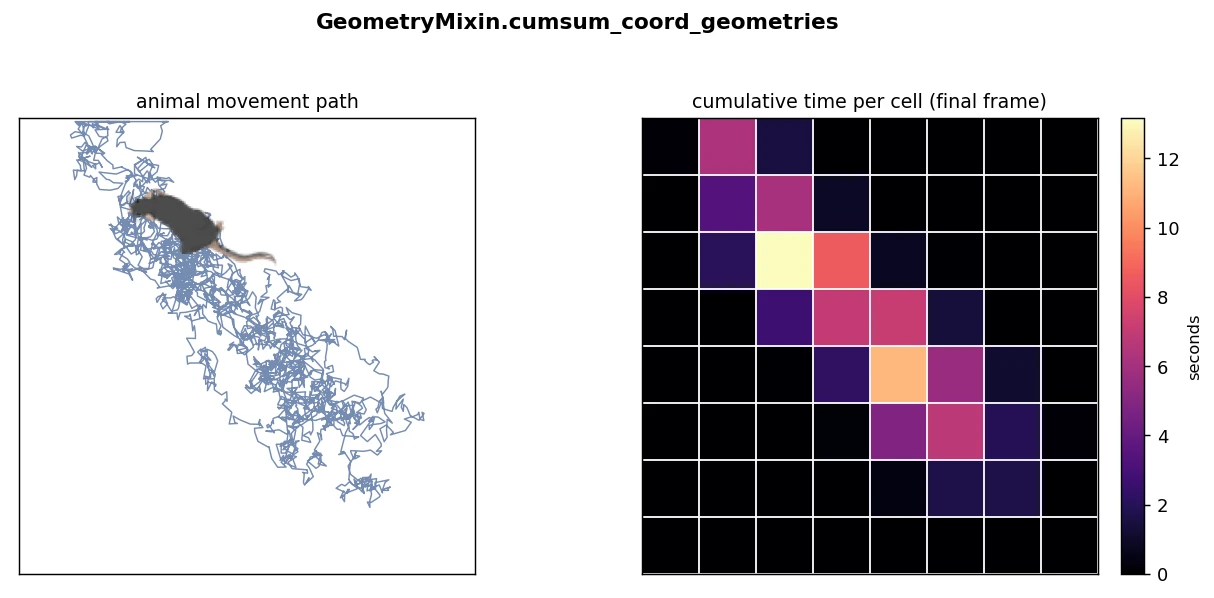
- GeometryMixin.cumsum_coord_geometries(data, geometries, fps=None, core_cnt=- 1, verbose=True, pool=None)[source]
Compute the cumulative time a body-part has spent inside a grid of geometries using multiprocessing.
See also
To create grid
geometries, seesimba.mixins.geometry_mixin.GeometryMixin.bucket_img_into_grid_square()orsimba.mixins.geometry_mixin.GeometryMixin.bucket_img_into_grid_hexagon().- Parameters
data (np.ndarray) – Input data array where rows represent frames and columns represent body-part x and y coordinates.
geometries (Dict[Tuple[int, int], Polygon]) – Dictionary of polygons representing spatial regions. E.g., created by
simba.mixins.geometry_mixin.GeometryMixin.bucket_img_into_grid_square()orsimba.mixins.geometry_mixin.GeometryMixin.bucket_img_into_grid_hexagon().fps (Optional[int]) – Frames per second (fps) for time normalization. If None, cumulative sum of frame count is returned.
core_cnt (Optional[int]) – Number of CPU cores to use for parallel processing. Default is -1 which is all available cores. Ignored if pool is provided.
verbose (Optional[bool]) – If True, prints progress.
pool (Optional[multiprocessing.Pool]) – Optional multiprocessing pool to reuse. If None, creates a new pool. Default None.
- Returns
Matrix of size (frames x horizontal bins x vertical bins) with cumulative time values.
- Return type
np.ndarray
- Example
>>> img_geometries = GeometryMixin.bucket_img_into_grid_square(img_size=(640, 640), bucket_grid_size=(10, 10), px_per_mm=1)
>>> bp_arr = np.random.randint(0, 640, (5000, 2))
>>> geo_data = GeometryMixin().cumsum_coord_geometries(data=bp_arr, geometries=img_geometries[0], verbose=False, fps=1)
- GeometryMixin.cumsum_bool_geometries(data, geometries, bool_data, fps=None, verbose=True, core_cnt=- 1, pool=None)[source]
Compute the cumulative sums of boolean events within polygon geometries over time using multiprocessing. For example, compute the cumulative bout count of classified events within spatial locations at all time-points of the video.

See also
To create grid
geometries, seesimba.mixins.geometry_mixin.GeometryMixin.bucket_img_into_grid_square()To create hexagonal grid
geometries, seesimba.mixins.geometry_mixin.GeometryMixin.bucket_img_into_grid_hexagon()To get Boolean counts, consider
simba.utils.data.detect_bouts()
- Parameters
data (np.ndarray) – Array containing spatial data with shape (n, 2). E.g., 2D-array with body-part coordinates.
geometries (Dict[Tuple[int, int], Polygon]) – Dictionary of polygons representing spatial regions. E.g., created by
simba.mixins.geometry_mixin.GeometryMixin.bucket_img_into_grid_square()orsimba.mixins.geometry_mixin.GeometryMixin.bucket_img_into_grid_hexagon().bool_data (np.ndarray) – Boolean array with shape (data.shape[0],) or (data.shape[0], 1) indicating the presence or absence in each frame.
fps (Optional[float]) – Frames per second. If provided, the result is normalized by the frame rate.
verbose (bool) – If true, prints progress. Default: True.
core_cnt (Optional[int]) – Number of CPU cores to use for parallel processing. Default is -1, which means using all available cores. Ignored if pool is provided.
pool (Optional[multiprocessing.Pool]) – Optional multiprocessing pool to reuse. If None, creates a new pool. Default None.
- Returns
Matrix of size (frames x horizontal bins x vertical bins) with times in seconds (if fps passed) or frames (if fps not passed)
- Return type
np.ndarray
- Return type
np.ndarray
- Example
>>> geometries = GeometryMixin.bucket_img_into_grid_square(bucket_size_mm=50, img_size=(800, 800) , px_per_mm=5.0)[0]
>>> coord_data = np.random.randint(0, 800, (500, 2))
>>> bool_data = np.random.randint(0, 2, (500,))
>>> x = GeometryMixin().cumsum_bool_geometries(data=coord_data, geometries=geometries, bool_data=bool_data, fps=15)
>>> x.shape
>>> (500, 4, 4)
- GeometryMixin.cumsum_animal_geometries_grid(data, grid, fps=None, core_cnt=- 1, verbose=True, pool=None)[source]
Compute the cumulative time the animal has spent in each geometry.
Note
The time is computed based on if any part of the animal is inside a specific geometry. Thus, if the hull is larger than the individual geometries, then the total time in the matrix can exceed the time of the video.
See also
To calculate the time / count of boolean events in geometries, see
simba.mixins.geometry_mixin.GeometryMixin.cumsum_bool_geometries(). To calculate the cumulative time the animal has spent in each geometry using a single key-point, seesimba.mixins.geometry_mixin.GeometryMixin.cumsum_coord_geometries().
- Parameters
data (List[Polygon]) – List of polygons where every index represent a frame and every value the animal convex hull
grid (Dict[Tuple[int, int], Polygon]) – Dictionary of polygons representing spatial regions. E.g., created by
simba.mixins.geometry_mixin.GeometryMixin.bucket_img_into_grid_square()orsimba.mixins.geometry_mixin.GeometryMixin.bucket_img_into_grid_hexagon().fps (Optional[int]) – Frames per second. If provided, the result is normalized by the frame rate.
core_cnt (Optional[int]) – Number of CPU cores to use for parallel processing. Default is -1, which means using all available cores. Ignored if pool is provided.
verbose (Optional[bool]) – If True, then prints progress.
pool (Optional[multiprocessing.Pool]) – Optional multiprocessing pool to reuse. If None, creates a new pool. Default None.
- Returns
Matrix of size (frames x horizontal bins x vertical bins) with values representing time in seconds (if fps passed) or frames (if fps not passed)
- Return type
np.ndarray
- Return type
np.ndarray
- static GeometryMixin.geometry_transition_probabilities(data, grid, core_cnt=- 1, verbose=False, pool=None)[source]
Calculate geometry transition probabilities based on spatial transitions between grid cells.
Computes transition probabilities between pairs of spatial grid cells, represented as polygons. For each cell, it calculates the likelihood of transitioning to other cells.

- Parameters
data (np.ndarray) – A 2D array where each row represents a point in space with two coordinates [x, y].
grid (Dict[Tuple[int, int], Polygon]) – A dictionary mapping grid cell identifiers (tuple of int, int) to their corresponding polygon objects. Each grid cell is represented by a tuple key (e.g., (row, col)) and its spatial boundaries as a Polygon. Can be computed with E.g., created by
simba.mixins.geometry_mixin.GeometryMixin.bucket_img_into_grid_square()orsimba.mixins.geometry_mixin.GeometryMixin.bucket_img_into_grid_hexagon().core_cnt (Optional[int]) – The number of cores to use for parallel processing. Default is -1, which uses the maximum available cores. Ignored if pool is provided.
verbose (Optional[bool]) – If True, the function will print additional information, including the elapsed time for processing.
pool (Optional[multiprocessing.Pool]) – Optional multiprocessing pool to reuse. If None, creates a new pool. Default None.
- Returns
A tuple containing two dictionaries: - A dictionary of transition probabilities between grid cells, where each key is a grid cell tuple (row, col),
and each value is another dictionary representing the transition probabilities to other cells.
A dictionary of transition counts between grid cells, where each key is a grid cell tuple (row, col), and each value is another dictionary representing the transition counts to other cells.
- Return type
Tuple[Dict[Tuple[int, int], Dict[Tuple[int, int], float]], Dict[Tuple[int, int], Dict[Tuple[int, int], int]]]
- Example
>>> video_meta_data = get_video_meta_data(video_path=r"C:/troubleshooting/mitra/project_folder/videos/708_MA149_Gq_CNO_0515.mp4")
>>> w, h = video_meta_data['width'], video_meta_data['height']
>>> grid = GeometryMixin().bucket_img_into_grid_square(bucket_grid_size=(5, 5), bucket_grid_size_mm=None, img_size=(h, w), verbose=False)[0]
>>> data = read_df(file_path=r'C:/troubleshooting/mitra/project_folder/csv/outlier_corrected_movement_location/708_MA149_Gq_CNO_0515.csv', file_type='csv')[['Nose_x', 'Nose_y']].values
>>> transition_probabilities, _ = geometry_transition_probabilities(data=data, grid=grid)
Image content within geometries
- static GeometryMixin.get_geometry_brightness_intensity(img, geometries, ignore_black=True)[source]
Calculate the average brightness intensity within a geometry region-of-interest of an image.
E.g., can be used with hardcoded thresholds or model kmeans in simba.mixins.statistics_mixin.Statistics.kmeans_1d to detect if a light source is ON or OFF state.

See also
For direct image brightness comparisons without geometry slicing, see
simba.mixins.image_mixin.ImageMixin.brightness_intensity(). For GPU acceleration, seesimba.data_processors.cuda.image.img_stack_brightness()- Parameters
img (np.ndarray) – Either an image in numpy array format OR a tuple with cv2.VideoCapture object and the frame index.
geometries (List[Union[Polygon, np.ndarray]]) – A list of shapes either as vertices in a numpy array, or as shapely Polygons.
ignore_black (Optional[bool]) – If non-rectangular geometries, then pixels that don’t belong to the geometry are masked in black. If True, then these pixels will be ignored when computing averages.
- Returns
List of geometry brighness values.
- Return type
List[float]
- Example
>>> img = cv2.imread('/Users/simon/Desktop/envs/troubleshooting/Emergence/project_folder/videos/Example_1_frames/1.png').astype(np.uint8)
>>> data_path = '/Users/simon/Desktop/envs/troubleshooting/Emergence/project_folder/csv/outlier_corrected_movement_location/Example_1.csv'
>>> data = pd.read_csv(data_path, usecols=['Nose_x', 'Nose_y']).sample(n=3).fillna(1).values.astype(np.int64)
>>> geometries = []
>>> for frm_data in data: geometries.append(GeometryMixin().bodyparts_to_circle(frm_data, 100))
>>> GeometryMixin().get_geometry_brightness_intensity(img=img, geometries=geometries, ignore_black=False)
>>> [125.0, 113.0, 118.0]
- static GeometryMixin.geometry_histocomparison(imgs, geometry=None, method='correlation', absolute=True)[source]
Retrieve histogram similarities within a geometry inside two images.
For example, the polygon may represent an area around a rodents head. While the front paws are not pose-estimated, computing the histograms of the geometry in two sequential images gives indication of non-freezing.
Important
If there is non-pose related noise in the environment (e.g., there are non-experiment related light sources that goes on and off, or waving window curtains causing changes in histgram values w/o affecting pose) this will negatively affect the realiability of histogram comparisons.

- Parameters
imgs (List[Union[np.ndarray, Tuple[cv2.VideoCapture, int]]]) – List of two input images. Can be either an two image in numpy array format OR a two tuples with cv2.VideoCapture object and the frame index.
geometry (Optional[Polygon]) – If Polygon, then the geometry in the two images that should be compared. If None, then entire images will be histocompared.
method (Literal['correlation', 'chi_square']) – The method used for comparison. E.g., if correlation, then small output values suggest large differences between the current versus prior image. If chi_square, then large output values suggest large differences between the geometries.
absolute (Optional[bool]) – If True, the absolute difference between the two histograms. If False, then (image2 histogram) - (image1 histogram)
- Returns
Value representing the histogram similarities between the geometry in the two images.
- Return type
- Example
>>> img_1 = cv2.imread('/Users/simon/Desktop/envs/troubleshooting/Emergence/project_folder/videos/Example_1_frames/1.png')
>>> img_2 = cv2.imread('/Users/simon/Desktop/envs/troubleshooting/Emergence/project_folder/videos/Example_1_frames/2.png')
>>> data_path = '/Users/simon/Desktop/envs/troubleshooting/Emergence/project_folder/csv/outlier_corrected_movement_location/Example_1.csv'
>>> data = pd.read_csv(data_path, nrows=1, usecols=['Nose_x', 'Nose_y']).fillna(-1).values.astype(np.int64)
>>> polygon = GeometryMixin().bodyparts_to_circle(data[0], 100)
>>> GeometryMixin().geometry_histocomparison(imgs=[img_1, img_2], geometry=polygon, method='correlation')
>>> 0.9999769684923543
>>> img_2 = cv2.imread('/Users/simon/Desktop/envs/troubleshooting/Emergence/project_folder/videos/Example_1_frames/41411.png')
>>> GeometryMixin().geometry_histocomparison(imgs=[img_1, img_2], geometry=polygon, method='correlation')
>>> 0.6732792208872572
>>> img_1 = (cv2.VideoCapture('/Users/simon/Desktop/envs/troubleshooting/Emergence/project_folder/videos/Example_1.mp4'), 1)
>>> img_2 = (cv2.VideoCapture('/Users/simon/Desktop/envs/troubleshooting/Emergence/project_folder/videos/Example_1.mp4'), 2)
>>> GeometryMixin().geometry_histocomparison(imgs=[img_1, img_2], geometry=polygon, method='correlation')
>>> 0.9999769684923543
- static GeometryMixin.geometry_contourcomparison(imgs, geometry=None, method='all', canny=True)[source]
Compare contours between a geometry in two images using shape matching.

Important
If there is non-pose related noise in the environment (e.g., there are non-experiment related intermittant light or shade sources that goes on and off, this will negatively affect the reliability of contour comparisons.
Used to pick up very subtle changes around pose-estimated body-part locations.
- Parameters
imgs (List[Union[np.ndarray, Tuple[cv2.VideoCapture, int]]]) – List of two input images. Can be either be two images in numpy array format OR a two tuples with cv2.VideoCapture object and the frame index.
geometry (Optional[Polygon]) – If Polygon, then the geometry in the two images that should be compared. If None, then entire images will be contourcompared.
method (Literal['all', 'exterior']) – The method used for contour comparison.
canny (Optional[bool]) – If True, applies Canny edge detection before contour comparison. Helps reduce noise and enhance contours. Default is True.
- Returns
Contour matching score between the two images. Lower scores indicate higher similarity.
- Return type
- Example
>>> img_1 = cv2.imread('/Users/simon/Desktop/envs/troubleshooting/Emergence/project_folder/videos/Example_1_frames/1978.png').astype(np.uint8)
>>> img_2 = cv2.imread('/Users/simon/Desktop/envs/troubleshooting/Emergence/project_folder/videos/Example_1_frames/1977.png').astype(np.uint8)
>>> data = pd.read_csv('/Users/simon/Desktop/envs/troubleshooting/Emergence/project_folder/csv/outlier_corrected_movement_location/Example_1.csv', nrows=1, usecols=['Nose_x', 'Nose_y']).fillna(-1).values.astype(np.int64)
>>> geometry = GeometryMixin().bodyparts_to_circle(data[0, :], 100)
>>> GeometryMixin().geometry_contourcomparison(imgs=[img_1, img_2], geometry=geometry, canny=True, method='exterior')
>>> 22.54
- GeometryMixin.multifrm_geometry_histocomparison(video_path, data, shape_type, lag=2, core_cnt=- 1, pixels_per_mm=1, parallel_offset=1, pool=None)[source]
Perform geometry histocomparison on multiple video frames using multiprocessing.
Note
Comparions are made using the intersections of the two image geometries, meaning that the same experimental area of the image and arena is used in the comparison and shifts in animal location cannot account for variability.
See also
For single core method, see
simba.mixins.geometry_mixin.GeometryMixin.geometry_histocomparison()- Parameters
video_path (Union[str, os.PathLike]) – Path to the video file.
data (np.ndarray) – Input data, typically containing coordinates of one or several body-parts.
shape_type (Literal['rectangle', 'circle', 'line']) – Type of shape for comparison.
lag (Optional[int]) – Number of frames to lag between comparisons. Default is 2.
core_cnt (Optional[int]) – Number of CPU cores to use for parallel processing. Default is -1 which is all available cores. Ignored if pool is provided.
pixels_per_mm (int) – Pixels per millimeter for conversion. Default is 1.
parallel_offset (int) – Size of the geometry ROI in millimeters. Default 1.
pool (Optional[multiprocessing.Pool]) – Optional multiprocessing pool to reuse. If None, creates a new pool. Default None.
- Returns
The difference between the successive geometry histograms.
- Return type
np.ndarray
- Example
>>> data = pd.read_csv('/Users/simon/Desktop/envs/troubleshooting/Emergence/project_folder/csv/outlier_corrected_movement_location/Example_1.csv', nrows=2100, usecols=['Nose_x', 'Nose_y']).fillna(-1).values.astype(np.int64)
>>> results = GeometryMixin().multifrm_geometry_histocomparison(video_path='/Users/simon/Desktop/envs/troubleshooting/Emergence/project_folder/videos/Example_1.mp4', data= data, shape_type='circle', pixels_per_mm=1, parallel_offset=100)
>>> data = pd.read_csv('/Users/simon/Desktop/envs/troubleshooting/Emergence/project_folder/csv/outlier_corrected_movement_location/Example_2.csv', nrows=2100, usecols=['Nose_x', 'Nose_y', 'Tail_base_x' , 'Tail_base_y', 'Center_x' , 'Center_y']).fillna(-1).values.astype(np.int64)
>>> results = GeometryMixin().multifrm_geometry_histocomparison(video_path='/Users/simon/Desktop/envs/troubleshooting/Emergence/project_folder/videos/Example_1.mp4', data= data, shape_type='rectangle', pixels_per_mm=1, parallel_offset=1)
Visualization
- static GeometryMixin.view_shapes(shapes, bg_img=None, bg_clr=None, size=None, color_palette='Set1', fill_shapes=False, thickness=2, pixel_buffer=200, circle_size=2)[source]
Draws geometrical shapes (such as LineString, Polygon, MultiPolygon, and MultiLineString) on a white canvas or a specified background image.
This function is useful for quick visual troubleshooting by allowing the inspection of geometrical shapes.
See also
See
simba.mixins.geometry_mixin.GeometryMixin.geometry_video()orsimba.plotting.geometry_plotter.GeometryPlotter()for videos.- Parameters
shapes (List[Union[LineString, Polygon, MultiPolygon, MultiLineString]]) – A list of geometrical shapes to be drawn. The shapes can be of type LineString, Polygon, MultiPolygon, or MultiLineString.
bg_img (Optional[np.ndarray]) – Optional. An image array (in np.ndarray format) to use as the background. If not provided, a blank canvas will be created.
bg_clr (Optional[Tuple[int, int, int]]) – A tuple representing the RGB color of the background (e.g., (255, 255, 255) for white). This is ignored if bg_img is provided. If None the background is white.
size (Optional[int]) – Optional. An integer to specify the size of the canvas (width and height). Only applicable if bg_img is not provided.
color_palette (Optional[str]) – Optional. A string specifying the color palette to be used for the shapes. Default is ‘Set1’, which uses distinct colors. Alternatively, a list of RGB value tuples of same length as shapes.
thickness (Optional[int]) – Optional. An integer specifying the thickness of the lines when rendering LineString or Polygon borders. Default is 2.
pixel_buffer (Optional[int]) – Optional. An integer specifying the number of pixels to add around the bounding box of the shapes for padding. Default is 200.
- Returns
An image (np.ndarray) with the rendered shapes.
- Return type
np.ndarray
- Example
>>> multipolygon_1 = MultiPolygon([Polygon([[200, 110],[200, 100],[200, 100],[200, 110]]), Polygon([[70, 70],[70, 60],[10, 50],[1, 70]])])
>>> polygon_1 = GeometryMixin().bodyparts_to_polygon(np.array([[100, 110],[100, 100],[110, 100],[110, 110]]))
>>> line_1 = GeometryMixin().bodyparts_to_line(np.array([[10, 70],[20, 60],[30, 50],[40, 70]]))
>>> img = GeometryMixin.view_shapes(shapes=[line_1, polygon_1, multipolygon_1])
- static GeometryMixin.geometry_video(shapes, size, save_path=None, fps=10, verbose=False, bg_img=None, bg_clr=None, circle_size=None, thickness=2)[source]
Helper to create a geometry video from a list of shapes.
See also
If more aesthetic videos are needed, overlaid on video, then use func:simba.plotting.geometry_plotter.GeometryPlotter
If single images of geometries are needed, then use
simba.mixins.geometry_mixin.view_shapes()
- Parameters
shapes (List[List[Union[LineString, Polygon, MultiPolygon, MultiPoint, MultiLineString]]]) – List of lists containing geometric shapes to be included in the video. Each sublist represents a frame, and each element within the sublist represents a shape for that frame.
save_path (Union[str, os.PathLike]) – Path where the resulting video will be saved.
size (Optional[Tuple[int]]) – Tuple specifying the size of the output video in pixels (width, height).
fps (Optional[int]) – Frames per second of the output video. Defaults to 10.
verbose (Optional[bool]) – If True, then prints progress frmae-by-frame. Default: False.
bg_img (Optional[np.ndarray]) – Background image to be used as the canvas for drawing shapes. Defaults to None. Could be e.g., a low opacity image of the arena.
bg_clr (Optional[Tuple[int]]) – Background color specified as a tuple of RGB values. Defaults to white.
- Returns
None
Multiprocess (multi-frame) variants
- GeometryMixin.multiframe_bodyparts_to_polygon(data, video_name=None, animal_name=None, verbose=False, cap_style='round', parallel_offset=1, pixels_per_mm=None, simplify_tolerance=2, preserve_topology=True, core_cnt=- 1, pool=None)[source]
Convert multidimensional NumPy array representing body part coordinates to a list of Polygons.
Note
To convert single frame animal body-part coordinates to polygon, use single core method
simba.mixins.geometry_mixin.GeometryMixin.bodyparts_to_polygon()- Parameters
data (np.ndarray) – NumPy array of body part coordinates. Each subarray represents the coordinates of a geometry in a frame.
video_name (Optional[str]) – Optional video name for progress messages.
animal_name (Optional[str]) – Optional animal name for progress messages.
verbose (Optional[bool]) – If True, prints progress messages. Default False.
cap_style (Literal['round', 'square', 'flat']) – Style of line cap for parallel offset. Options: ‘round’, ‘square’, ‘flat’.
parallel_offset (int) – Offset distance for parallel lines. Default is 1.
pixels_per_mm (Optional[float]) – Pixels per millimeter conversion factor.
simplify_tolerance (float) – Tolerance parameter for simplifying geometries. Default is 2.
preserve_topology (bool) – If True, preserves topology during simplification. Default True.
core_cnt (int) – Number of CPU cores to use for parallel processing. Default is -1, which uses all available cores. Ignored if pool is provided.
pool (Optional[multiprocessing.Pool]) – Optional multiprocessing pool to reuse. If None, creates a new pool. Default None.
- Returns
A list of polygons with length data.shape[0]
- Return type
List[Polygon]
- Example
>>> data = np.array([[[364, 308], [383, 323], [403, 335], [423, 351]],[[356, 307], [376, 319], [396, 331], [419, 347]]])
>>> GeometryMixin().multiframe_bodyparts_to_polygon(data=data)
- static GeometryMixin.multiframe_bodypart_to_point(data, core_cnt=- 1, buffer=None, px_per_mm=None, pool=None)[source]
Process multiple frames of body part data in parallel and convert them to shapely Points.
This function takes a multi-frame body part data represented as an array and converts it into points. It utilizes multiprocessing for parallel processing.
See also
For non-parallized call, use
simba.mixins.geometry_mixin.GeometryMixin.bodyparts_to_points()- Parameters
data (np.ndarray) – 2D or 3D array with body-part coordinates where rows are frames and columns are x and y coordinates.
core_cnt (Optional[int]) – The number of cores to use. If -1, then all available cores. Ignored if pool is provided.
buffer (Optional[int]) – If not None, then the area of the Point. Thus, if not None, then returns Polygons representing the Points.
px_per_mm (Optional[int]) – Pixels to millimeter conversion factor. Required if buffer is not None.
pool (Optional[multiprocessing.Pool]) – Optional multiprocessing pool to reuse. If None, creates a new pool. Default None.
- Return Union[List[Point], List[List[Point]]]
If input is a 2D array, then list of Points. If 3D array, then list of list of Points.
Note
If buffer and px_per_mm is not None, then the points will be buffered and a 2D share polygon created with the specified buffered area. If buffer is provided, then also provide px_per_mm for accurate conversion factor between pixels and millimeters.
- Example
>>> data = np.random.randint(0, 100, (100, 2))
>>> points_lst = GeometryMixin().multiframe_bodypart_to_point(data=data, buffer=10, px_per_mm=4)
>>> data = np.random.randint(0, 100, (10, 10, 2))
>>> point_lst_of_lst = GeometryMixin().multiframe_bodypart_to_point(data=data)
- GeometryMixin.multiframe_bodyparts_to_circle(data, parallel_offset=1, core_cnt=- 1, verbose=True, pixels_per_mm=1, pool=None)[source]
Convert a set of pose-estimated key-points to circles with specified radius using multiprocessing.
See also
For non-parallized call, use
simba.mixins.geometry_mixin.GeometryMixin.bodyparts_to_circle()- Parameters
data (np.ndarray) – The body-part coordinates xy as a 2d array where rows are frames and columns represent x and y coordinates . E.g., np.array([[364, 308], [369, 309]])
parallel_offset (int) – The radius of the resultant circle in millimeters.
core_cnt (int) – Number of CPU cores to use. Defaults to -1 meaning all available cores will be used. Ignored if pool is provided.
verbose (bool) – If True, prints progress messages. Default True.
pixels_per_mm (int) – The pixels per millimeter of the video. If not passed, 1 will be used meaning revert to radius in pixels rather than millimeters.
pool (Optional[multiprocessing.Pool]) – Optional multiprocessing pool to reuse. If None, creates a new pool. Default None.
- Returns
List of shapely Polygons of circular shape of size data.shape[0].
- Return type
List[Polygon]
- Example
>>> data = np.random.randint(0, 100, (100, 2))
>>> circles = GeometryMixin().multiframe_bodyparts_to_circle(data=data)
- GeometryMixin.multiframe_bodyparts_to_line(data, buffer=None, px_per_mm=None, core_cnt=- 1, pool=None)[source]
Convert multiframe body-parts data to a list of LineString objects using multiprocessing.
- Parameters
data (np.ndarray) – Input array representing multiframe body-parts data. It should be a 3D array with dimensions (frames, points, coordinates).
buffer (Optional[int]) – If not None, then the linestring will be expanded into a 2D geometry polygon with area
buffer.px_per_mm (Optional[float]) – If
bufferif not None, then provide the pixels to millimeter conversion factor.core_cnt (Optional[int]) – Number of CPU cores to use for parallel processing. If set to -1, the function will automatically determine the available core count. Ignored if pool is provided.
pool (Optional[multiprocessing.Pool]) – Optional multiprocessing pool to reuse. If None, creates a new pool. Default None.
- Returns
A list of LineString objects representing the body-parts trajectories.
- Return type
List[LineString]
- Example
>>> data = np.random.randint(0, 100, (100, 2))
>>> data = data.reshape(50,-1, data.shape[1])
>>> lines = GeometryMixin().multiframe_bodyparts_to_line(data=data)
- GeometryMixin.multiframe_bodyparts_to_multistring_skeleton(data_df, skeleton, core_cnt=- 1, verbose=False, video_name=False, animal_names=False, pool=None)[source]
Convert body parts to LineString skeleton representations in a videos using multiprocessing.
See also
For single core method, see
simba.mixins.geometry_mixin.GeometryMixin.bodyparts_to_multistring_skeleton()- Parameters
data_df (pd.DataFrame) – Pose-estimation data.
skeleton (Iterable[str]) – Iterable of body part pairs defining the skeleton structure. Eg., [[‘Center’, ‘Lat_left’], [‘Center’, ‘Lat_right’], [‘Center’, ‘Nose’], [‘Center’, ‘Tail_base’]]
core_cnt (Optional[int]) – Number of CPU cores to use for parallel processing. Default is -1, which uses all available cores. Ignored if pool is provided.
verbose (Optional[bool]) – If True, print progress information during computation. Default is False.
video_name (Optional[str]) – If string, include video name in progress information.
animal_names (Optional[str]) – If string, include animal names in progress information.
pool (Optional[multiprocessing.Pool]) – Optional multiprocessing pool to reuse. If None, creates a new pool. Default None.
- Returns
List of LineString or MultiLineString objects representing the computed skeletons.
- Return type
List[Union[LineString, MultiLineString]]
- Example
>>> df = pd.read_csv('/Users/simon/Desktop/envs/troubleshooting/Rat_NOR/project_folder/csv/machine_results/08102021_DOT_Rat7_8(2).csv', nrows=500).fillna(0).astype(int)
>>> skeleton = [['Center', 'Lat_left'], ['Center', 'Lat_right'], ['Center', 'Nose'], ['Center', 'Tail_base'], ['Lat_left', 'Tail_base'], ['Lat_right', 'Tail_base'], ['Nose', 'Ear_left'], ['Nose', 'Ear_right'], ['Ear_left', 'Lat_left'], ['Ear_right', 'Lat_right']]
>>> geometries = GeometryMixin().multiframe_bodyparts_to_multistring_skeleton(data_df=df, skeleton=skeleton, core_cnt=2, verbose=True)
- GeometryMixin.multiframe_delaunay_triangulate_keypoints(data, core_cnt=- 1, pool=None)[source]
Triangulates a set of 2D keypoints. E.g., can be used to polygonize animal hull, or triangulate a gridpoint arena.
See also
For single core process, see
simba.mixins.geometry_mixin.GeometryMixin.delaunay_triangulate_keypoints()- Parameters
data (np.ndarray) – 3D array of keypoints where shape is (frames, keypoints, coordinates).
core_cnt (int) – Number of CPU cores to use for parallel processing. Default is -1, which uses all available cores. Ignored if pool is provided.
pool (Optional[multiprocessing.Pool]) – Optional multiprocessing pool to reuse. If None, creates a new pool. Default None.
- Returns
List of lists of Polygon objects representing triangles.
- Return type
List[List[Polygon]]
- Example
>>> data_path = '/Users/simon/Desktop/envs/troubleshooting/Rat_NOR/project_folder/csv/machine_results/08102021_DOT_Rat7_8(2).csv'
>>> data = pd.read_csv(data_path, index_col=0).head(1000).iloc[:, 0:21]
>>> data = data[data.columns.drop(list(data.filter(regex='_p')))]
>>> animal_data = data.values.reshape(len(data), -1, 2).astype(int)
>>> tri = GeometryMixin().multiframe_delaunay_triangulate_keypoints(data=animal_data)
- static GeometryMixin.multiframe_buffer_shapes(geometries, size_mm, pixels_per_mm, core_cnt=- 1, cap_style='round', pool=None)[source]
Buffer shapes by a specified size using multiprocessing.
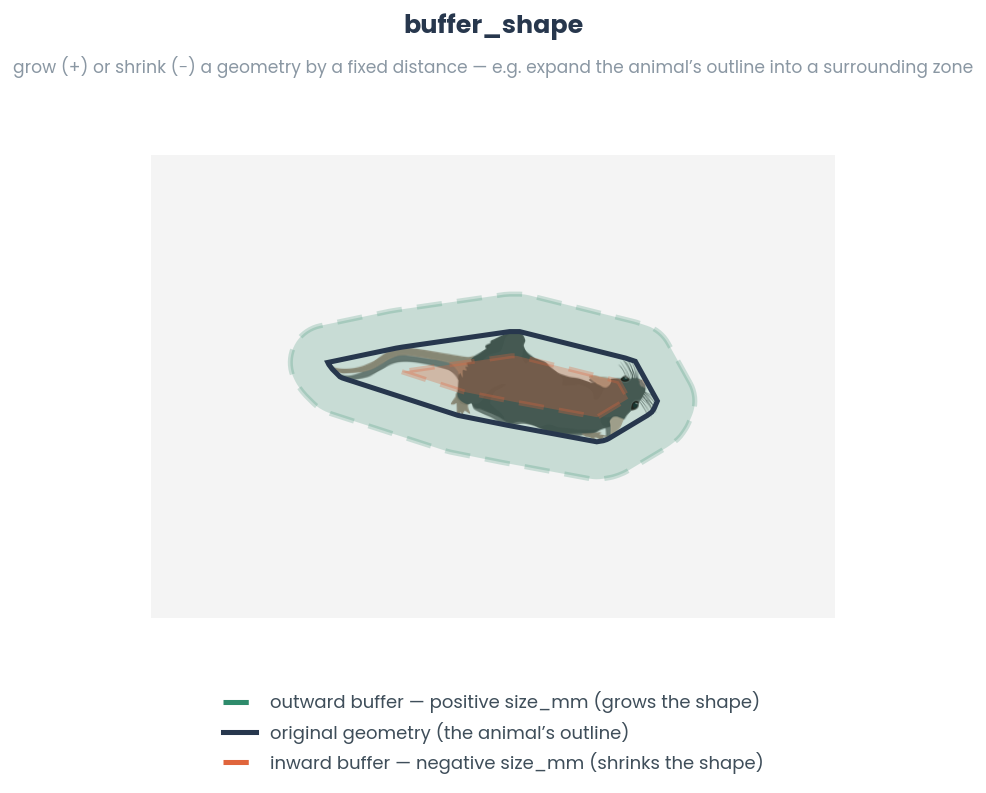
See also
For single core method, see
simba.mixins.geometry_mixin.GeometryMixin.buffer_shape()- Parameters
geometries (List[Union[Polygon, LineString]]) – List of geometries to buffer.
size_mm (int) – Buffer size in millimeters.
pixels_per_mm (float) – Pixels per millimeter conversion factor.
core_cnt (int) – Number of CPU cores to use for parallel processing. Default is -1, which uses all available cores. Ignored if pool is provided.
cap_style (Literal["round", "square", "flat"]) – Style of line cap for buffering. Options: ‘round’, ‘square’, ‘flat’. Default ‘round’.
pool (Optional[multiprocessing.Pool]) – Optional multiprocessing pool to reuse. If None, creates a new pool. Default None.
- Returns
List of buffered polygons.
- Return type
List[Polygon]
- GeometryMixin.multiframe_minimum_rotated_rectangle(shapes, video_name=None, verbose=False, animal_name=None, core_cnt=- 1, pool=None)[source]
Compute the minimum rotated rectangle for each Polygon in a list using multiprocessing.
See also
For single-core method, see
simba.mixins.geometry_mixin.GeometryMixin.minimum_rotated_rectangle()- Parameters
shapes (List[Polygon]) – List of Polygons.
video_name (Optional[str]) – Optional video name to print (if verbose is True).
animal_name (Optional[str]) – Optional animal name to print (if verbose is True).
verbose (Optional[bool]) – If True, prints progress.
core_cnt (int) – Number of CPU cores to use for parallel processing. Default is -1, which uses all available cores. Ignored if pool is provided.
pool (Optional[multiprocessing.Pool]) – Optional multiprocessing pool to reuse. If None, creates a new pool. Default None.
- Returns
A list of rotated rectangles of size len(shapes).
- Return type
List[Polygon]
- Example
>>> df = read_df(file_path=r"C:/troubleshooting/two_black_animals_14bp/project_folder/csv/outlier_corrected_movement_location/Together_2.csv", file_type='csv').astype(int)
>>> animal_1_cols = [x for x in df.columns if '_1_' in x and not '_p' in x]
>>> animal_1_arr = df[animal_1_cols].values.reshape(len(df), int(len(animal_1_cols)/ 2), 2)
>>> animal_1_geo = GeometryMixin.bodyparts_to_polygon(data=animal_1_arr)
>>> GeometryMixin().multiframe_minimum_rotated_rectangle(shapes=animal_1_geo)
- GeometryMixin.multiframe_union(shapes, core_cnt=- 1, pool=None)[source]
Join multiple shapes frame-wise into a single shape/
Can be useful to get more accurate representation of animal by joining animal hull (Polygon) together with animal tail (Linestring or second polygon).
See also
For single core method, see
simba.mixins.geometry_mixin.GeometryMixin.union()- Parameters
shapes (Iterable[Union[LineString, MultiLineString, Polygon]]) – Iterable collection of shapes (LineString, MultiLineString, or Polygon) to be merged. E.g, of size NxM where N is the number of frames and M is the number of shapes in each frame.
core_cnt (int) – The number of CPU cores to use for parallel processing; defaults to -1, which uses all available cores. Ignored if pool is provided.
pool (Optional[multiprocessing.Pool]) – Optional multiprocessing pool to reuse. If None, creates a new pool. Default None.
- Returns
An iterable of merged shapes, where each frame is combined into a single shape.
- Return type
List[Union[LineString, MultiLineString, Polygon]]
- Example
>>> data_1 = np.random.randint(0, 100, (5000, 2)).reshape(1000,-1, 2)
>>> data_2 = np.random.randint(0, 100, (5000, 2)).reshape(1000,-1, 2)
>>> polygon_1 = GeometryMixin().multiframe_bodyparts_to_polygon(data=data_1)
>>> polygon_2 = GeometryMixin().multiframe_bodyparts_to_polygon(data=data_2)
>>> data = np.array([polygon_1, polygon_2]).T
>>> unions = GeometryMixin().multiframe_union(shapes=data)
- GeometryMixin.multiframe_difference(shapes, core_cnt=- 1, verbose=False, animal_names=None, video_name=None, pool=None)[source]
Compute the multi-frame difference for a collection of shapes using parallel processing.
See also
For single core method, see
simba.mixins.geometry_mixin.GeometryMixin.difference()- Parameters
shapes (Iterable[Union[LineString, Polygon, MultiPolygon]]) – A collection of shapes, where each shape is a list containing two geometries.
core_cnt (int) – The number of CPU cores to use for parallel processing. Default is -1, which automatically detects the available cores. Ignored if pool is provided.
verbose (Optional[bool]) – If True, print progress messages during computation. Default is False.
animal_names (Optional[str]) – Optional string representing the names of animals for informative messages.
video_name (Optional[str]) – Optional string representing the name of the video for informative messages.
pool (Optional[multiprocessing.Pool]) – Optional multiprocessing pool to reuse. If None, creates a new pool. Default None.
- Returns
A list of geometries representing the multi-frame difference.
- Return type
List[Union[Polygon, MultiPolygon]]
- GeometryMixin.multiframe_symmetric_difference(shapes, core_cnt=- 1, pool=None)[source]
Compute the symmetric differences between corresponding LineString or MultiLineString geometries using multiprocessing.
Computes a new geometry consisting of the parts that are exclusive to each input geometry.
In other words, it includes the parts that are unique to each geometry while excluding the parts that are common to both.
See also
For single core method, see
simba.mixins.geometry_mixin.GeometryMixin.symmetric_difference()- Parameters
shapes (Iterable[Union[LineString, MultiLineString, Polygon]]) – Iterable collection of shapes where each element is a list containing two geometries.
core_cnt (int) – Number of CPU cores to use for parallel processing. Default is -1, which uses all available cores. Ignored if pool is provided.
pool (Optional[multiprocessing.Pool]) – Optional multiprocessing pool to reuse. If None, creates a new pool. Default None.
- Returns
List of symmetric difference geometries.
- Return type
List[Union[LineString, MultiLineString, Polygon]]
- Example
>>> data_1 = np.random.randint(0, 100, (5000, 2)).reshape(1000,-1, 2)
>>> data_2 = np.random.randint(0, 100, (5000, 2)).reshape(1000,-1, 2)
>>> polygon_1 = GeometryMixin().multiframe_bodyparts_to_polygon(data=data_1)
>>> polygon_2 = GeometryMixin().multiframe_bodyparts_to_polygon(data=data_2)
>>> data = np.array([polygon_1, polygon_2]).T
>>> symmetric_differences = GeometryMixin().multiframe_symmetric_difference(shapes=data)
- GeometryMixin.multiframe_compute_pct_shape_overlap(shape_1, shape_2, core_cnt=- 1, video_name=None, verbose=False, animal_names=None, denominator='difference', pool=None)[source]
Compute the percentage overlap between corresponding Polygons in two lists.

See also
simba.mixins.geometry_mixin.GeometryMixin.compute_pct_shape_overlap(). For Boolean rather than percent results (if geometries are overlapping), seesimba.mixins.geometry_mixin.GeometryMixin.multiframe_compute_shape_overlap()- Parameters
shape_1 (List[Polygon]) – List of Polygons.
shape_2 (List[Polygon]) – List of Polygons with the same length as shape_1.
core_cnt (int) – Number of CPU cores to use for parallel processing. Default is -1, which uses all available cores. Ignored if pool is provided.
video_name (Optional[str]) – If not None, then the name of the video being processed for interpretable progress msgs.
verbose (Optional[bool]) – If True, then prints interpretable progress msgs.
animal_names (Optional[Tuple[str]]) – If not None, then a two-tuple of animal names (or alternative shape names) interpretable progress msgs.
denominator (Optional[Literal["difference", "shape_1", "shape_2"]]) – Denominator for percentage calculation. “difference” uses union minus intersection, “shape_1” uses shape_1 area, “shape_2” uses shape_2 area. Default: “difference”.
pool (Optional[multiprocessing.Pool]) – Optional multiprocessing pool to reuse. If None, creates a new pool. Default None.
- Returns
List of length
shape_1with percentage overlap between corresponding Polygons.- Return type
np.ndarray
- Example
>>> df = read_df(file_path=r"C:/troubleshooting/two_black_animals_14bp/project_folder/csv/outlier_corrected_movement_location/Together_2.csv", file_type='csv').astype(int)
>>> animal_1_cols = [x for x in df.columns if '_1_' in x and not '_p' in x]
>>> animal_2_cols = [x for x in df.columns if '_2_' in x and not '_p' in x]
>>> animal_1_arr = df[animal_1_cols].values.reshape(len(df), int(len(animal_1_cols)/ 2), 2)
>>> animal_2_arr = df[animal_2_cols].values.reshape(len(df), int(len(animal_1_cols)/ 2), 2)
>>> animal_1_geo = GeometryMixin.bodyparts_to_polygon(data=animal_1_arr)
>>> animal_2_geo = GeometryMixin.bodyparts_to_polygon(data=animal_2_arr)
>>> GeometryMixin().multiframe_compute_pct_shape_overlap(shape_1=animal_1_geo, shape_2=animal_2_geo)
- GeometryMixin.multiframe_compute_shape_overlap(shape_1, shape_2, core_cnt=- 1, verbose=False, names=None, pool=None)[source]
Multiprocess compute overlap between corresponding Polygons in two lists.
Note
This function only returns Boolean if two shapes are overlapping or not overlapping. If the amount of overlap is required, use
simba.mixins.geometry_mixin.GeometryMixin.compute_pct_shape_overlap()ofsimba.mixins.geometry_mixin.GeometryMixin.multiframe_compute_pct_shape_overlap().Note that shape_1 and shape_2 entries can be NoneType. If so no overlap will be in the output for that observation.
See also
simba.mixins.geometry_mixin.GeometryMixin.compute_shape_overlap(),simba.mixins.geometry_mixin.GeometryMixin.compute_pct_shape_overlap(),simba.mixins.geometry_mixin.GeometryMixin.multiframe_compute_pct_shape_overlap()- Parameters
shape_1 (List[Union[Polygon, LineString, None]]) – List of Polygons, LineStrings, or None.
shape_2 (List[Union[Polygon, LineString, None]]) – List of Polygons, LineStrings, or None with the same length as shape_1.
core_cnt (int) – Number of CPU cores to use for parallel processing. Default is -1, which uses all available cores. Ignored if pool is provided.
verbose (Optional[bool]) – If True, prints progress messages. Default False.
names (Optional[Tuple[str]]) – Optional tuple of names for progress messages.
pool (Optional[multiprocessing.Pool]) – Optional multiprocessing pool to reuse. If None, creates a new pool. Default None.
- Return List[int]
List of overlap between corresponding Polygons. If overlap 1, else 0.
- Example
>>> df = read_df(file_path=r"C:/troubleshooting/two_black_animals_14bp/project_folder/csv/outlier_corrected_movement_location/Together_2.csv", file_type='csv').astype(int)
>>> animal_1_cols = [x for x in df.columns if '_1_' in x and not '_p' in x]
>>> animal_2_cols = [x for x in df.columns if '_2_' in x and not '_p' in x]
>>> animal_1_arr = df[animal_1_cols].values.reshape(len(df), int(len(animal_1_cols)/ 2), 2)
>>> animal_2_arr = df[animal_2_cols].values.reshape(len(df), int(len(animal_1_cols)/ 2), 2)
>>> animal_1_geo = GeometryMixin.bodyparts_to_polygon(data=animal_1_arr)
>>> animal_2_geo = GeometryMixin.bodyparts_to_polygon(data=animal_2_arr)
>>> GeometryMixin().multiframe_compute_shape_overlap(shape_1=animal_1_geo, shape_2=animal_2_geo)
- GeometryMixin.multiframe_is_shape_covered(shape_1, shape_2, core_cnt=- 1, pool=None)[source]
For each shape in time-series of shapes, check if another shape in the same time-series fully covers the first shape.

See also
For single core method, see
simba.mixins.geometry_mixin.GeometryMixin.is_shape_covered()- Parameters
shape_1 (List[Union[LineString, Polygon, MultiPolygon]]) – List of geometries to check if covered.
shape_2 (List[Union[LineString, Polygon, MultiPolygon]]) – List of geometries that may cover shape_1.
core_cnt (Optional[int]) – Number of CPU cores to use for parallel processing. Default is -1, which uses all available cores. Ignored if pool is provided.
pool (Optional[multiprocessing.Pool]) – Optional multiprocessing pool to reuse. If None, creates a new pool. Default None.
- Returns
List of booleans indicating if each shape_1 is covered by corresponding shape_2.
- Return type
List[bool]
- Example
>>> shape_1 = GeometryMixin().multiframe_bodyparts_to_polygon(data=np.random.randint(0, 200, (100, 6, 2)))
>>> shape_2 = [Polygon([[0, 0], [20, 20], [20, 10], [10, 20]]) for x in range(len(shape_1))]
>>> GeometryMixin.multiframe_is_shape_covered(shape_1=shape_1, shape_2=shape_2, core_cnt=3)
- GeometryMixin.multiframe_area(shapes, pixels_per_mm=1.0, core_cnt=- 1, verbose=False, video_name=False, animal_names=False, pool=None)[source]
Calculate the area of geometries in square millimeters using multiprocessing.
Note
If certain that the input data are valid Polygons, consider using
simba.feature_extractors.perimeter_jit.jitted_hull()orsimba.data_processors.cuda.geometry.poly_area()for numba jit and CUDA acceleration, respectively.- Parameters
shapes (List[Union[MultiPolygon, Polygon]]) – List of polygons of Multipolygons.
pixels_per_mm (float) – Pixel per millimeter conversion factor. Default: 1.0.
core_cnt (Optional[int]) – The number of CPU cores to use for parallel processing. Default is -1, which automatically detects the available cores. Ignored if pool is provided.
verbose (Optional[bool]) – If True, prints progress.
video_name (Optional[str]) – If string, prints video name string during progress if verbose.
animal_names (Optional[str]) – If string, prints animal name during progress if verbose.
pool (Optional[multiprocessing.Pool]) – Optional multiprocessing pool to reuse. If None, creates a new pool. Default None.
- Returns
List of length
len(shapes)with area values.- Return type
List[float]
- GeometryMixin.multiframe_length(shapes, pixels_per_mm, core_cnt=- 1, unit='mm', pool=None)[source]
Calculate the length of LineStrings using multiprocessing.
See also
For single core process, see
simba.mixins.geometry_mixin.GeometryMixin.length()- Parameters
shapes (List[Union[LineString, MultiLineString]]) – List of LineString or MultiLineString geometries.
pixels_per_mm (float) – Pixels per millimeter conversion factor.
core_cnt (int) – Number of CPU cores to use for parallel processing. Default is -1, which uses all available cores. Ignored if pool is provided.
unit (Literal["mm", "cm", "dm", "m"]) – Unit of measurement for the result. Options: ‘mm’, ‘cm’, ‘dm’, ‘m’. Default: ‘mm’.
pool (Optional[multiprocessing.Pool]) – Optional multiprocessing pool to reuse. If None, creates a new pool. Default None.
- Returns
List of lengths in the specified unit.
- Return type
List[float]
- Example
>>> data = np.random.randint(0, 100, (5000, 2))
>>> data = data.reshape(2500,-1, data.shape[1])
>>> lines = GeometryMixin().multiframe_bodyparts_to_line(data=data)
>>> lengths = GeometryMixin().multiframe_length(shapes=lines, pixels_per_mm=1.0)
- GeometryMixin.multiframe_shape_distance(shapes_a, shapes_b, pixels_per_mm=1, unit='mm', verbose=False, core_cnt=- 1, maxchildpertask=8000, shape_names=None, pool=None)[source]
Compute shape distances between corresponding shapes in two lists of LineString or Polygon geometries for multiple frames.
Note
The distance is the minimum Euclidean distance between any point on geometry A and any point on geometry B.
See also
For single core method, see
simba.mixins.geometry_mixin.GeometryMixin.shape_distance()
- Parameters
shapes_a (List[Union[LineString, Polygon]]) – List of LineString or Polygon geometries.
shapes_b (List[Union[LineString, Polygon]]) – List of LineString or Polygon geometries with the same length as shapes_a.
pixels_per_mm (Optional[float]) – Conversion factor from pixels to millimeters. Default 1.
unit (Literal['mm', 'cm', 'dm', 'm']) – Unit of measurement for the result. Options: ‘mm’, ‘cm’, ‘dm’, ‘m’. Default: ‘mm’.
verbose (bool) – If True, prints progress information during computation. Default False.
core_cnt (int) – Number of CPU cores to use for parallel processing. Default is -1, which uses all available cores. Ignored if pool is provided.
maxchildpertask (int) – Maximum number of tasks per child process before restarting. Default is from Defaults.MAXIMUM_MAX_TASK_PER_CHILD. Ignored if pool is provided.
shape_names (Optional[str]) – Optional name identifier for the shapes being compared, used in verbose output. Default None.
pool (Optional[multiprocessing.Pool]) – Optional multiprocessing pool to reuse. If None, creates a new pool. Default None.
- Returns
List of shape distances between corresponding shapes in passed unit.
- Return type
List[float]
- Example
>>> df = read_df(file_path=r"C:/troubleshooting/two_black_animals_14bp/project_folder/csv/outlier_corrected_movement_location/Together_2.csv", file_type='csv').astype(int)
>>> animal_1_cols = [x for x in df.columns if '_1_' in x and not '_p' in x]
>>> animal_2_cols = [x for x in df.columns if '_2_' in x and not '_p' in x]
>>> animal_1_arr = df[animal_1_cols].values.reshape(len(df), int(len(animal_1_cols)/ 2), 2)
>>> animal_2_arr = df[animal_2_cols].values.reshape(len(df), int(len(animal_1_cols)/ 2), 2)
>>> animal_1_geo = GeometryMixin.bodyparts_to_polygon(data=animal_1_arr)
>>> animal_2_geo = GeometryMixin.bodyparts_to_polygon(data=animal_2_arr)
>>> GeometryMixin().multiframe_shape_distance(shapes_a=animal_1_geo, shapes_b=animal_2_geo, pixels_per_mm=2.12, unit='cm')
- GeometryMixin.multiframe_hausdorff_distance(geometries, lag=1, sample_rate=1, core_cnt=- 1, pool=None)[source]
The Hausdorff distance measure of the similarity between sequential time-series geometries.
See also
For single core method, see
simba.mixins.geometry_mixin.GeometryMixin.hausdorff_distance()- Parameters
geometries (List[Union[Polygon, LineString]]) – List of geometries.
lag (Optional[Union[float, int]]) – If int, then the number of frames preceeding the current frame to compare the geometry with. Eg., 1 compares the geometry to the immediately preceeding geometry. If float, then evaluated as seconds. E.g., 1 compares the geometry to the geometry 1s prior in the geometries list.
sample_rate (Optional[Union[float, int]]) – The FPS of the recording. Used as conversion factor if lag is a float.
core_cnt (Optional[int]) – The number of cores to use for parallel processing. Default is -1, which uses the maximum available cores. Ignored if pool is provided.
pool (Optional[multiprocessing.Pool]) – Optional multiprocessing pool to reuse. If None, creates a new pool. Default None.
- Returns
List of Hausdorff distance measures.
- Return type
List[float]
- Example
>>> df = read_df(file_path='/Users/simon/Desktop/envs/simba/troubleshooting/mouse_open_field/project_folder/csv/outlier_corrected_movement_location/SI_DAY3_308_CD1_PRESENT.csv', file_type='csv')
>>> cols = [x for x in df.columns if not x.endswith('_p')]
>>> data = df[cols].values.reshape(len(df), -1 , 2).astype(np.int)
>>> geometries = GeometryMixin().multiframe_bodyparts_to_polygon(data=data, pixels_per_mm=1, parallel_offset=1, verbose=False, core_cnt=-1)
>>> hausdorff_distances = GeometryMixin.multiframe_hausdorff_distance(geometries=geometries)
Geometry GPU methods
- simba.data_processors.cuda.geometry.directionality_to_nonstatic_target(left_ear, right_ear, nose, target, verbose=False)[source]
GPU method to calculate if an animal is directing towards a moving point location given the target location and the left ear, right ear, and nose coordinates of the observer.
EXPECTED RUNTIMES
Observations Frames
Mean (s)
Std (s)
Min (s)
Max (s)
10,000
0.147
0.2064
0.0008
0.4389
100,000
0.0056
0.0005
0.0052
0.0063
1,000,000
0.0438
0.0235
0.0239
0.0768
10,000,000
0.2133
0.0046
0.2083
0.2195
50,000,000
1.5716
0.2608
1.2548
1.8936
NVIDIA GeForce RTX 4070
3 ITERATIONS

See also
Input left ear, right ear, and nose coordinates of the observer is returned by
simba.mixins.feature_extraction_mixin.FeatureExtractionMixin.check_directionality_viable()For non-GPU numba based CPU method, see
simba.mixins.feature_extraction_mixin.FeatureExtractionMixin.jitted_line_crosses_to_nonstatic_targets()If the target is static, consider
simba.mixins.feature_extraction_mixin.FeatureExtractionMixin.jitted_line_crosses_to_static_targets()orsimba.data_processors.cuda.geometry.directionality_to_static_targets()for GPU acceleration.- Parameters
left_ear (np.ndarray) – 2D array of size len(frames) x 2 with the coordinates of the observer animals left ear
right_ear (np.ndarray) – 2D array of size len(frames) x 2 with the coordinates of the observer animals right ear
nose (np.ndarray) – 2D array of size len(frames) x 2 with the coordinates of the observer animals nose
target (np.ndarray) – 1D array of with x,y of target location
- Returns
2D array of size len(frames) x 4. First column represent the side of the observer that the target is in view. 0 = Left side, 1 = Right side, 2 = Not in view. Second and third column represent the x and y location of the observer animals
eye(half-way between the ear and the nose). Fourth column represent if target is view (bool).- Return type
np.ndarray
- Example
>>> left_ear = np.random.randint(0, 500, (100, 2))
>>> right_ear = np.random.randint(0, 500, (100, 2))
>>> nose = np.random.randint(0, 500, (100, 2))
>>> target = np.random.randint(0, 500, (100, 2))
>>> directionality_to_nonstatic_target(left_ear=left_ear, right_ear=right_ear, nose=nose, target=target)
- simba.data_processors.cuda.geometry.directionality_to_static_targets(left_ear, right_ear, nose, target, verbose=False)[source]
GPU helper to calculate if an animal is directing towards a static location (e.g., ROI centroid), given the target location and the left ear, right ear, and nose coordinates of the observer.
Note
Input left ear, right ear, and nose coordinates of the observer is returned by
simba.mixins.feature_extraction_mixin.FeatureExtractionMixin.check_directionality_viable()See also
For numba based CPU method, see
simba.mixins.feature_extraction_mixin.FeatureExtractionMixin.jitted_line_crosses_to_static_targets()If the target is moving, considersimba.mixins.feature_extraction_mixin.FeatureExtractionMixin.jitted_line_crosses_to_nonstatic_targets().
EXPECTED RUNTIMES
FRAMES (MILLIONS)
GPU TIME (S)
GPU TIME (STEV)
10
0.1005
0.02
20
0.1918
0.04
40
0.4382
0.094
80
0.912
0.2904
160
2.8023
1.2692
240
5.7812
3.85148
NVIDIA GeForce RTX 4070
3 ITERATIONS
- Parameters
left_ear (np.ndarray) – 2D array of size len(frames) x 2 with the coordinates of the observer animals left ear
right_ear (np.ndarray) – 2D array of size len(frames) x 2 with the coordinates of the observer animals right ear
nose (np.ndarray) – 2D array of size len(frames) x 2 with the coordinates of the observer animals nose
target (np.ndarray) – 1D array of with x,y of target location
- Returns
2D array of size len(frames) x 4. First column represent the side of the observer that the target is in view. 0 = Left side, 1 = Right side, 2 = Not in view. Second and third column represent the x and y location of the observer animals
eye(half-way between the ear and the nose). Fourth column represent if target is view (bool).- Return type
np.ndarray
- Example
>>> left_ear = np.random.randint(0, 500, (100, 2))
>>> right_ear = np.random.randint(0, 500, (100, 2))
>>> nose = np.random.randint(0, 500, (100, 2))
>>> target = np.random.randint(0, 500, (2))
>>> directionality_to_static_targets(left_ear=left_ear, right_ear=right_ear, nose=nose, target=target)
- simba.data_processors.cuda.geometry.find_midpoints(x, y, percentile=0.5, batch_size=15000000)[source]
Calculate the midpoints between corresponding points in arrays x and y based on a given percentile using GPU acceleration.
For example, calculate the midpoint between the animal ears (to get presumed
nape) or lateral sides (to get presumed center of mass), or nose and left ear (to get left eye) etc.This function computes the midpoints between each pair of points (x[i], y[i]) from the input arrays x and y. The midpoint is calculated by taking a weighted sum of the differences along each axis, where the weight is determined by the specified percentile. The computation is performed in batches to handle large datasets efficiently.
See also
For CPU function see
simba.mixins.feature_extraction_mixin.FeatureExtractionMixin.find_midpoints().
EXPECTED RUNTIMES
OBSERVATIONS (MILLIONS)
TIME (S)
STD (S)
2
0.014
0.004
4
0.022
0.015
8
0.039
0.025
16
0.073
0.057
32
0.161
0.102
64
0.290
0.205
128
0.609
0.477
512
2.100
0.9
- Parameters
x (np.ndarray) – An array of shape (n, 2) representing the x-coordinates of n points.
y (np.ndarray) – An array of shape (n, 2) representing the y-coordinates of n points.
percentile – A float value between 0 and 1 indicating the percentile to use when calculating the midpoints. The default value is 0.5, which corresponds to the middle.
batch_size (Optional[int]) – An integer specifying the batch size for processing the input arrays. Larger batch sizes will use more memory but may be faster. The default value is 15 million (1.5e+7).
- Returns
An array of shape (n, 2) containing the calculated midpoints for each pair of corresponding points in x and y.
- Return type
np.ndarray
- Example
>>> x = np.random.randint(0, 100, (100, 2)).astype(np.int8)
>>> y = np.random.randint(0, 100, (100, 2)).astype(np.int8)
>>> p = find_midpoints(x=x, y=y)
- simba.data_processors.cuda.geometry.get_convex_hull(pts)[source]
Compute the convex hull for each set of 2D points in parallel using CUDA and the Jarvis March algorithm. This function processes a batch of 2D point sets (frames) and computes the convex hull for each set. The convex hull of a set of points is the smallest convex polygon that contains all the points.
The function uses a variant of the Gift Wrapping algorithm (Jarvis March) to compute the convex hull. It finds the leftmost point, then iteratively determines the next point on the hull by checking the orientation of the remaining points. The results are stored in the results array, where each row corresponds to a frame and contains the indices of the points forming the convex hull. Points not on the hull are marked with -1.
EXPECTED RUNTIMES
FRAMES
TIME (S)
110k
0.009
181k
0.014
327k
0.026
620k
0.049
1.2m
0.095
2.4m
0.18
4.7m
0.351
9m
0.865
17.9m
1.452
35.8m
5.695
71.6m
7.243
NVIDIA GeForce RTX 4070
7 body-parts
Note
Implements the Jarvis March (gift-wrapping) convex-hull algorithm (Jarvis, R. A., 1973, Information Processing Letters 2(1): 18-21).
See also
- Parameters
pts – A 3D numpy array of shape (M, N, 2) where: - M is the number of frames. - N is the number of points (body-parts) in each frame. - The last dimension (2) represents the x and y coordinates of each point.
- Returns
An upated 3D numpy array of shape (M, N, 2) consisting of the points in the hull.
- Return type
np.ndarray
- Example
>>> video_path = r"/mnt/c/troubleshooting/mitra/project_folder/videos/501_MA142_Gi_CNO_0514.mp4"
>>> data_path = r"/mnt/c/troubleshooting/mitra/project_folder/csv/outlier_corrected_movement_location/501_MA142_Gi_CNO_0514 - test.csv"
>>> df = read_df(file_path=data_path, file_type='csv')
>>> frame_data = df.values.reshape(len(df), -1, 2)
>>> x = get_convex_hull(frame_data)
- simba.data_processors.cuda.geometry.hausdorff_distance_cuda(verts_a, verts_b, counts_a=None, counts_b=None)[source]
Compute the discrete Hausdorff distance between each pair of polygons (how much one shape’s outline differs from the other’s - larger means less similar), batched on the GPU.
Note
Matches shapely to sub-pixel accuracy (float round-off).
EXPECTED RUNTIMES
N PAIRS
INPUT
MEAN (S)
PAIRS/S
10k
tiny
0.0043
2.3m
100k
4mb
0.0159
6.3m
1m
0.3gb
0.1237
8.1m
10m
2.6gb
1.2261
8.2m
NVIDIA GeForce RTX 4070 (12GB)
16-vertex polygon pairs; mean of 3 runs; exact vs shapely; ~88x vs shapely loop
input arrays are the memory constraint (~30-40M in-VRAM ceiling; larger spills to paging)
See also
CPU (shapely) version:
simba.mixins.geometry_mixin.GeometryMixin.hausdorff_distance().- Parameters
verts_a (np.ndarray) – (n_pairs, max_verts, 2) vertices of the first polygon in each pair.
verts_b (np.ndarray) – (n_pairs, max_verts, 2) vertices of the second polygon in each pair.
counts_a (Optional[np.ndarray]) – Only for ragged input - a (n_pairs,) array of the valid vertex count per first polygon when polygons of different vertex counts are packed into
max_vertsby padding. LeaveNone(default) to use allmax_vertsvertices.counts_b (Optional[np.ndarray]) – As
counts_a, for the second polygon. DefaultNone.
- Returns
(n_pairs,) float32 discrete Hausdorff distance per pair.
- Return type
np.ndarray
- Example
>>> d = hausdorff_distance_cuda(verts_a, verts_b)                          # equal-sized polygons
>>> d = hausdorff_distance_cuda(verts_a, verts_b, counts_a=ca, counts_b=cb)   # ragged (padded) polygons
- simba.data_processors.cuda.geometry.is_inside_circle(x, y, r)[source]
Determines whether points in array x are inside the circle with center
yand radiusr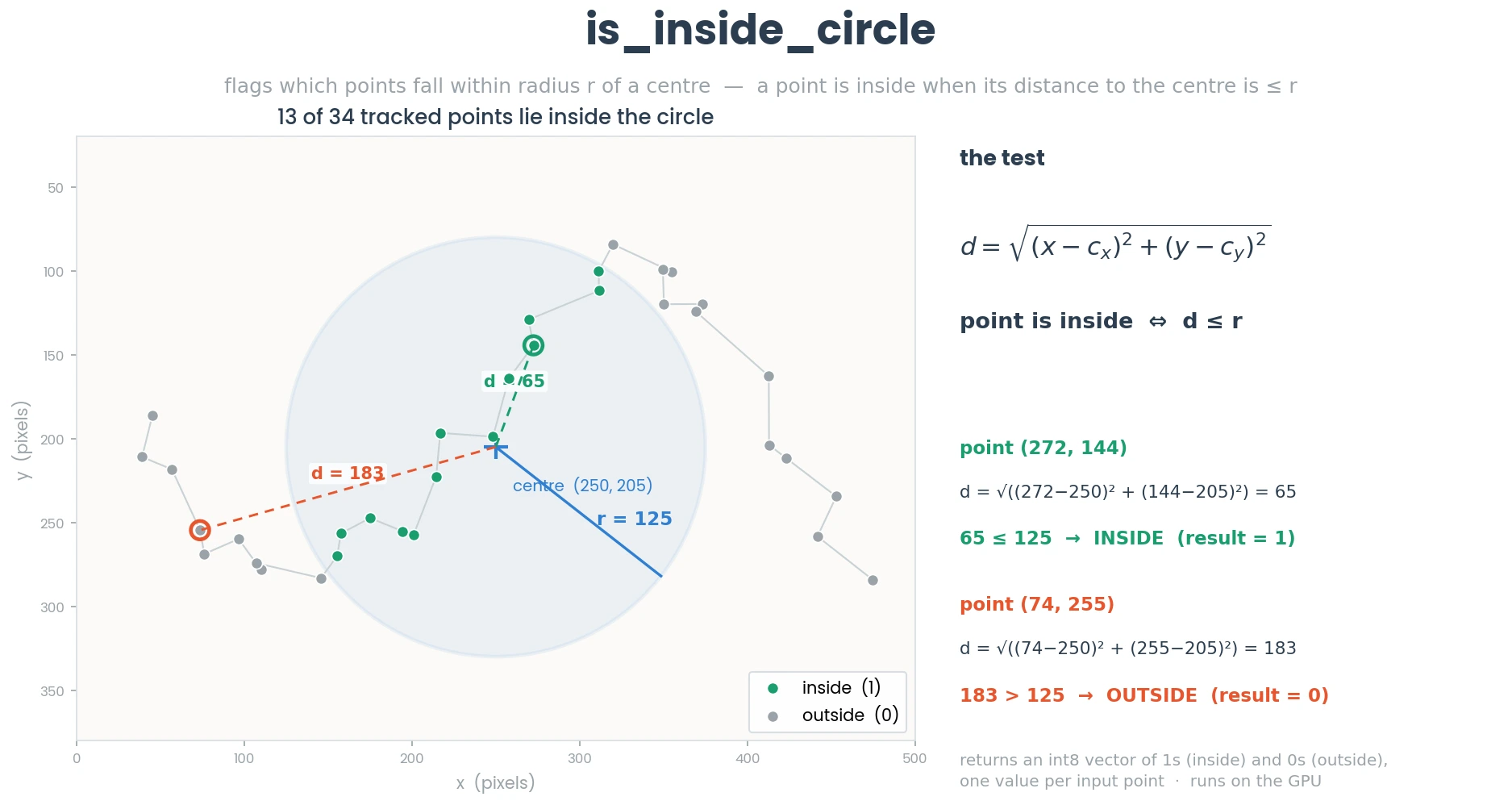
EXPECTED RUNTIMES
FRAMES (MILLIONS)
CUDA JIT GPU (S)
2
0.006
4
0.007
8
0.016
16
0.028
32
0.054
64
0.114
128
0.319
256
0.44
512
1.085
1000
2.966
- Parameters
x (np.ndarray) – 2d numeric np.ndarray size (N, 2).
y (np.ndarray) – 2d numeric np.ndarray size (1, 2) representing the center of the circle.
r (float) – The radius of the circle.
- Returns
2d numeric boolean (N, 1) with 1s representing the point being inside the circle and 0 if the point is outside the rectangle.
- Return type
1d np.ndarray vector.
- simba.data_processors.cuda.geometry.is_inside_polygon(x, y)[source]
Determines whether points in array x are inside the polygon defined by the vertices in array y.
This function uses GPU acceleration to perform the point-in-polygon test. The points in x are tested against the polygon defined by the vertices in y. The result is an array where each element indicates whether the corresponding point is inside the polygon.

EXPECTED RUNTIMES
FRAMES (MILLIONS)
CUDA JIT GPU (S)
NUMBA CPU TIME (S)
2
0.002
0.038
4
0.004
0.082
8
0.006
0.170
16
0.009
0.295
32
0.021
0.823
64
0.041
1.395
128
0.101
2.688
256
0.369
4.640
512
0.614
10.940
1000
1.293
19.947
See also
For jitted CPU function see
framewise_inside_polygon_roi()- Parameters
x (np.ndarray) – An array of shape (N, 2) where each row represents a point in 2D space. The points are checked against the polygon.
y (np.ndarray) – An array of shape (M, 2) where each row represents a vertex of the polygon in 2D space.
- Returns
An array of shape (N,) where each element is 1 if the corresponding point in x is inside the polygon defined by y, and 0 otherwise.
- Return type
np.ndarray
- Example
>>> x = np.random.randint(0, 200, (i, 2)).astype(np.int8)
>>> y = np.random.randint(0, 200, (4, 2)).astype(np.int8)
>>> results = is_inside_polygon(x=x, y=y)
>>> print(results)
>>> [1 0 1 0 1 1 0 0 1 0]
- simba.data_processors.cuda.geometry.is_inside_rectangle(x, y)[source]
Determines whether points in array x are inside the rectangle defined by the top left and bottom right vertices in array y. 😍

EXPECTED RUNTIMES
FRAMES (MILLIONS)
CUDA JIT GPU (S)
NUMBA CPU TIME (S)
2
0.005
0.022
4
0.009
0.031
8
0.016
0.097
16
0.028
0.199
32
0.054
0.399
64
0.111
0.769
128
0.33
1.300
256
0.666
2.531
512
1.161
7.273
1000
3.828
13.342
See also
For numba CPU function see
framewise_inside_rectangle_roi()- Parameters
x (np.ndarray) – 2d numeric np.ndarray size (N, 2).
y (np.ndarray) – 2d numeric np.ndarray size (2, 2) (top left[x, y], bottom right[x, y])
- Returns
2d numeric boolean (N, 1) with 1s representing the point being inside the rectangle and 0 if the point is outside the rectangle.
- Return type
np.ndarray
- simba.data_processors.cuda.geometry.minimum_rotated_rectangle_cuda(data)[source]
Compute the minimum rotated rectangle (oriented bounding box, OBB) of each point set in a batch, on the GPU.
EXPECTED RUNTIMES
N SHAPES
MEAN (S)
SD (S)
SHAPES/S
1k
0.0012
0.0001
838k
10k
0.0016
0.0002
6.3m
100k
0.0090
0.0003
11.1m
1m
0.0814
0.0011
12.3m
NVIDIA GeForce RTX 4070
9 body-parts (K=9)
end-to-end (incl. host<->device); mean +/- SD of 3 runs
- Parameters
data (np.ndarray) – 3D array
(n_shapes, n_points, 2)of 2D (x, y) points.n_shapesis the number of shapes (usually video frames) andn_pointsthe number of points per shape (usually body-parts); i.e. a pose dataframe reshaped to(len(df), n_bodyparts, 2). Alln_pointspoints are used for every shape - one rectangle is computed per shape (per frame).- Returns
(n_shapes, 4, 2)int32 array of the four OBB corner (x, y) coordinates per shape, rounded to whole pixels (matching the CPUminimum_rotated_rectangle(..., return_type='array')).- Return type
np.ndarray
- Example
>>> df = read_df(file_path='.../Box1.csv')
>>> bp_cols = [x for x in df.columns if not x.endswith('_p')]
>>> data = df[bp_cols].values.reshape(len(df), len(bp_cols) // 2, 2)   # (n_frames, n_bodyparts, 2)
>>> rects = minimum_rotated_rectangle_cuda(data=data)                  # (n_frames, 4, 2) int32
See also
For the CPU counterpart, see
simba.mixins.geometry_mixin.GeometryMixin.minimum_rotated_rectangle().
- simba.data_processors.cuda.geometry.poly_area(data, pixels_per_mm=1.0, batch_size=5000000)[source]
Compute the area of a polygon using GPU acceleration.
This function calculates the area of polygons defined by sets of points in a 3D array. Each 2D slice along the first dimension represents a polygon, with each row corresponding to a point in the polygon and each column representing the x and y coordinates.
The computation is done in batches to handle large datasets efficiently.
See also

- Parameters
data – A 3D numpy array of shape (N, M, 2), where N is the number of polygons, M is the number of points per polygon, and 2 represents the x and y coordinates.
pixels_per_mm – Optional scaling factor to convert the area from pixels squared to square millimeters. Default is 1.0.
batch_size – Optional batch size for processing the data in chunks to fit in memory. Default is 0.5e+7.
- Returns
A 1D numpy array of shape (N,) containing the computed area of each polygon in square millimeters.
- Return type
np.ndarray
- simba.data_processors.cuda.geometry.shape_distance_cuda(verts_a, verts_b, counts_a=None, counts_b=None, pixels_per_mm=1.0, unit='mm')[source]
Compute the minimum distance between the boundaries of each pair of polygons (0 if the shapes overlap or touch), batched on the GPU.
Note
Matches shapely to sub-pixel accuracy (limited by integer-vertex rounding of the input).
EXPECTED RUNTIMES
N PAIRS
INPUT
MEAN (S)
SD (S)
PAIRS/S
10k
tiny
0.0012
0.0001
8.6m
100k
4mb
0.0060
0.0004
16.7m
1m
0.2gb
0.0520
0.0003
19.2m
10m
1.6gb
0.5440
0.0068
18.4m
50m
8gb
3.2388
0.6321
15.4m
NVIDIA GeForce RTX 4070 (12GB)
6-vertex polygon pairs; mean +/- SD of 3 runs
50m~8GB input is the in-VRAM ceiling (100m spills to paging)
See also
CPU (shapely) version:
simba.mixins.geometry_mixin.GeometryMixin.shape_distance().- Parameters
verts_a (np.ndarray) – (n_pairs, max_verts, 2) vertices of the first polygon in each pair.
verts_b (np.ndarray) – (n_pairs, max_verts, 2) vertices of the second polygon in each pair.
counts_a (Optional[np.ndarray]) – Only for ragged input - a (n_pairs,) array of the valid vertex count per first polygon when polygons of different vertex counts are packed into
max_vertsby padding. LeaveNone(default) to use allmax_vertsvertices.counts_b (Optional[np.ndarray]) – As
counts_a, for the second polygon. DefaultNone.pixels_per_mm (float) – Pixel-to-mm conversion. Default 1.0.
unit (str) – One of ‘mm’, ‘cm’, ‘dm’, ‘m’. Default ‘mm’.
- Returns
(n_pairs,) float32 distances in
unit(0 where shapes overlap/touch).- Return type
np.ndarray
- Example
>>> d = shape_distance_cuda(verts_a, verts_b, pixels_per_mm=1.0)                    # equal-sized polygons
>>> d = shape_distance_cuda(verts_a, verts_b, counts_a=ca, counts_b=cb)             # ragged (padded) polygons
Geometry plotter
Render the geometric shapes (bounding boxes, polygons, circles, lines) produced by the geometry methods as overlays on the original video, for visual inspection and figures.
- class simba.plotting.geometry_plotter.GeometryPlotter(geometries, video_name, config_path=None, pool=None, core_cnt=- 1, save_dir=None, thickness=None, circle_size=None, intersection_clr=None, bg_opacity=1, shape_opacity=0.3, outline_clr=None, time_slice=None, palette=None, colors=None, verbose=True)[source]
A class for creating overlay geometry visualization videos based on provided geometries and video name.
See also
For a GPU (NVDEC -> CUDA -> NVENC) version, see
GeometryPlotterNVENC. To quickly create static geometries on a white background (useful for troubleshooting unexpected geometries), seesimba.mixins.geometry_mixin.GeometryMixin.view_shapes()andsimba.mixins.geometry_mixin.GeometryMixin.geometry_video()- Parameters
geometries (List[List[Union[Polygon, LineString, MultiPolygon, MultiLineString, Point]]]) – List of lists of geometries for each frame. Each list contains as many entries as frames. Each list may represent a track or unique tracked object.
video_name (Union[str, os.PathLike]) – Name of the input video (path or filename; if filename,
config_pathmust be provided).config_path (Optional[Union[str, os.PathLike]]) – Path to SimBA configuration file. Required when
video_nameis a filename. Default: None.pool (Optional[multiprocessing.Pool]) – Reusable process pool for parallel rendering. If None, a pool is created from
core_cnt. Default: None.core_cnt (int) – Number of CPU cores to use for parallel processing. Ignored if
poolis provided. Default: -1 (all available cores).save_dir (Optional[Union[str, os.PathLike]]) – Directory to save output videos. Required when
config_pathis None. Default: None.thickness (Optional[int]) – Thickness of geometry outlines and line strokes in pixels. Default: None (falls back to
circle_size).circle_size (Optional[int]) – Radius in pixels for Point geometries. Default: None (auto from frame size).
intersection_clr (Optional[Tuple[int, int, int]]) – BGR color for geometries that intersect another. None keeps original fill color. Default: None.
bg_opacity (Optional[float]) – Background video opacity from 0.0 to 1.0. Default: 1.0.
shape_opacity (float) – Shape fill opacity from 0.0 to 1.0. Default: 0.3.
outline_clr (Optional[Tuple[int, int, int]]) – BGR color for polygon/line outlines. None disables outlines. Default: None.
time_slice (Optional[Dict[str, str]]) – Restrict rendering to a time range. Must have keys
'start_time'and'end_time'(HH:MM:SS). Default: None.palette (Optional[str]) – Color palette name for geometries. Provide either
paletteorcolors. Default: None.colors (Optional[List[Union[str, Tuple[int, int, int]]]]) – Custom colors per geometry (names from SimBA color dict or BGR tuples). Length must match
geometries. Default: None.verbose (Optional[bool]) – Print progress information. Default: True.
- Raises
InvalidInputError – If geometries are invalid, neither palette nor colors given, or video/config/save_dir inconsistent.
CountError – If the number of shapes in the geometries does not match the number of frames in the video.
- run()[source]
Geometry plotter (GPU)
- class simba.data_processors.cuda.geometry_plotter_nvenc.GeometryPlotterNVENC(video_path, geometries=None, roi_path=None, config_path=None, video_name=None, save_path=None, colors=None, palette=None, shape_opacity=0.5, bg_opacity=1.0, outline_clr=None, thickness=2, circle_size=None, codec='h264', buffer_size=16, n_workers=None, verbose=True)[source]
Overlay geometries on a video, fully on the GPU (NVDEC -> CUDA -> NVENC). GPU-only.
GPU counterpart of
GeometryPlotter. See the module docstring for the supported-geometry scope (filled Polygon + Point, optional outlines; interiors/intersection- colouring are not yet implemented). ROIs can be loaded directly withfrom_roi().See also
Full-featured CPU version:
GeometryPlotter.Measured runtime (RTX 4070, h264, threaded decode, n_workers=1) Resolution
Frames
Geometries
Time (s)
Encode FPS
800x600
108000
2 polygons
77.8
1388
1280x720
108000
3 ROIs (rect/circle/polygon)
110.1
962
Provide the geometries as exactly ONE of:
geometries(a per-frame list),roi_path(a SimBAROI_definitions.h5), orconfig_path(a SimBA project).from_roi()is a thin convenience wrapper around theroi_path/config_pathinputs with outline-only defaults.- Parameters
video_path (Union[str, os.PathLike]) – Path to the video to overlay onto.
geometries (Optional[List[List]]) – List (per geometry/track) of per-frame shapely geometries, as for the CPU
GeometryPlotter. Requirescolorsorpalette.roi_path (Optional[Union[str, os.PathLike]]) – Path to a SimBA
ROI_definitions.h5; its ROIs (with their own colours) are drawn. Alternative togeometries.config_path (Optional[Union[str, os.PathLike]]) – Path to a SimBA
project_config.inito read ROIs from the project. Alternative togeometries/roi_path.video_name (Optional[str]) – When reading ROIs, the video whose ROIs to draw. Defaults to the
video_pathfile name.save_path (Union[str, os.PathLike]) – Output path. If None,
<video>_geometry.mp4next to the source.colors (Optional[List[Union[str, Tuple[int,int,int]]]]) – One colour per geometry (BGR tuple or SimBA colour name). Used with
geometries; provide this orpalette.palette (Optional[str]) – Colour palette name (used with
geometriesifcolorsis None).shape_opacity (float) – Fill opacity 0-1 (0 = no fill, outline only). Default 0.5.
bg_opacity (float) – Background opacity 0-1. Default 1.0.
outline_clr (Optional[Tuple[int,int,int]]) – BGR colour for polygon/circle outlines. None = no outline. Default None.
thickness (Optional[int]) – Outline thickness in pixels (used when
outline_clris set). Default 2.circle_size (Optional[int]) – Radius for Point geometries. Default: auto from frame size.
codec (str) – NVENC codec (‘h264’, ‘hevc’, ‘av1’). Default ‘h264’.
buffer_size (int) – Threaded NVDEC read-ahead per worker. Default 16.
n_workers (Optional[int]) – Parallel decode/encode pipelines; None auto-detects NVDEC count. Default None.
verbose (bool) – Print progress. Default True.
- Example
>>> # per-frame geometries:
>>> GeometryPlotterNVENC(video_path='in.mp4', geometries=geos, colors=['Red', 'Green'], save_path='out.mp4').run()
>>> # or straight from a SimBA ROI file:
>>> GeometryPlotterNVENC(video_path='in.mp4', roi_path='ROI_definitions.h5', save_path='out.mp4', outline_clr=(0, 0, 255)).run()
- classmethod from_roi(video_path, roi_path=None, config_path=None, video_name=None, save_path=None, shape_opacity=0.0, bg_opacity=1.0, outline_clr=(0, 0, 255), thickness=2, codec='h264', buffer_size=16, n_workers=None, verbose=True)[source]
Convenience constructor for SimBA ROIs. Identical to passing
roi_path(orconfig_path) toGeometryPlotterNVENCdirectly, but defaults to the usual outline-only ROI look (shape_opacity=0with a red outline).- Example
>>> GeometryPlotterNVENC.from_roi(video_path='in.mp4', roi_path='ROI_definitions.h5', save_path='out.mp4').run()
- run()[source]
Render the geometry-overlay video on the GPU and write it to
save_path.