SimBA Blob Tracking Methods
On this page
This section documents SimBA’s blob tracking functionality, which uses background subtraction and blob detection to track animals in videos without requiring pose-estimation data.
Main Executor
The main class for executing blob tracking workflows.
- class simba.video_processors.blob_tracking_executor.BlobTrackingExecutor(data, batch_size=None, rostrocaudal=True, mediolateral=True, center=True)[source]
Bases:
objectPerform animal blob tracking from video data using background subtraction, blob location detection, and geometry-based processing. The class handles the processing of video frames in parallel, tracks blob locations across frames, and saves the results to CSV files.
The
dataparameter should be a dictionary or path to a pickle file containing a dictionary with the following required keys: -input_dir: Input directory containing videos -output_dir: Output directory for results -gpu: Boolean indicating whether to use GPU acceleration -core_cnt: Number of CPU cores to use -video_data: Dictionary mapping video names to their configuration (threshold, reference video, etc.) -vertice_cnt: Number of vertices to use when sampling blob geometry -save_bg_videos: Boolean indicating whether to save background-subtracted videos -close_iterations: Number of iterations for morphological closing -open_iterations: Number of iterations for morphological openingSee also
For GUI used to create
data, seesimba.video_processors.batch_process_menus.BatchProcessFrame(). This is a wrapper for calling background subtraction throughsimba.video_processors.video_processing.video_bg_subtraction_mp()orvideo_bg_subtraction(). For finding the animal, this class wrapssimba.data_processors.find_animal_blob_location.get_blob_vertices_from_video(). For GPU based bg subtraction methods, seebg_subtraction_cuda()orbg_subtraction_cupy().- Parameters
data (Union[dict, str, os.PathLike]) – Path to a pickle file or a dictionary containing the necessary parameters for blob tracking. The configuration should include keys for the video data, input/output directories, and other processing settings.
batch_size (Optional[int]) – The batch size for blob location detection. If None, automatically calculated based on available RAM. Default: None.
rostrocaudal (bool) – If True, compute nose and tail coordinates. Default: True.
mediolateral (bool) – If True, compute left and right point coordinates. Default: True.
center (bool) – If True, compute center coordinates. Default: True.
- Example
>>> tracker = BlobTrackingExecutor(data=r"C:/troubleshooting/mitra/test/.temp/blob_definitions.pickle")
>>> tracker.run()
>>> tracker = BlobTrackingExecutor(data=r"C:/troubleshooting/mitra/test/.temp/blob_definitions.pickle", batch_size=5000)
>>> tracker.run()
User Interfaces
GUI tools for configuring and running blob tracking.
- class simba.ui.blob_tracker_ui.BlobTrackingUI(input_dir, output_dir)[source]
Bases:
simba.mixins.pop_up_mixin.PopUpMixinGUI interface for configuring and executing blob tracking on videos using background subtraction.

This class provides a graphical user interface for setting up blob tracking parameters for multiple videos, including background reference videos, thresholds, inclusion zones, smoothing, and morphological operations. The interface allows batch processing of videos with per-video settings and generates a configuration file that is used by
simba.video_processors.blob_tracking_executor.BlobTrackingExecutor()to perform the actual tracking.Note
The output directory must be empty when initializing the class. All configuration data is saved to a pickle file in the output directory, which is then used by the blob tracking executor.
See also
To execute blob tracking, see
simba.video_processors.blob_tracking_executor.BlobTrackingExecutor(). For quick checking of blob detection settings, seesimba.ui.blob_quick_check_interface.BlobQuickChecker().- Parameters
input_dir (Union[str, os.PathLike]) – Directory containing input video files to be tracked.
output_dir (Union[str, os.PathLike]) – Directory where blob tracking results and configuration files will be saved. Must be empty. Will be created if it doesn’t exist.
- Example
>>> _ = BlobTrackingUI(input_dir=r'D:/open_field_3/sample', output_dir=r"D:/open_field_3/sample/blob_data")
- class simba.ui.blob_quick_check_interface.BlobQuickChecker(video_path, bg_video_path, method='absolute', threshold=70, inclusion_zones=None, status_label=None, close_kernel_size=None, close_kernel_iterations=3, open_kernel_size=None, open_kernel_iterations=3)[source]
Bases:
objectInteractive tool for visual comparisons using threshold-based difference detection with support for inclusion zones and interactive frame navigation.
- Parameters
video_path (Union[str, os.PathLike]) – Path to the video file being analyzed.
bg_video_path (Union[str, os.PathLike]) – Path to the background reference video.
method (str) – Method for computing the difference image. Options: ‘absolute’, ‘light’, ‘dark’. Default is ‘absolute’.
threshold (int) – Threshold value for difference computation (1-255). Default is 70.
inclusion_zones (Optional[Union[Polygon, MultiPolygon]]) – Optional geometric regions of interest to highlight in the processed frames.
- Example
>>> _ = BlobQuickChecker(video_path=r"C:/troubleshooting/mitra/test/501_MA142_Gi_Saline_0515.mp4", bg_video_path=r"C:/troubleshooting/mitra/test/background_dir/501_MA142_Gi_Saline_0515.mp4")
Blob Detection Functions
Core functions for detecting and extracting blob vertices from videos.
- simba.data_processors.find_animal_blob_location.get_blob_vertices_from_video(video_path, pool=None, gpu=False, core_cnt=- 1, verbose=True, inclusion_zone=None, window_size=None, batch_size=None, convex_hull=False, vertice_cnt=50)[source]
Detects the location of the largest blob in each frame of a video. Processes frames in batches and optionally uses GPU for acceleration. Returns a NumPy array with blob vertices.
See also
For visualization of results, see
simba.plotting.blob_plotter.BlobPlotter()andsimba.mixins.plotting_mixin.PlottingMixin._plot_blobs()Background subtraction can be performed usingvideo_bg_subtraction_mp()orvideo_bg_subtraction().Note
If
inclusion_zoneis not None, then the largest blob will be searched for inside the passed vertices.- param Union[str, os.PathLike] video_path
Path to the video file from which to extract frames. Often, a background subtracted video, which can be created with e.g.,
simba.video_processors.video_processing.video_bg_subtraction_mp().- param Optional[multiprocessing.Pool] pool
Optional multiprocessing pool for parallel processing. If None, a new pool is created and terminated after processing. Default: None.
- param bool gpu
Whether to use GPU acceleration for processing. Default: False.
- param int core_cnt
Number of CPU cores to use for parallel processing. Default is -1, which uses all available cores.
- param bool verbose
Whether to print progress and status messages. Default: True.
- param Optional[Union[Polygon, MultiPolygon]] inclusion_zone
Optional shapely polygon, or multipolygon, restricting where to search for the largest blob. Default: None.
- param Optional[float] window_size
If not None, then float representing the size multiplier of the animal geometry in previous frame. If not None, the animal geometry will only be searched for within this geometry. Default: None.
- param Optional[int] batch_size
Number of frames to process in each batch. If None, automatically calculated based on available RAM. Default: None.
- param bool convex_hull
If True, creates the convex hull of the shape, which is the smallest convex polygon that encloses the shape. Default: False.
- param int vertice_cnt
Number of vertices to use when resampling the blob shape. Default: 50.
- return
NumPy array of shape (N, vertice_cnt*2) where N is the number of frames, containing the X and Y coordinates of the vertices representing the blob shape in each frame.
- rtype
np.ndarray
- example
>>> x = get_blob_vertices_from_video(video_path=r"/mnt/c/troubleshooting/RAT_NOR/project_folder/videos/2022-06-20_NOB_DOT_4_downsampled_bg_subtracted.mp4", gpu=True)
>>> y = get_blob_vertices_from_video(video_path=r"C:        roubleshooting\RAT_NOR\project_folder
ideos2-06-20_NOB_IOT_1_bg_subtracted.mp4”, gpu=True)
- simba.data_processors.find_animal_blob_location.get_nose_tail_from_vertices(vertices, fps=10, smooth_factor=0.5, jump_threshold=0.75)[source]
Identify the anterior (nose/head) and posterior (tail) points of an animal from its body shape vertices.
Determines the nose and tail positions by finding the two farthest points in each frame and using motion vectors and bearing calculations to consistently label which point is anterior vs posterior across frames. Includes smoothing and jump detection to maintain temporal consistency.
Note
The function identifies the two farthest points in each frame, then uses the cumulative motion vector and bearing calculations to determine which point is the nose (anterior) and which is the tail (posterior). Jump detection prevents sudden swaps when the animal changes direction.
See also
For computing left and right points using the nose and tail, see
get_left_right_points(). For blob tracking that uses this function, seeBlobTrackingExecutor().- Parameters
vertices (np.ndarray) – Array of shape (n_frames, n_points, 2) containing the x,y coordinates of body shape vertices for each frame.
fps (float) – Frames per second of the video. Used to calculate smoothing window size. Default: 10.
smooth_factor (float) – Factor (in seconds) to determine smoothing window size. Window size is calculated as
max(2, int(fps * smooth_factor)). Default: 0.5.jump_threshold (float) – Threshold multiplier for detecting sudden jumps in nose/tail positions. If the distance between candidate and previous positions exceeds
jump_threshold * mean_distance, the labels are swapped. Default: 0.75.
- Returns
Tuple containing two arrays: - anterior: Array of shape (n_frames, 2) with x,y coordinates of the anterior (nose/head) point for each frame. - posterior: Array of shape (n_frames, 2) with x,y coordinates of the posterior (tail) point for each frame.
- Return type
Tuple[np.ndarray, np.ndarray]
- Example
>>> vertices = np.random.randint(0, 100, (100, 50, 2)).astype(np.float32)
>>> nose, tail = get_nose_tail_from_vertices(vertices=vertices, fps=30, smooth_factor=0.5, jump_threshold=0.75)
- simba.data_processors.find_animal_blob_location.get_left_right_points(hull_vertices, anterior, center, posterior)[source]
Identify the leftmost and rightmost points on an animal’s body shape relative to its anterior-posterior axis.
Computes the mediolateral (left-right) extents of an animal’s body by projecting all hull vertices onto a perpendicular vector to the anterior-posterior direction. The leftmost and rightmost points are identified as the vertices closest to the center on each side of the perpendicular axis.
Note
The function determines left and right based on a perpendicular vector to the anterior-posterior axis. The perpendicular vector is computed as (-dy, dx) where (dx, dy) is the direction from anterior to posterior.
See also
For computing anterior and posterior points, see
get_nose_tail_from_vertices(). For blob tracking that uses this function, seeBlobTrackingExecutor().- Parameters
hull_vertices (np.ndarray) – Array of shape (n_frames, n_points, 2) containing the x,y coordinates of hull vertices for each frame.
anterior (np.ndarray) – Array of shape (n_frames, 2) containing the x,y coordinates of the anterior (nose/head) point for each frame.
center (np.ndarray) – Array of shape (n_frames, 2) containing the x,y coordinates of the center point for each frame.
posterior (np.ndarray) – Array of shape (n_frames, 2) containing the x,y coordinates of the posterior (tail) point for each frame.
- Returns
Tuple containing two arrays: - left_points: Array of shape (n_frames, 2) with x,y coordinates of the leftmost point for each frame. - right_points: Array of shape (n_frames, 2) with x,y coordinates of the rightmost point for each frame.
- Return type
Tuple[np.ndarray, np.ndarray]
- Example
>>> vertices = np.random.randint(0, 100, (100, 50, 2)).astype(np.float32)
>>> anterior = np.random.randint(0, 100, (100, 2)).astype(np.float32)
>>> center = np.mean(vertices, axis=1)
>>> posterior = np.random.randint(0, 100, (100, 2)).astype(np.float32)
>>> left, right = get_left_right_points(hull_vertices=vertices, anterior=anterior, center=center, posterior=posterior)
Background Subtraction: CPU Multiprocessing
CPU-based background subtraction using multiprocessing for parallel frame processing.
- simba.video_processors.video_processing.video_bg_subtraction_mp(video_path, pool=None, bg_video_path=None, bg_start_frm=None, bg_end_frm=None, bg_start_time=None, bg_end_time=None, avg_frm=None, bg_color=(0, 0, 0), fg_color=None, save_path=None, core_cnt=- 1, verbose=True, gpu=False, threshold=50, method='absolute', closing_kernel_size=None, closing_iterations=3, opening_kernel_size=None, opening_iterations=3)[source]
Subtract the background from a video using multiprocessing.
Note
If
avg_frmis passed, that img will be used to parse the background.If
avg_frmis NOT passed andbg_video_pathIS passed, thebg_video_pathwill be used to parse the background.If
avg_frmis NOT passed andbg_video_pathis NOT passed, thevideo_pathwill be used to parse the background.If
avg_frmis NOT passed, pass consider passingstart_frmandend_frmORstart_timeandend_time. Those arguments will be used to slice the background video, and the sliced part is used to parse the background.For example, in the scenario where there is no animal in the
video_pathvideo for the first 20s, then the first 20s can be used to parse the background. In this scenario,bg_video_pathcan be passed asNoneand bg_start_time and bg_end_time can be00:00:00and00:00:20, repectively.In the scenario where there is animal(s) in the entire
video_pathvideo, passbg_video_pathas a path to a video recording the arena without the animals.See also
For single core alternative, see
video_bg_subtraction(). For GPU based alternative, seebg_subtraction_cuda()orbg_subtraction_cupy().EXPECTED RUNTIMES
FRAME COUNT
TIME (SECONDS)
STDEV (SECONDS)
1800
18.53
0.84
5400
22.8
0.34
10800
25.89
1.85
21600
40.07
1.23
43200
65.67
1.91
i9-1499KF 14 cores
RESOLUTON: 620x402
3 RUNS
- Parameters
video_path (Union[str, os.PathLike]) – The path to the video to remove the background from.
pool (Optional[multiprocessing.Pool]) – Optional multiprocessing pool for parallel processing. If None, a new pool is created and terminated after processing. Default: None.
bg_video_path (Optional[Union[str, os.PathLike]]) – Path to the video which contains a segment with the background only. If None, then
video_pathwill be used. Default: None.bg_start_frm (Optional[int]) – The first frame in the background video to use when creating a representative background image. Default: None.
bg_end_frm (Optional[int]) – The last frame in the background video to use when creating a representative background image. Default: None.
bg_start_time (Optional[str]) – The start timestamp in HH:MM:SS format in the background video to use to create a representative background image. Default: None.
bg_end_time (Optional[str]) – The end timestamp in HH:MM:SS format in the background video to use to create a representative background image. Default: None.
avg_frm (Optional[Union[np.ndarray, str, os.PathLike]]) – The average frame to use to compute the background. Can be a NumPy array, or a path to an image file. If None is passed, then the average frame will be computed from the background video. Default: None.
bg_color (Tuple[int, int, int]) – The RGB color to use for background pixels in the output video. Default: (0, 0, 0).
fg_color (Optional[Tuple[int, int, int]]) – The RGB color to use for foreground (moving object) pixels in the output video. If None, original colors are preserved. Default: None.
save_path (Optional[Union[str, os.PathLike]]) – The path to where to save the output video where the background is removed. If None, saves the output video in the same directory as the input video with the
_bg_subtractedsuffix. Default: None.core_cnt (int) – The number of cores to use. Defaults to -1 representing all available cores.
verbose (bool) – Whether to print progress messages. Default: True.
gpu (bool) – Whether to use GPU acceleration for video concatenation. Default: False.
threshold (Optional[int]) – Value between 1-255 representing the difference threshold between the average frame subtracted from each frame. Higher values mean more pixels will be considered background. Default: 50.
method (str) – Method for background subtraction. Options: ‘absolute’, ‘light’, ‘dark’. Default: ‘absolute’.
closing_kernel_size (Optional[Tuple[int, int]]) – Size of the morphological closing kernel (width, height). If None, closing is not applied. Default: None.
closing_iterations (int) – Number of iterations for morphological closing operation. Default: 3.
opening_kernel_size (Optional[Tuple[int, int]]) – Size of the morphological opening kernel (width, height). If None, opening is not applied. Default: None.
opening_iterations (int) – Number of iterations for morphological opening operation. Default: 3.
- Returns
None.
- Example
>>> video_bg_subtraction_mp(video_path='/Users/simon/Downloads/1_LH.mp4', bg_start_time='00:00:00', bg_end_time='00:00:10', bg_color=(0, 0, 0), fg_color=(255, 255, 255))
Background Subtraction: GPU (CuPy)
GPU-accelerated background subtraction using CuPy for faster processing on NVIDIA GPUs.
- simba.data_processors.cuda.image.bg_subtraction_cupy(video_path, avg_frm, save_path=None, bg_clr=(0, 0, 0), fg_clr=None, batch_size=500, threshold=50, verbose=True, async_frame_read=True)[source]
Remove background from videos using GPU acceleration through CuPY.
See also
For CPU-based alternative, see
simba.video_processors.video_processing.video_bg_subtraction()orvideo_bg_subtraction_mp()For GPU-based alternative, seebg_subtraction_cuda(). Needs work, CPU/multicore appears faster.- Parameters
video_path (Union[str, os.PathLike]) – The path to the video to remove the background from.
avg_frm (np.ndarray) – Average frame of the video. Can be created with e.g.,
simba.video_processors.video_processing.create_average_frm().save_path (Optional[Union[str, os.PathLike]]) – Optional location to store the background removed video. If None, then saved in the same directory as the input video with the _bg_removed suffix.
bg_clr (Optional[Tuple[int, int, int]]) – Tuple representing the background color of the video.
fg_clr (Optional[Tuple[int, int, int]]) – Tuple representing the foreground color of the video (e.g., the animal). If None, then the original pixel colors will be used. Default: 50.
batch_size (Optional[int]) – Number of frames to process concurrently. Use higher values of RAM memory allows. Default: 500.
threshold (Optional[int]) – Value between 0-255 representing the difference threshold between the average frame subtracted from each frame. Higher values and more pixels will be considered background. Default: 50.
- Example
>>> avg_frm = create_average_frm(video_path="/mnt/c/troubleshooting/mitra/project_folder/videos/temp/temp_ex_bg_subtraction/original/844_MA131_gq_CNO_0624.mp4")
>>> video_path = "/mnt/c/troubleshooting/mitra/project_folder/videos/temp/temp_ex_bg_subtraction/844_MA131_gq_CNO_0624_7.mp4"
>>> bg_subtraction_cupy(video_path=video_path, avg_frm=avg_frm, batch_size=500)
Background Subtraction: GPU (CUDA)
GPU-accelerated background subtraction using CUDA for faster processing on NVIDIA GPUs.
- simba.data_processors.cuda.image.bg_subtraction_cuda(video_path, avg_frm, save_path=None, bg_clr=(0, 0, 0), fg_clr=None, batch_size=500, threshold=50)[source]
Remove background from videos using GPU acceleration.
Note
To create an avg_frm, use
simba.video_processors.video_processing.create_average_frm(),simba.data_processors.cuda.image.create_average_frm_cupy(), orcreate_average_frm_cuda()See also
For CPU-based alternative, see
simba.video_processors.video_processing.video_bg_subtraction()orvideo_bg_subtraction_mp()For GPU-based alternative, seebg_subtraction_cupy(). Needs work, CPU/multicore appears faster.See also
To create average frame on the CPU, see
simba.video_processors.video_processing.create_average_frm(). CPU/multicore appears faster.EXPECTED RUNTIMES
FRAMES
GPU TIME (S)
GPU TIME (STEV)
450
2.76
0.18
900
5.45
0.208
1800
10.36
0.183
3600
20.527
0.886
7200
42.79
0.327
14400
82.95
3.69
28800
160.38
5.186
NVIDIA GeForce RTX 4070
video, RGB 620x530:
3 ITERATIONS
- Parameters
video_path (Union[str, os.PathLike]) – The path to the video to remove the background from.
avg_frm (np.ndarray) – Average frame of the video. Can be created with e.g.,
simba.video_processors.video_processing.create_average_frm().save_path (Optional[Union[str, os.PathLike]]) – Optional location to store the background removed video. If None, then saved in the same directory as the input video with the _bg_removed suffix.
bg_clr (Optional[Tuple[int, int, int]]) – Tuple representing the background color of the video.
fg_clr (Optional[Tuple[int, int, int]]) – Tuple representing the foreground color of the video (e.g., the animal). If None, then the original pixel colors will be used. Default: 50.
batch_size (Optional[int]) – Number of frames to process concurrently. Use higher values of RAM memory allows. Default: 500.
threshold (Optional[int]) – Value between 0-255 representing the difference threshold between the average frame subtracted from each frame. Higher values and more pixels will be considered background. Default: 50.
- Example
>>> video_path = "/mnt/c/troubleshooting/mitra/project_folder/videos/clipped/592_MA147_Gq_CNO_0515.mp4"
>>> avg_frm = create_average_frm(video_path=video_path)
>>> bg_subtraction_cuda(video_path=video_path, avg_frm=avg_frm, fg_clr=(255, 255, 255))
Background Subtraction: GPU (NVDEC/NVENC)
Fully on-GPU background subtraction (NVDEC decode -> CUDA kernel -> NVENC encode), with a threaded ffmpeg/cv2 fallback when PyNvVideoCodec is unavailable.
- class simba.data_processors.cuda.bg_subtractor.BackgroundSubtractorCUDA(video_path, avg_frm, save_path=None, bg_clr=(0, 0, 0), fg_clr=None, batch_size=500, threshold=50, use_nvenc=None, codec='h264', queue_size=3, verbose=True)[source]
Bases:
objectRemove background from a video using GPU acceleration.
Uses a fully on-GPU pipeline when PyNvVideoCodec is available: frames are decoded on the NVDEC engine straight to device memory, background-subtracted by a CUDA kernel, and re-encoded on the NVENC engine - no host round-trips and no CPU video encoding. When PyNvVideoCodec is not installed, transparently falls back to an ffmpeg-decode + CUDA-kernel + cv2-encode pipeline whose three stages are overlapped across threads.
See also
Reference CPU implementation:
simba.video_processors.video_processing.video_bg_subtraction(). To create anavg_frm, seesimba.video_processors.video_processing.create_average_frm().Note
The NVENC back-end encodes H.264 (YUV420), so its output pixels are perceptually equivalent but not bit-identical to the CPU (mpeg4) back-end - both are lossy. The computed foreground/background classification is the same for both.
Expected runtimes by back-end (RTX 4070, 1280x1024, 1802 frames) BACK-END
TIME (S)
FPS
SPEEDUP
nvenc (NVDEC -> CUDA -> NVENC)
2.47
731
20x
cv2 fallback (ffmpeg + CUDA + cv2)
10.87
166
4.6x
original bg_subtraction_cuda
50.08
36
1x
NVENC back-end: FPS by image size IMAGE SIZE
FPS
STDEV (FPS)
320x256
1799.3
105.4
640x512
1691.2
35.8
1280x1024
730.7
1.9
1920x1536
346.7
0.4
NVIDIA GeForce RTX 4070
NVENC h264; 1802 frames; 3 runs
Note
batch_sizedoes not affect the NVENC back-end, which decodes and encodes frame-by-frame - measured FPS at 1280x1024 is flat across batch sizes (1 -> 729, 100 -> 735, 500 -> 736).batch_sizeonly tunes the cv2 fallback.- Parameters
video_path (Union[str, os.PathLike]) – Path to the video to remove the background from.
avg_frm (np.ndarray) – Average frame of the video (BGR), e.g. from
create_average_frm().save_path (Optional[Union[str, os.PathLike]]) – Output path. If None, saved next to the input with a
_bg_removedsuffix.bg_clr (Optional[Tuple[int, int, int]]) – Background fill colour. Default (0, 0, 0).
fg_clr (Optional[Tuple[int, int, int]]) – Foreground colour. If None, original pixel colours are kept.
batch_size (Optional[int]) – Frames processed per batch on the fallback (cv2) back-end. Default 500.
threshold (Optional[int]) – Difference threshold (0-255) above which a pixel is foreground. Default 50.
use_nvenc (Optional[bool]) – Force the back-end. None (default) = auto (NVENC if available, else cv2). True raises if PyNvVideoCodec is missing.
codec (str) – NVENC codec when using the NVENC back-end (‘h264’, ‘hevc’, or ‘av1’). Default ‘h264’.
queue_size (int) – Pipeline queue depth for the cv2 fallback back-end. Default 3.
verbose (bool) – If True, print progress. Default True.
- Example
>>> from simba.video_processors.video_processing import create_average_frm
>>> video_path = "/mnt/c/troubleshooting/mitra/project_folder/videos/clipped/592_MA147_Gq_CNO_0515.mp4"
>>> avg_frm = create_average_frm(video_path=video_path)
>>> subtractor = BackgroundSubtractorCUDA(video_path=video_path, avg_frm=avg_frm, fg_clr=(255, 255, 255))
>>> subtractor.run()
Compute Average Frame
Functions for computing average frames from videos, used as background references for blob tracking.
CPU-based average frame computation
- simba.video_processors.video_processing.create_average_frm(video_path, start_frm=None, end_frm=None, start_time=None, end_time=None, save_path=None, verbose=False)[source]
Create an image representing the average frame of a segment in a video or an entire video.
See also
See
simba.data_processors.cuda.image.create_average_frm_cupy(),simba.data_processors.cuda.image.create_average_frm_cuda()for GPU acceleration. This one appears quicker than the GPU implementations…EXPECTED RUNTIMES
OBSERVATIONS (THOUSANDS)
TIME (S)
STDEV (S)
1.8
1.205733333
0.041036732
3.6
2.376
0.12985592
5.4
3.556166667
0.131753267
7.2
4.624466667
0.116711196
9
6.3948
0.798469906
18
12.24
0.781892576
27
19.2576
0.257472387
36
23.74796667
0.237322151
REPEATS = 3
RESOLUTION: 670 x 530
Note
Useful helper for e.g., video background subtraction
simba.video_processors.video_processing.video_bg_substraction()Either passstart_frmandend_frmORstart_timeandend_timeOR pass all four arguments as None. If all are None, then the entire video will be used to create the average frame.- Parameters
video_path (Union[str, os.PathLike]) – The path to the video to create the average frame from. Default: None.
start_frm (Optional[int]) – The first frame in the segment to create the average frame from. Default: None.
end_frm (Optional[int]) – The last frame in the segment to create the average frame from. Default: None.
start_time (Optional[str]) – The start timestamp in HH:MM:SS format in the segment to create the average frame from. Default: None.
end_time (Optional[str]) – The end timestamp in HH:MM:SS format in the segment to create the average frame from. Default: None.
save_path (Optional[Union[str, os.PathLike]]) – The path to where to save the average image. If None, then returns the average image in np,ndarray format. Default: None.
- Return Union[None, np.ndarray]
The average image (if
save_pathis not None) or None ifsave_pathis passed.
GPU-based average frame computation (CuPy)
- simba.data_processors.cuda.image.create_average_frm_cupy(video_path, start_frm=None, end_frm=None, start_time=None, end_time=None, save_path=None, batch_size=3000, verbose=False, async_frame_read=False)[source]
Computes the average frame using GPU acceleration from a specified range of frames or time interval in a video file. This average frame is typically used for background subtraction.
The function reads frames from the video, calculates their average, and optionally saves the result to a specified file. If save_path is provided, the average frame is saved as an image file; otherwise, the average frame is returned as a NumPy array.
See also
For CPU function see
create_average_frm(). For CUDA function seecreate_average_frm_cuda()EXPECTED RUNTIMES
OBSERVATIONS (THOUSANDS)
TIME (S)
STDEV (S)
1
2.323333333
0.032145503
2
3.486666667
0.205993527
3
4.71
0.02
4
6.03
0.346987031
5
7.566666667
0.159478316
6
8.943333333
0.210792157
7
10.26666667
0.494098506
NVIDIA GeForce RTX 4070
REPEATS = 3
BATCH SIZE: 500.
RESOLUTION: 600 x 400
ASYNC FRAME READ: TRUE
- Parameters
video_path (Union[str, os.PathLike]) – The path to the video file from which to extract frames.
start_frm (Optional[int]) – The starting frame number (inclusive). Either start_frm/end_frm or start_time/end_time must be provided, but not both. If both start_frm and end_frm are None, processes all frames in the video.
end_frm (Optional[int]) – The ending frame number (exclusive). Either start_frm/end_frm or start_time/end_time must be provided, but not both.
start_time (Optional[str]) – The start time in the format ‘HH:MM:SS’ from which to begin extracting frames. Either start_frm/end_frm or start_time/end_time must be provided, but not both.
end_time (Optional[str]) – The end time in the format ‘HH:MM:SS’ up to which frames should be extracted. Either start_frm/end_frm or start_time/end_time must be provided, but not both.
save_path (Optional[Union[str, os.PathLike]]) – The path where the average frame image will be saved. If None, the average frame is returned as a NumPy array.
batch_size (Optional[int]) – The number of frames to process in each batch. Default is 3000. Increase if your RAM allows it.
verbose (Optional[bool]) – If True, prints progress and informational messages during execution. Default: False.
async_frame_read (bool) – If True, uses asynchronous frame reading for improved performance. Default: False.
- Returns
Returns None if the result is saved to save_path. Otherwise, returns the average frame as a NumPy array.
- Example
>>> create_average_frm_cupy(video_path=r"C:/troubleshooting/RAT_NOR/project_folder/videos/2022-06-20_NOB_DOT_4_downsampled.mp4", verbose=True, start_frm=0, end_frm=9000)
>>> create_average_frm_cupy(video_path=r"C:/videos/my_video.mp4", start_time="00:00:00", end_time="00:01:00", async_frame_read=True, save_path=r"C:/output/avg_frame.png")
GPU-based average frame computation (CUDA)
- simba.data_processors.cuda.image.create_average_frm_cuda(video_path, start_frm=None, end_frm=None, start_time=None, end_time=None, save_path=None, batch_size=6000, verbose=False, async_frame_read=False)[source]
Computes the average frame using GPU acceleration from a specified range of frames or time interval in a video file. This average frame typically used for background substraction.
The function reads frames from the video, calculates their average, and optionally saves the result to a specified file. If save_path is provided, the average frame is saved as an image file; otherwise, the average frame is returned as a NumPy array.
See also
For CuPy function see
create_average_frm_cupy(). For CPU function seecreate_average_frm().- Parameters
video_path (Union[str, os.PathLike]) – The path to the video file from which to extract frames.
start_frm (Optional[int]) – The starting frame number (inclusive). Either start_frm/end_frm or start_time/end_time must be provided, but not both.
end_frm (Optional[int]) – The ending frame number (exclusive).
start_time (Optional[str]) – The start time in the format ‘HH:MM:SS’ from which to begin extracting frames.
end_time (Optional[str]) – The end time in the format ‘HH:MM:SS’ up to which frames should be extracted.
save_path (Optional[Union[str, os.PathLike]]) – The path where the average frame image will be saved. If None, the average frame is returned as a NumPy array.
batch_size (Optional[int]) – The number of frames to process in each batch. Default is 3000. Increase if your RAM allows it.
verbose (Optional[bool]) – If True, prints progress and informational messages during execution.
- Returns
Returns None if the result is saved to save_path. Otherwise, returns the average frame as a NumPy array.
- Example
>>> create_average_frm_cuda(video_path=r"C:/troubleshooting/RAT_NOR/project_folder/videos/2022-06-20_NOB_DOT_4_downsampled.mp4", verbose=True, start_frm=0, end_frm=9000)
Data Import
Import blob tracking data into SimBA projects.
- class simba.pose_importers.simba_blob_importer.SimBABlobImporter(config_path, data_path, save_dir=None, smoothing_settings=None, interpolation_settings=None, verbose=True)[source]
Bases:
simba.mixins.config_reader.ConfigReaderImport blob tracking data generated by SimBA’s blob tracking tools into a SimBA project.
This class imports CSV files containing blob tracking data (with columns for nose, tail, center, left, and right body parts) and converts them into SimBA’s standard pose-estimation format. Because blob tracking is geometric (derived from a background-subtracted silhouette) and carries no pose-confidence score, a constant likelihood column (
<bp>_p = 1.0) is appended for each body part, yielding a 15-column SimBA pose file. The imported data can optionally be interpolated and smoothed.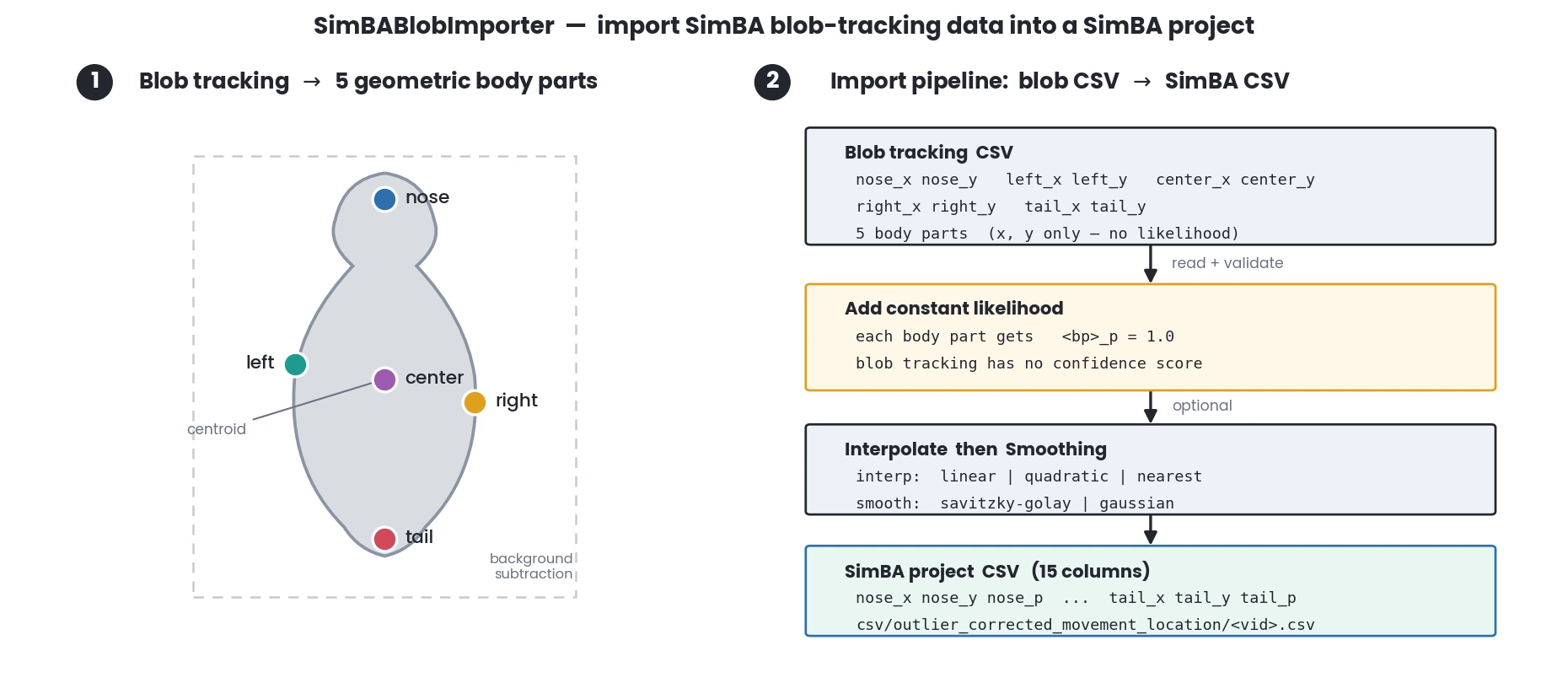
Note
The project must be configured as a SimBA blob project (pose setting must be set to ‘simba_blob’). The input CSV files must contain the following required fields: nose_x, nose_y, left_x, left_y, center_x, center_y, right_x, right_y, tail_x, tail_y.
See also
To generate blob tracking data, see
simba.video_processors.blob_tracking_executor.BlobTrackingExecutor(). To visualize blob tracking results, seesimba.plotting.blob_visualizer.BlobVisualizer().- Parameters
config_path (Union[str, os.PathLike]) – Path to the SimBA project configuration file.
data_path (Union[str, os.PathLike]) – Path to a directory containing blob tracking CSV files, or a single CSV file.
save_dir (Optional[Union[str, os.PathLike]]) – Directory where imported files will be saved. If None, saves to the project’s outlier_corrected directory. Default: None.
smoothing_settings (Optional[dict]) – Dictionary with smoothing settings. Must contain ‘method’ (‘savitzky-golay’ or ‘gaussian’) and ‘time_window’ (positive integer). If None, no smoothing is applied. Default: None.
interpolation_settings (Optional[dict]) – Dictionary with interpolation settings. Must contain ‘method’ (‘linear’, ‘quadratic’, or ‘nearest’) and ‘type’ (‘body-parts’ or ‘animals’). If None, no interpolation is applied. Default: None.
verbose (Optional[bool]) – If True, prints progress messages. Default: True.
- Example
>>> r = SimBABlobImporter(config_path=r"C:/troubleshooting/simba_blob_project/project_folder/project_config.ini", data_path=r'C:/troubleshooting/simba_blob_project/data')
>>> r.run()
>>> r = SimBABlobImporter(config_path=r"C:/troubleshooting/simba_blob_project/project_folder/project_config.ini",
...                       data_path=r'C:/troubleshooting/simba_blob_project/data',
...                       smoothing_settings={'method': 'savitzky-golay', 'time_window': 100},
...                       interpolation_settings={'method': 'nearest', 'type': 'body-parts'})
>>> r.run()
- run()[source]
Visualization
Tools for visualizing blob tracking results.
- class simba.plotting.blob_plotter.BlobPlotter(data_path, gpu=False, batch_size=2000, circle_color=(147, 20, 255), save_dir=None, verbose=True, smoothing=None, circle_size=None, core_cnt=- 1)[source]
Bases:
simba.mixins.plotting_mixin.PlottingMixinPlot the results of animal tracking based on blob.
See also
simba.mixins.plotting_mixin.PlottingMixin._plot_blobs(),simba.mixins.image_mixin.ImageMixin.get_blob_locations()- param Union[List[str], str, os.PathLike] data_path
Path(s) to video file(s) or directory containing video files.
- param Optional[bool] gpu
Whether to use GPU for processing. Defaults to False.
- param Optional[int] batch_size
Number of frames to process in each batch. Defaults to 2000. Increase if your RAM allows.
- param Optional[Tuple[int, int, int]] circle_color
Color of the blobs as an RGB tuple. Defaults to pink (255, 105, 180).
- param Optional[Union[str, os.PathLike]] save_dir
Directory to save output files. If None, no files will be saved.
- param Optional[int] verbose
If True, then prints msgs informing on progress.
- param Optional[str] smoothing
Savitzky Golay, Gaussian, or None. Smooths body-part coordinate data for more accurate blob representation. Default None.
- param Optional[int] circle_size
The circle defining the x, y location of the animal in the data. Defaults to None and SimBA will try and retrieve the optimal circle size based in the video resolution.
- param Optional[int] core_cnt
The number of cores to use for multiprocessing. Deafults to -1 which means all available cores.
- example
>>> BlobPlotter(data_path=r"C: roubleshooting\RAT_NOR\project_folder
ideos est2-06-20_NOB_DOT_4_downsampled.mp4”, smoothing=’Savitzky Golay’, circle_size=10).run()
- run()[source]
- class simba.plotting.blob_visualizer.BlobVisualizer(data_path, video_path, save_dir, core_cnt=- 1, shape_opacity=0.5, bg_opacity=1.0, circle_size=None, hull=(178, 102, 255), anterior=(0, 0, 255), posterior=(0, 128, 0), center=(0, 165, 255), left=(255, 51, 153), right=(255, 255, 102))[source]
Bases:
objectVisualize blob tracking data by overlaying geometric shapes and body part markers on video frames.
Processes blob tracking CSV data files and corresponding videos to create annotated output videos. It can visualize multiple body parts including convex hulls, anterior (nose), posterior (tail), center points, and left/right body parts. The visualizations are rendered with customizable colors, opacity, and circle sizes.
See also
To create blob data, see
simba.video_processors.blob_tracking_executor.BlobTrackingExecutor()To import blob data into SimBA project, seesimba.pose_importers.simba_blob_importer.SimBABlobImporter()- Parameters
data_path – Path to a single CSV file or directory containing blob tracking CSV data files. CSV files must contain columns: ‘nose_x’, ‘nose_y’, ‘tail_x’, ‘tail_y’, ‘center_x’, ‘center_y’, ‘left_x’, ‘left_y’, ‘right_x’, ‘right_y’, and optionally ‘vertice_*’ columns for hull visualization.
video_path – Path to a single video file or directory containing video files. Video filenames must match the corresponding CSV data filenames (without extension).
save_dir – Directory path where annotated output videos will be saved. Directory will be created if it doesn’t exist.
core_cnt – Number of CPU cores to use for video processing. Default: -1 (auto-detect). Set to -1 to use all available cores, or specify a positive integer.
shape_opacity – Opacity of the drawn shapes (0.1-1.0). Default: 0.5. Lower values make shapes more transparent.
bg_opacity – Opacity of the background video frames (0.1-1.0). Default: 1.0. Lower values make background more transparent.
circle_size – Size of circles drawn for point markers (anterior, posterior, center, left, right). Default: None (uses default size). Set to None to use default, or specify a positive integer.
hull – RGB color tuple (R, G, B) for convex hull visualization. Default: (178, 102, 255). Set to None to disable hull visualization.
anterior – RGB color tuple (R, G, B) for anterior (nose) point visualization. Default: (0, 0, 255). Set to None to disable anterior visualization.
posterior – RGB color tuple (R, G, B) for posterior (tail) point visualization. Default: (0, 128, 0). Set to None to disable posterior visualization.
center – RGB color tuple (R, G, B) for center point visualization. Default: (0, 165, 255). Set to None to disable center visualization.
left – RGB color tuple (R, G, B) for left body part point visualization. Default: (255, 51, 153). Set to None to disable left visualization.
right – RGB color tuple (R, G, B) for right body part point visualization. Default: (255, 255, 102). Set to None to disable right visualization.
- Example
>>> visualizer = BlobVisualizer(data_path=r'/path/to/blob_data.csv',
...                             video_path=r'/path/to/video.mp4',
...                             save_dir=r'/path/to/output',
...                             core_cnt=4,
...                             shape_opacity=0.6,
...                             posterior=None,
...                             left=None,
...                             right=None)
>>> visualizer.run()
- run()[source]
- class simba.plotting.geometry_plotter.GeometryPlotter(geometries, video_name, config_path=None, pool=None, core_cnt=- 1, save_dir=None, thickness=None, circle_size=None, intersection_clr=None, bg_opacity=1, shape_opacity=0.3, outline_clr=None, time_slice=None, palette=None, colors=None, verbose=True)[source]
Bases:
simba.mixins.config_reader.ConfigReader,simba.mixins.plotting_mixin.PlottingMixinA class for creating overlay geometry visualization videos based on provided geometries and video name.
See also
For a GPU (NVDEC -> CUDA -> NVENC) version, see
GeometryPlotterNVENC. To quickly create static geometries on a white background (useful for troubleshooting unexpected geometries), seesimba.mixins.geometry_mixin.GeometryMixin.view_shapes()andsimba.mixins.geometry_mixin.GeometryMixin.geometry_video()- Parameters
geometries (List[List[Union[Polygon, LineString, MultiPolygon, MultiLineString, Point]]]) – List of lists of geometries for each frame. Each list contains as many entries as frames. Each list may represent a track or unique tracked object.
video_name (Union[str, os.PathLike]) – Name of the input video (path or filename; if filename,
config_pathmust be provided).config_path (Optional[Union[str, os.PathLike]]) – Path to SimBA configuration file. Required when
video_nameis a filename. Default: None.pool (Optional[multiprocessing.Pool]) – Reusable process pool for parallel rendering. If None, a pool is created from
core_cnt. Default: None.core_cnt (int) – Number of CPU cores to use for parallel processing. Ignored if
poolis provided. Default: -1 (all available cores).save_dir (Optional[Union[str, os.PathLike]]) – Directory to save output videos. Required when
config_pathis None. Default: None.thickness (Optional[int]) – Thickness of geometry outlines and line strokes in pixels. Default: None (falls back to
circle_size).circle_size (Optional[int]) – Radius in pixels for Point geometries. Default: None (auto from frame size).
intersection_clr (Optional[Tuple[int, int, int]]) – BGR color for geometries that intersect another. None keeps original fill color. Default: None.
bg_opacity (Optional[float]) – Background video opacity from 0.0 to 1.0. Default: 1.0.
shape_opacity (float) – Shape fill opacity from 0.0 to 1.0. Default: 0.3.
outline_clr (Optional[Tuple[int, int, int]]) – BGR color for polygon/line outlines. None disables outlines. Default: None.
time_slice (Optional[Dict[str, str]]) – Restrict rendering to a time range. Must have keys
'start_time'and'end_time'(HH:MM:SS). Default: None.palette (Optional[str]) – Color palette name for geometries. Provide either
paletteorcolors. Default: None.colors (Optional[List[Union[str, Tuple[int, int, int]]]]) – Custom colors per geometry (names from SimBA color dict or BGR tuples). Length must match
geometries. Default: None.verbose (Optional[bool]) – Print progress information. Default: True.
- Raises
InvalidInputError – If geometries are invalid, neither palette nor colors given, or video/config/save_dir inconsistent.
CountError – If the number of shapes in the geometries does not match the number of frames in the video.
- run()[source]